What Is Inbound and Outbound Calls? a Practical Guide
Table of Contents
An inbound call is initiated by an outside caller to your number, and an outbound call is initiated by you, your app, or your workflow toward another number. If someone dials your dedicated number and it rings, forwards, or goes to voicemail, that's inbound. If you open a browser and dial a relative's mobile abroad, that's outbound, even though you never touched a desk phone.
The Two Directions of a Phone Call
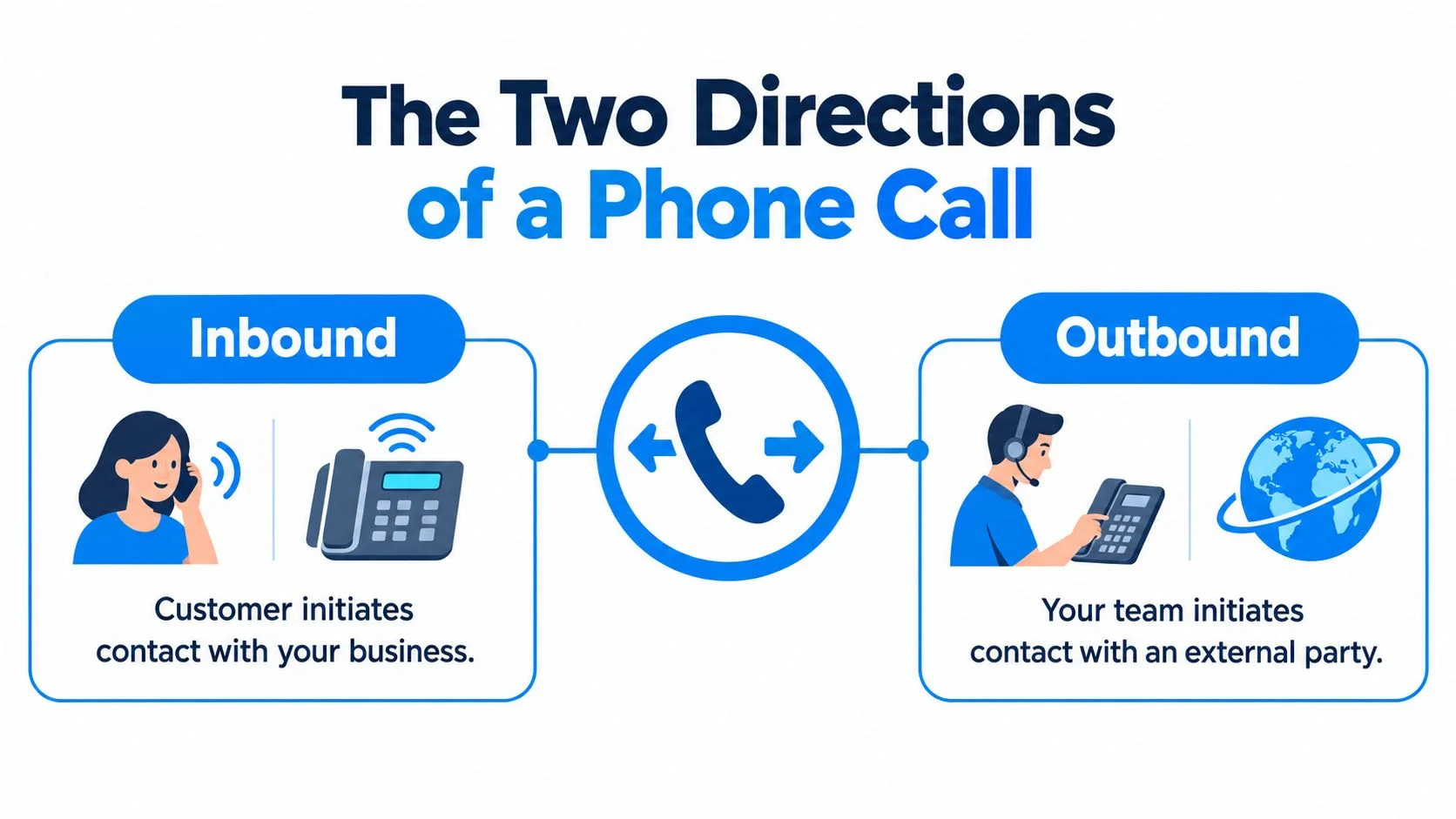
Inbound means the call comes toward you, and outbound means the call starts with you. That's the whole answer to what is inbound and outbound calls, but the direction controls far more than vocabulary.
Your business line rings while you're about to call a supplier overseas. The ringing line is inbound demand, because a customer chose this moment to contact you. Your call to the supplier is outbound activity, because you chose the moment, the destination, and the reason.

Who Starts the Session Decides Everything Else
An inbound call may be answered, missed, declined, abandoned in a queue, or routed to voicemail. An outbound call may be placed by an employee, an automated dialer, or an application. You can review the basic distinction between calls a customer initiates and calls an organization places to see why the two directions measure different things.
Typical inbound work includes support, orders, reservations, technical help, and information requests. Typical outbound work includes sales, reminders, collections, surveys, notifications, and follow-up. The device doesn't change the label, so a browser call to a landline is still outbound from your perspective.
Practical rule: Ask who pressed dial first. That person or system started the direction, and everyone else is receiving it.
This split has old roots. Organized call centers grew in the 1960s, and in 1973 Rockwell built an automatic call distributor for Continental Airlines to route incoming calls to available agents, as shown in this history of contact center routing and dialing. Inbound teams therefore learned to optimize availability and queues, while outbound teams optimized dialing and connection rates.
For BubblyPhone, calls you place from a browser, mobile app, or API to regular phones are outbound. Calls arriving through your dedicated number are inbound, and the person you call doesn't need an app or account.
How Inbound Calls Actually Work End to End
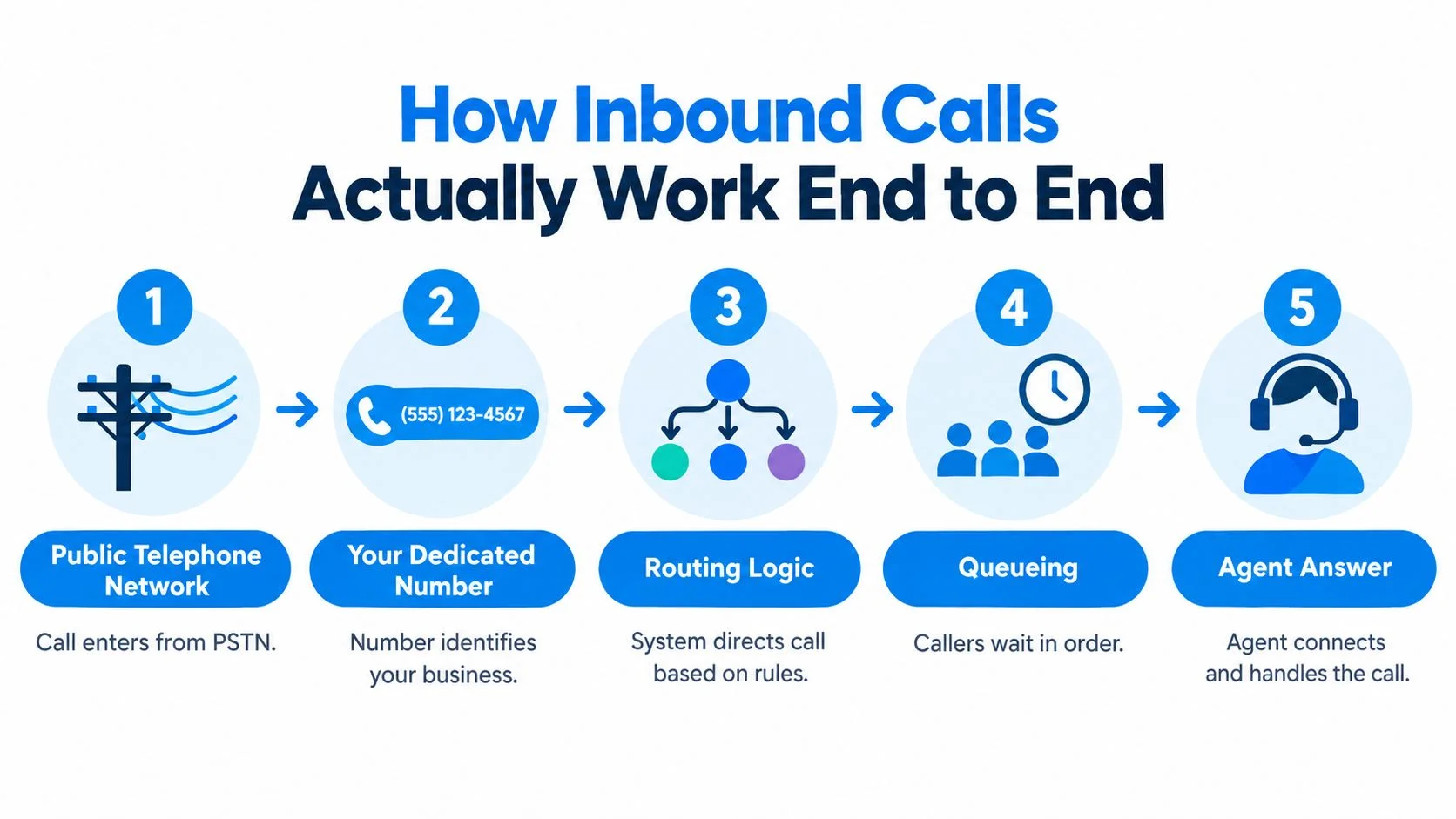
An inbound call works when an external caller dials a number that points to your system, and your system decides where that call should go. You're not starting anything. You're staying reachable for a moment you don't control.
A customer calls your dedicated number at 9 p.m. with a delivery question. The call arrives from the public switched telephone network, or PSTN, and reaches the endpoint mapped to that number. Your rules check business hours, find the office closed, and send the caller to voicemail instead of a queue.

From Ring to Voicemail to Transcript
The caller leaves a message. You get a notification, listen later, and, if you've enabled it, read a transcription of what was said. Nothing about placing outbound calls gave you this ability, because inbound reachability needs an address people can dial.
During open hours, the same number can behave differently. It can ring in your browser or app, queue callers in order, or forward a call to your mobile when you're away from your desk. If you're setting up that kind of routing, these VoxNote call forwarding questions are a useful companion for thinking through forwarding behavior, and this guide to choosing a phone forwarding number covers the number side of the setup.
- Number lookup: The system matches the dialed number to your account and endpoint.
- Routing rules: Business hours, forwarding, and queue logic decide the next step.
- Fallback: Voicemail catches the call when nobody answers, with optional transcription afterward.
- Answer side capacity: Concurrent sessions limit how many callers you can handle at once.
The receiving system has to stay correctly registered and provisioned, because the caller picks the time. The FCC makes the same separation clear by distinguishing outbound-only VoIP, which can call the PSTN without accepting PSTN calls back, in its definition of outbound-only interconnected VoIP capability. A dedicated number plus an enabled receiving workflow is what turns you into someone who can be called, not just someone who calls.
How Outbound Calls Are Placed From a Browser or App
An outbound call starts when you, your app, or your workflow sends a request toward an external number. You control the timing, so the system checks your authorization, balance, and destination before it connects anything.
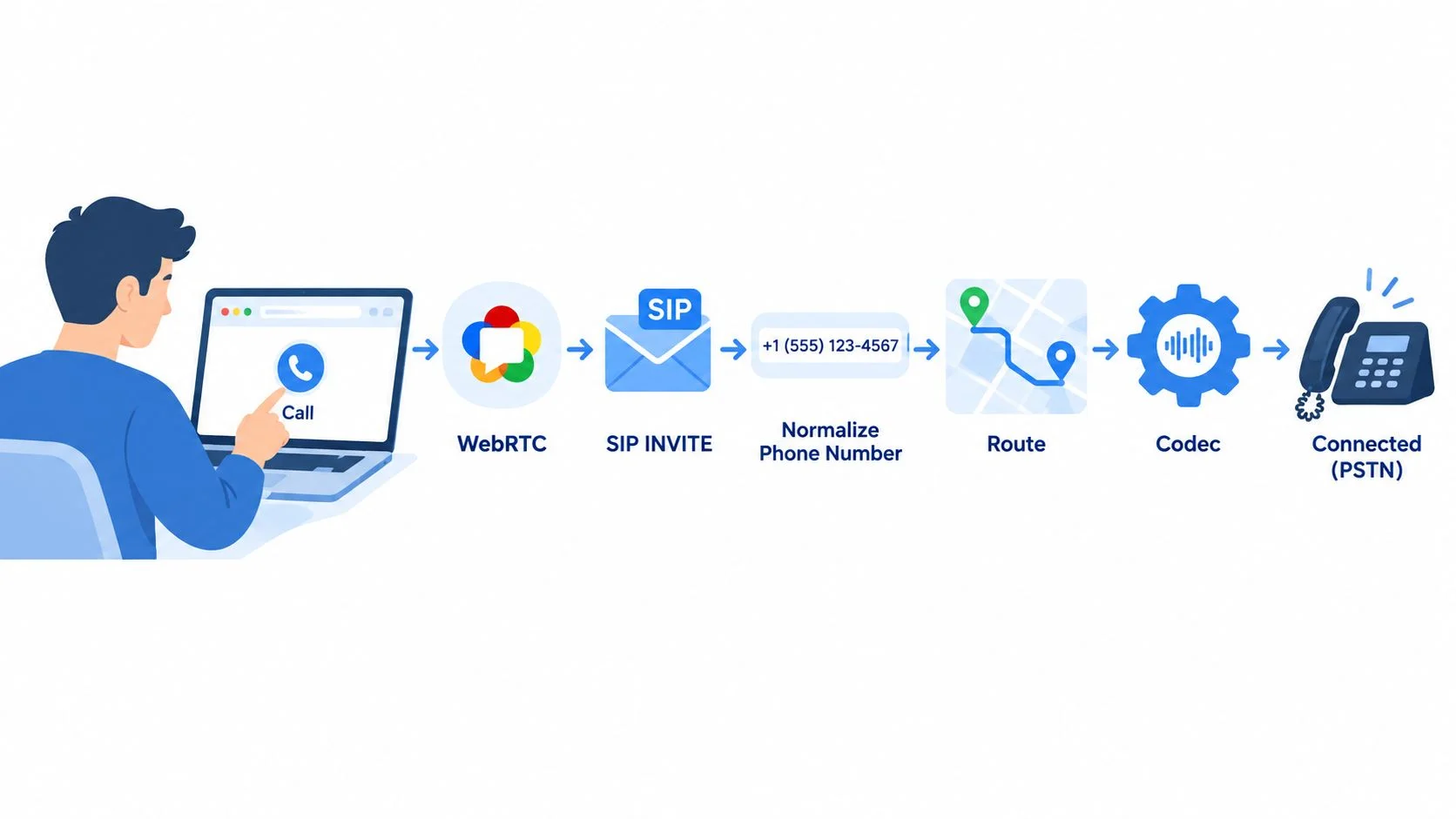
You open your laptop, enter your cousin's mobile number abroad, and click dial. Your browser captures your voice through WebRTC, and the platform starts the session with a SIP INVITE or an equivalent application request. This diagram shows that first leg of the journey.

What Happens After You Click Dial
The platform authenticates you, normalizes and validates the number, and selects a termination route. It negotiates media codecs, then bridges your internet media leg through enterprise-grade global carriers to the PSTN or mobile network. 3GPP describes the same origination pattern as a registered user starting a voice session through a SIP INVITE in its technical description of IMS call origination.
Your cousin's phone rings like any ordinary call. She doesn't install anything and doesn't create an account. If you're unsure about country codes or number format before dialing, this walkthrough on how to place an international call covers the dialing sequence step by step.
The short video below shows the browser calling experience from the caller's side.
A mobile app places the same kind of outbound call with a different surface. A developer API does it programmatically, so a reminder system or AI voice workflow can start a call without a person clicking dial. In every case, outbound capacity is governed by caller ID policy, prepaid balance, and concurrent call limits, and billing runs per minute from your credits.
Comparing Inbound and Outbound Side by Side
Inbound is defined by being reachable, and outbound is defined by initiating contact. Put side by side, the differences show up in who needs what, what you pay for, and what you measure.
Inbound vs Outbound Calls at a Glance
The measurement row matters more than people expect. When callers come to you, a long queue or a caller who hangs up is a service failure you can count. When you dial out, the first question is whether anyone picks up at all.
Mixing the two dashboards hides both problems. A busy outbound day can look productive while inbound callers quietly abandon your queue.
Both directions share the same underlying carrier infrastructure once a call is connected. The operational responsibility is what differs, because inbound success means you were available and outbound success means your attempt reached a person. Any feature you encounter belongs to one side of that line, and the table tells you which.
Compliance and Consent Differences by Direction
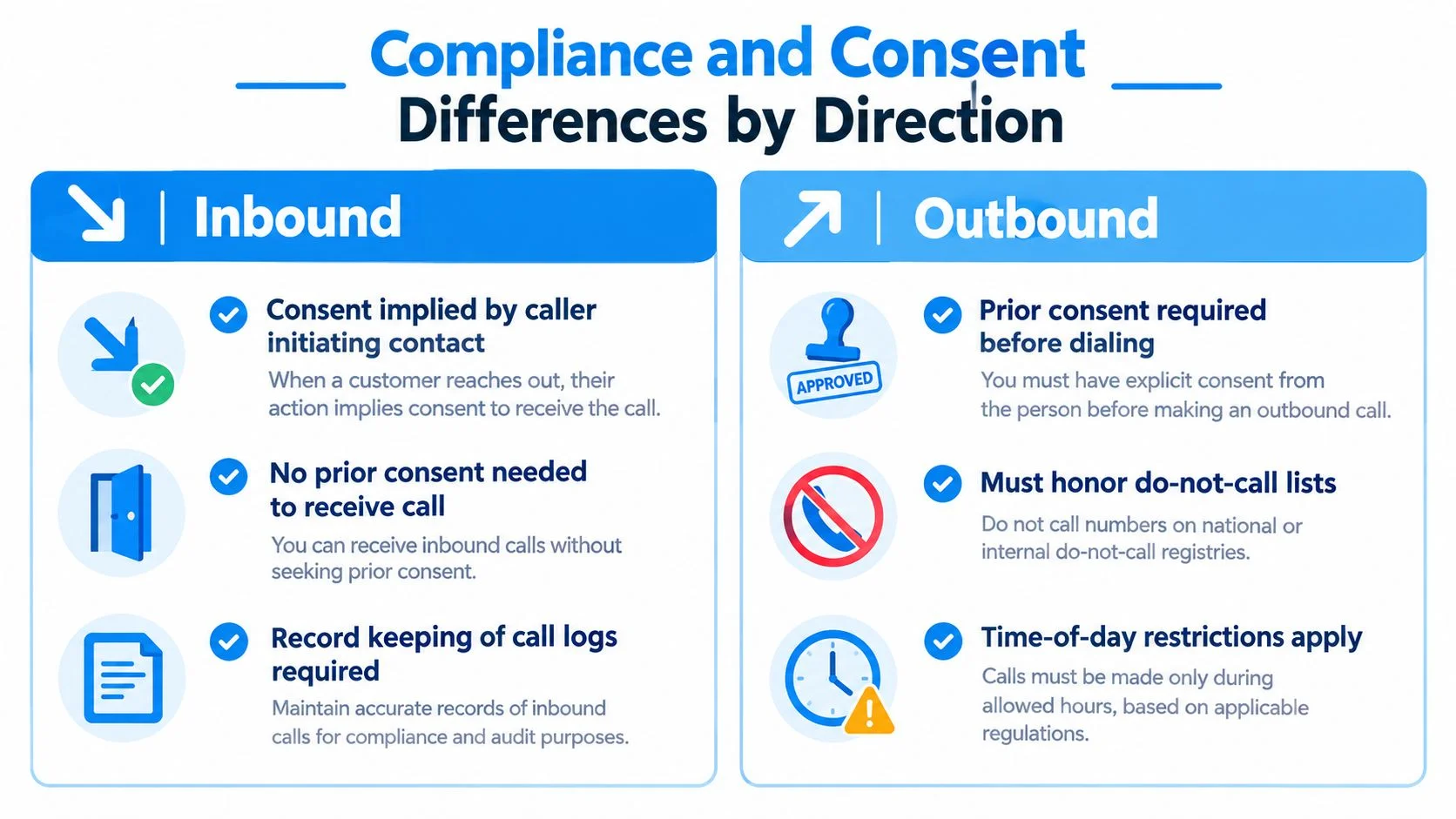
Outbound calling carries consent and identity obligations that receiving calls doesn't, especially once dialing is automated. Direction isn't just operational. It changes your legal position before anyone says hello.
When a customer calls you, they've initiated contact, so the consent question is mostly settled by their own action. When you call them, you're the one who must justify the contact. That burden grows sharply when a machine does the dialing.

Automation Changes the Legal Conditions
In the United States, an autodialed or prerecorded call to a mobile phone generally requires the recipient's prior express consent, and consent must be in writing if the call contains advertising. The FCC also treats AI-generated voices as artificial voices under the Telephone Consumer Protection Act, as explained in its guidance on consent rules for autodialed and AI voice calls. A staff member manually dialing a customer, an autodialer campaign, and an AI voice agent are therefore three different risk categories, not one activity with three tools.
Certain destinations need screening before any automated dial. The Telephone Consumer Protection Act restricts autodialed or prerecorded calls to emergency lines, hospital and healthcare guest rooms, and similar sensitive numbers without an emergency purpose or prior express consent, as set out in the FCC summary of protected destination categories. Your workflow has to check the destination, not treat every number as equivalent.
Caller ID is part of compliance too. Providers use STIR/SHAKEN to authenticate caller ID on IP networks, and FCC rules required implementation in IP portions of networks by June 30, 2021, according to the FCC page on caller ID authentication and robocall mitigation. In the UK, Ofcom caps abandoned calls at 3% of live calls per campaign over 24 hours, so predictive dialers that outrun agent availability create a measurable breach, as detailed in Ofcom guidance on abandoned call limits.
Before launching outbound automation, ask whether the call is live or automated, whether it uses a prerecorded or AI voice, whether the number is mobile, how consent was recorded, and how opt-outs will be honored. The FCC consumer guide on stopping unwanted robocalls and consent requirements is a practical reference for building that checklist, along with suppression lists and human escalation paths.
Choosing the Right Setup for Your Use Case
You need a dedicated number only if people must be able to call you back on a stable identity. If you only ever start calls, outbound-only is enough.
Match the Setup to Who Starts Your Calls
- Calling family abroad: You initiate every call, so browser outbound with prepaid credit covers you. Add a dedicated number only if relatives need a number where they can reach you and leave voicemail.
- Running a small business: Customers initiate contact, so the dedicated number becomes the core asset, with forwarding to your mobile and voicemail after hours. Outbound credit handles supplier calls and follow-ups, and if you're designing the wider support flow around those calls, this e-commerce communication platform guide helps you think about how channels fit together.
- Working remotely with a second identity: A dedicated number separates work callers from your personal mobile, and receive-only SMS on that number helps with verification messages and customer texts you need to read.
- Building automated outreach: You're an outbound-first user, so the developer API is your entry point, with the consent and caller ID checks from the section above built into the workflow from day one.
Count who starts your typical call for a week. If it's almost always you, don't pay for inbound capacity you won't use yet.
Teams often begin with outbound-only because it delivers immediate results. They incorporate inbound capabilities later, when missed callbacks or a shared business line start causing real problems.
Billing, Features, and the Path Forward
Outbound calls are pay-as-you-go, and inbound capability comes from the one optional subscription. That split maps directly onto the two directions you've just learned to tell apart.
Calling itself needs no subscription. You load prepaid credit, and each outbound call is billed per minute, rounded up to the whole minute, at the published destination rate. You can check what a call will cost on the live rates page before dialing, and this breakdown of how much calls cost explains the rounding and credit model in detail.
The dedicated-number plan is the only recurring product, and it exists to enable the inbound side. It gives you a number that receives calls, forwards them, takes voicemail, receives SMS, and can transcribe incoming calls. The API extends the outbound side for developers who need programmatic calling.
Start with the direction you use. Place outbound calls today, and add a number when people need to reach you.
Make your first outbound call from any browser with BubblyPhone, where the person you're calling needs no app or account and any landline or mobile will ring. Credits start at $5 and never expire, so you can call family, customers, or suppliers abroad today and add a dedicated number later if you need people calling you back.