Virtual Phone Number for Small Business: A Practical Guide

Table of Contents
- The number stays separate from the hardware
- Choose the number structure carefully
- Judge each feature by the failure it prevents
- Don't buy theatre
- Separate the line from the minutes
- Find the hidden friction before signup
- Add workflow context before adding complexity
- Start with the actual call pattern
- Make geography a two-part decision
- Configure, then test
Your team is probably using personal mobiles for supplier calls, forwarding customer calls manually, and trying to remember which colleague last spoke with whom. A virtual phone number for small business gives you a stable business identity, but the right choice depends on operations, not on how many features appear on a pricing page.
Treat the decision as two separate questions: Do you need a fixed inbound line, and how much real calling will the team do? A monthly dedicated-number plan can make sense for shared access and predictable traffic. Pay-as-you-go calling is usually more disciplined for occasional international calls because you pay for actual minutes instead of reserving capacity you may not use.
What a Virtual Phone Number Actually Is
A virtual phone number is a cloud-routed business number that isn't tied to one SIM, desk phone, carrier line, or office. The number lives on a communications platform, while calls are routed over the internet to the devices and people your business has configured.
When a customer dials the number, the public telephone network passes the call into the service. The platform then applies rules such as business hours, simultaneous ringing, voicemail, or an automated menu. It can send the call to a mobile phone, browser, softphone, office handset, or another number, as described in this overview of how virtual phone numbers work.

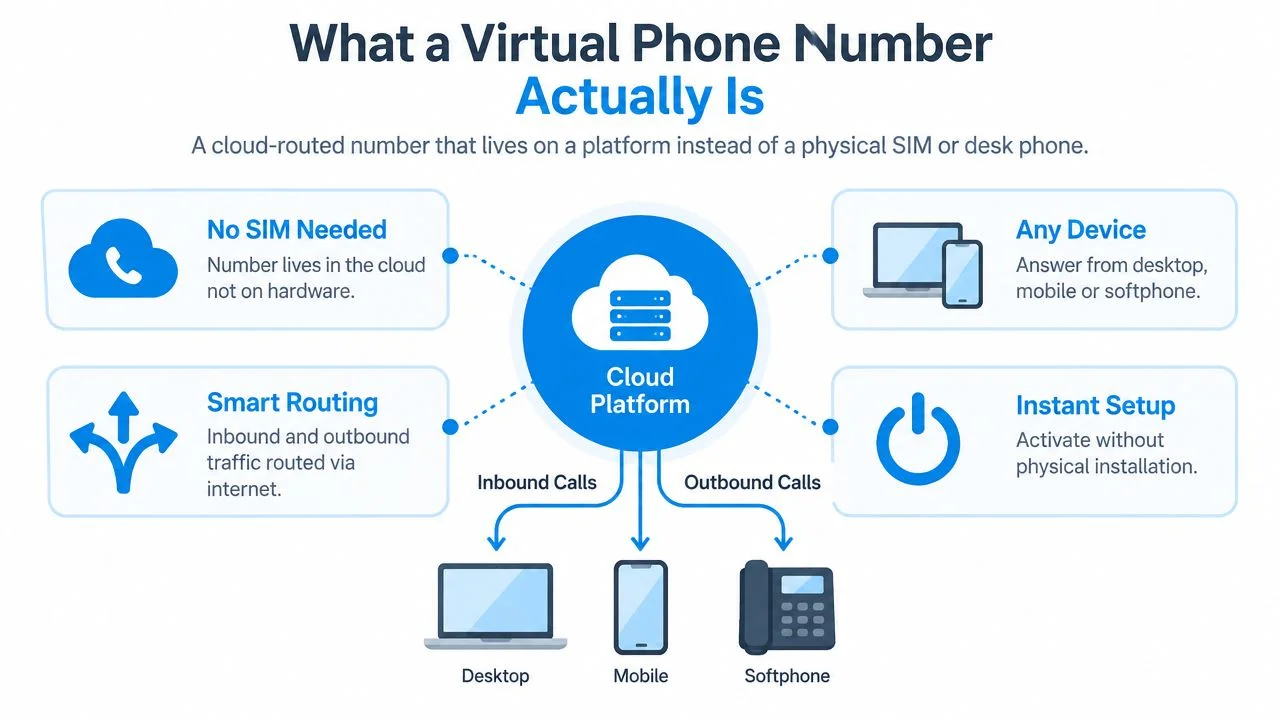
The number stays separate from the hardware
That separation is the important operational feature. If an employee changes phones, works from home, or leaves the business, you can change the destination without changing the number printed on invoices, websites, or packaging. The same public identity can follow the team as its devices and locations change.
Routing rules also move into software. You can define a schedule, send after-hours calls to voicemail, create an IVR menu, or ring two people at once without rewiring an office.
Choose the number structure carefully
A shared pooled number lets several users handle the same business line. It suits a small support or sales team, but it requires shared visibility so people don't call the same customer twice.
A toll-free inbound number presents the business as reachable nationally and is mainly useful when customers call you. A dedicated number belongs to one account and can support a private business identity, receiving calls and, where supported, receiving SMS or MMS. Dedicated virtual numbers are commonly structured as single-account numbers rather than shared pools, which is useful when one person or one workflow must control the line (Voiso).
The distinction matters because a number isn't automatically a phone system. Decide whether you need one person to receive messages, several people to answer calls, or a broader workflow that connects conversations to customer records.
How a Small Business Uses a Virtual Number Day to Day
A two-person import business can use one virtual number to coordinate customer calls, overseas suppliers, and time-zone gaps without exposing either partner's personal mobile number. The value appears in the handoffs, not in the existence of the number itself.
At nine in the morning, both partners' mobiles ring when a retail customer calls the business line. One partner answers and discusses a delayed shipment. The other sees that the call was handled, so they don't interrupt the customer with a duplicate callback. If the first partner is already speaking with a supplier, the second can take the call using the same business identity.
At midday, one partner calls a supplier abroad from a laptop while travelling between warehouses. The supplier sees the business caller ID rather than a personal number. Later, the partner can send a confirmation or quote from the business line, keeping the conversation tied to the order instead of scattering it across a private messaging account.
Operational test: If a customer can't tell which teammate owns the conversation, the number is shared but the workflow isn't.
After closing time, calls follow a different route. The system sends them to voicemail, and a transcript can arrive in the shared business inbox for review the next morning. The partner who opens the office first can read the request, assign it, and respond without asking the other person to search through their phone.
That changes the working day in practical ways:
- Personal boundaries: Staff can silence the business line after hours without silencing family and private calls.
- Stable caller identity: Customers learn one number and recognise it when the team calls back.
- Faster handoffs: One partner can see that the other is unavailable and take responsibility immediately.
- Cleaner records: Calls, voicemail, and business messages stay attached to the company line rather than an employee's personal device.
The setup doesn't solve every problem. If the team needs a shared conversation history, customer notes, or automated reminders, it may need more than forwarding. The number is the entry point, not the complete operating system.
Features Worth Paying Attention To
The features worth paying for are the ones that prevent missed calls, duplicated work, or unclear ownership. For a two-to-five-person team, a simple routing setup usually beats an elaborate contact-centre configuration.
Judge each feature by the failure it prevents
Forwarding rules matter when the team works different shifts or locations. The minimum viable version is a schedule, a ring group, and voicemail fallback. You don't need a complicated call tree if every call goes to the same two people.
Voicemail transcription is valuable when staff are frequently in transit or on customer calls. It turns a missed call into a readable task, but don't pay for advanced analysis if the team only needs the caller's name, number, and request.
Shared inboxes solve the most common small-team failure, nobody knows who replied. Look for conversation ownership, internal notes, and a visible history. A basic shared view is more useful than an impressive dashboard that nobody opens.
Don't buy theatre
Complex wallboards, deep queue metrics, and multi-layer IVRs can look professional while adding administration. A two-person business rarely needs twenty routing branches. Start with one main line, one fallback route, one voicemail path, and clear ownership.
The market is moving toward communications integrated with customer relationship management, help-desk, collaboration, and contact-center tools, according to market coverage of virtual phone numbers for business. That direction matters, but integration should follow a real workflow. Don't buy automation before you know which repeated task the team wants to remove.
How Pricing Really Works for Small Teams
A small business phone budget has two layers: the recurring cost of the number and the usage cost of calls. Business virtual numbers commonly cost about 1 to 5 per month for local numbers and 5 to 15 per month for toll-free numbers, with usage charged separately, usually by the minute.
That separation changes the decision. A monthly dedicated-number plan is sensible when the team needs a stable inbound identity, shared access, or predictable activity. Pay-as-you-go is the better discipline for occasional international callbacks, especially when the business doesn't need a permanent shared inbox.
Separate the line from the minutes
Don't compare a monthly plan with a calling balance as if they're the same product. A dedicated number pays for identity and inbound availability. Outbound calls still need a clear usage policy, particularly for overseas suppliers and customers.
Pay-as-you-go calling is billed per minute and rounded up to the whole minute for BubblyPhone, while no subscription is needed for calling. Credits start at $5 and never expire, according to the publisher's stated product terms. Review the live BubblyPhone pricing information before calling, and check destination rates at BubblyPhone's rate table, because no responsible budget should rely on a guessed per-minute figure.
Find the hidden friction before signup
Ask whether forwarding minutes, recording storage, extra users, transcription, and SMS sit inside the plan or appear as separate charges. For international work, also ask whether inbound numbers, outbound routes, and forwarding to mobile networks are priced independently.
Small and medium enterprises represented 58.3% of virtual phone number adoption in 2025, while business applications held 54.7% of market share, according to DataIntelo's market view. That mix supports a practical conclusion: small businesses are buying phone capability for operations, so the invoice should be mapped to real workflows, not just a low headline price.
When a Basic Number Is Not Enough
A standalone virtual number fixes caller identity and privacy, but it doesn't automatically create shared operational context. Once two or three people answer the same line, forwarding alone can leave duplicated callbacks, missing notes, and no reliable record of the last supplier conversation.
The problem becomes obvious during a busy morning. One employee answers a customer question on a mobile, another calls back from a laptop, and neither sees the other's notes. The customer repeats the order details, while the team loses time reconstructing a conversation that already happened.
Add workflow context before adding complexity
Browser-based calling can place calls from a web browser to mobile phones, landlines, and SIP-enabled devices, so the recipient doesn't need the same app installed. That makes a browser useful when staff already work in a desktop system and need the call interface near customer records.
The meaningful upgrade isn't the browser by itself. It's the combination of shared contacts, call tags, ownership, and post-call notes. Those details turn a phone conversation into an assigned business task instead of a private event trapped on one device.
An API becomes relevant when the team repeats a predictable action. Appointment reminders, order-status notifications, and two-factor codes can be triggered by business systems rather than typed manually. If the process happens only occasionally, manual work may be cheaper and easier. If it happens every day, programmatic messaging can remove a clear bottleneck.
International calling exposes another weakness. An inexpensive inbound number doesn't guarantee affordable outbound routes to the countries your team calls. Check the actual destinations, minute billing, forwarding behavior, and whether the recipient can answer on a normal landline or mobile.
For a broader framework covering feature selection and total ownership considerations, use this VoIP phone system buyer's guide from IT Cloud Global, LLC. The important principle is simple: buying a number gives you an identity. Buying a communications system means connecting calls, messages, and customer data in one usable workflow.
Choosing and Setting Up the Right Setup
Choose the setup by classifying your traffic first. Decide whether the team is inbound-only, outbound-heavy, or handling balanced two-way communication with messaging.
Start with the actual call pattern
An inbound-only business can usually choose a local or toll-free dedicated number and forward calls to existing mobiles. That keeps the public identity separate from personal numbers without forcing the team into a larger system.
An outbound-heavy sales or sourcing team should prioritise transparent international destination rates and a calling model that doesn't punish uneven usage. Confirm every country the team regularly calls before committing to a bundle.
A balanced team needs predictable handling for calls and messages. One invoice that combines the number, included usage, and essential team access may be easier to manage than several add-ons, but only if the included allowance matches actual activity.
Budget rule: Buy for the traffic you have measured, not the traffic you hope to create.
Make geography a two-part decision
The number's location affects how customers perceive the business. The team's location affects forwarding, device access, and whether remote staff can answer without extra charges or awkward handoffs.
Check porting before signup if customers already know your number. In the United States and Canada, portability rules can allow subscribers to retain a number when switching providers in the same geographic area, and simple ports are generally required to complete within one business day under FCC rules, as outlined in this overview of US virtual business numbers.
Configure, then test
For most cloud systems, setup is straightforward:
- Choose the number: Select the country and local area or toll-free format that matches customers.
- Port or provision: Start a port if keeping an existing line, or activate a new number.
- Set routing: Add business hours, simultaneous ringing, voicemail, and any basic menu.
- Invite users: Give each teammate the access needed for their role.
- Test every path: Place inbound and outbound calls, inspect caller ID, leave a voicemail, and verify message routing.
A practical feature and pricing checklist is available in this guide to VoIP phone system features and cost from Nutmeg Technologies. For a broader decision framework, review this guide to VoIP service for small businesses.
BubblyPhone's optional dedicated-number plans can cover a stable local line through a more bundled small-team arrangement. Its browser calling option is separate from the recurring number plan, so a team can keep calling usage-based when it doesn't need a permanent shared line.
Putting It All Together and Making Your First Call
The correct choice comes down to three questions: Do you need inbound routing, shared access, or international outbound reach? If you need a stable public identity and shared handling, consider a monthly dedicated-number plan. If calls are occasional and international, usage-based calling gives you tighter control over actual spend.

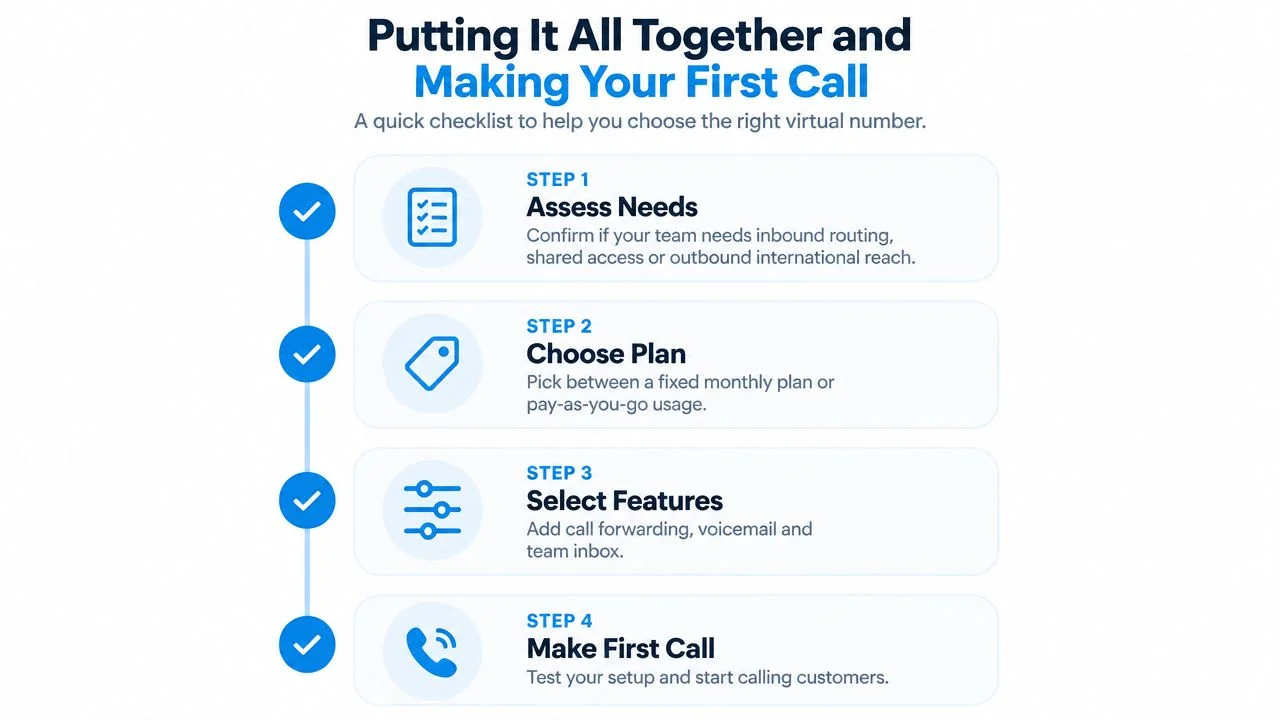
Use this order:
- Assess needs: Identify inbound routing, shared access, outbound international calling, and messaging requirements.
- Choose the plan: Pick a fixed monthly dedicated-number plan for predictable shared operations, or pay-as-you-go for irregular usage.
- Select features: Add forwarding schedules, voicemail-to-text, shared access, and integrations only when they solve a known problem.
- Make a test call: Check caller ID, audio, voicemail, forwarding, and SMS routing before publishing the number.
Choose the country and city, port an existing line or provision a new one, configure forwarding, set voicemail-to-text, add teammates, and test every route. Confirm that the person receiving a browser-based call doesn't need an app or account, then check the live rates before making international calls.
The following video can help visualise the setup process:
A dedicated number suits teams that want a stable inbound identity and predictable monthly administration. When call patterns shift, browser-based pay-as-you-go calling can keep international usage separate from the recurring cost of maintaining that identity.
Make your first international business call with BubblyPhone directly from any browser. The recipient can answer on a regular landline or mobile without an app or account, while credits start at $5, never expire, and calling is billed per minute.