How to Call to Thailand

Table of Contents
You can call Thailand from the U.S., Canada, the UK, Australia, or most other countries with the same basic pattern, and the part people usually miss is the leading 0 in the Thai number. Once you drop that domestic trunk prefix and add the right exit code for your country, the call usually becomes straightforward.
The Universal Dialing Pattern for Thailand
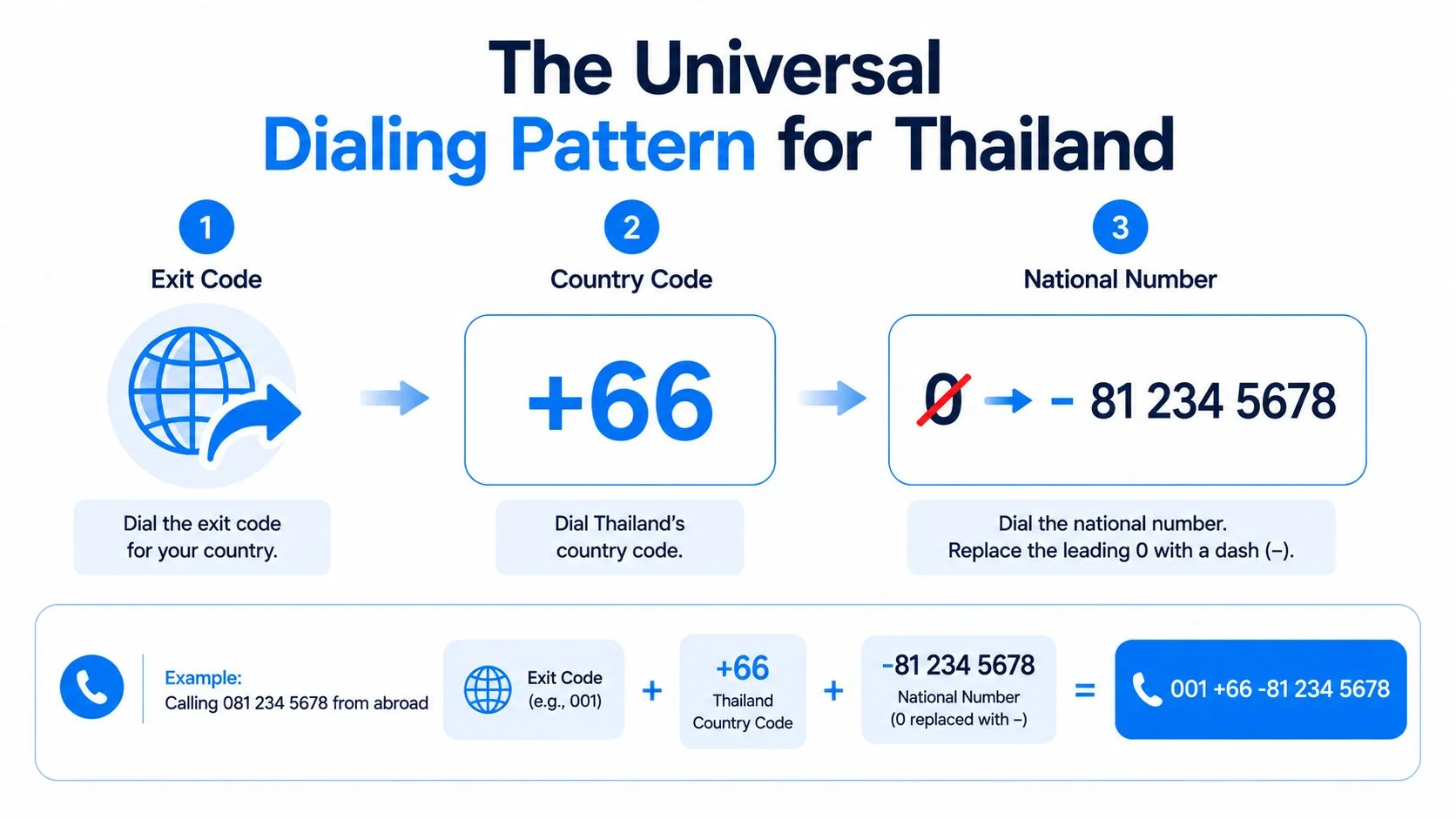
The safest way to think about how to call to Thailand is exit code + 66 + Thai number without the leading 0. That rule holds whether you're calling a Bangkok landline, a Thai mobile, or a business number, and the 0 is the part that trips people up because it belongs only to domestic dialing.

How the pieces fit together
The exit code hands your call to your country's international network. The 66 routes it into Thailand. The rest of the digits identify the person or business you're trying to reach, with the domestic trunk 0 removed before you dial from abroad, as the Thai numbering rules require. Thailand's numbering references also show that national numbers are typically 8 to 9 digits long excluding the country code, with mobile services using the 81 destination code in a 9-digit national number structure (ITU numbering data).
On mobile phones, the + symbol is the easiest shortcut because it replaces whatever exit code your country uses. That's why a phone in your hand can often use the same international format anywhere in the world, while a landline needs the local exit prefix first.
Practical rule: if the Thai number starts with 0 in domestic form, drop that 0 before adding 66.
A U.S. landline example looks like 011 66 2 123 4567, where 011 is the U.S. exit code, 66 is Thailand, and 2 123 4567 is the Bangkok number without its domestic 0. For a faster reference while formatting numbers, keep the Thailand country code hub handy.
Calling Thailand From the United States and Canada
From the U.S. and Canada, the landline pattern is the same, 011 + 66 + Thai number without the leading 0. If you're calling a Bangkok landline, a common example is 011 66 2 123 4567. If you're calling a Thai mobile, it becomes 011 66 8 1234 5678.
The part people mix up
The key is that 011 is the exit code, not part of the Thai number. After that, 66 tells the network you want Thailand, and the rest of the digits are the local number written in international form. For mobile numbers, you keep the mobile's first digit after the trunk prefix, so a domestic 081-234-5678 becomes 011 66 81 234 5678 or, on a smartphone, +66 81 234 5678.
Canadian dialing follows the same pattern as the U.S., so you don't need separate instructions. If you're on a phone app or a mobile keypad, the + shortcut usually replaces 011, which makes the format easier to remember on the go.
If you're used to dialing office systems, double-check whether you're entering the international prefix on the handset itself or through a switchboard. That's where people sometimes pause too early or add an extra 0 out of habit.
Calling Thailand From the UK, Australia, and Most of Europe
From the UK, Australia, Ireland, Germany, France, the Netherlands, Spain, Italy, and most of Europe, the pattern is usually 00 + 66 + Thai number without the leading 0. So a Bangkok landline becomes 00 66 2 123 4567, and a Thai mobile becomes 00 66 8 1234 5678. The only thing that changes compared with North America is the exit code.
What stays the same
The Thai part of the number does not change. You still remove the domestic trunk 0, then keep the rest of the national digits exactly as they appear in international format. That's why 00 66 2 123 4567 and 011 66 2 123 4567 both reach the same Bangkok destination, they just start from different countries.
Many smartphones in Europe and Australia also let you use +66 instead of typing an exit code. If 00 doesn't work on a particular mobile line, try the plus sign first, because mobile dialing behavior can vary by network and handset.
Some mobile users in mainland Europe use different international access behavior, so if 00 doesn't connect, switch to +66 before changing the number itself.
Australian landlines are a useful exception to remember, because they typically use 0011, not 00. That means the right habit is to confirm the exit code for your device, then keep everything after 66 exactly the same.
How Thai Number Formats Look Side by Side
Thai numbers make more sense when you compare the domestic form with the international form. The same number can look right inside Thailand and wrong from abroad, because the leading 0 changes meaning depending on where the call starts.
For a quick formatter while you check a contact card or business listing, use the phone number formatter. It's a simple way to spot whether you're looking at a domestic Thai format or the international version you need to dial.
Thai mobiles, Bangkok landlines, and provincial landlines
Thai mobile numbers normally start with 0 followed by a mobile prefix such as 08, 09, or 06. In domestic form, they're often written as 10 digits including the leading 0, and the international version drops that first 0 while keeping the rest of the number intact. For example, 081 234 5678 becomes +66 81 234 5678.
Bangkok landlines usually use area code 2, so a domestic format like 02 123 4567 becomes +66 2 123 4567 abroad. A provincial landline, such as a Chiang Mai example with area code 53, follows the same logic, so 053 123 456 becomes +66 53 123 456. The area code stays, the trunk 0 goes away.
Some newer mobile prefixes may exist, but the 08x and 09x patterns cover most current subscribers, and the international formatting rule stays the same either way. If a number looks valid domestically but not internationally, the first thing to check is whether that initial 0 should disappear.
Why Your Call to Thailand Is Not Connecting
A call to Thailand usually fails for one of three reasons, and the symptom tells you which one to fix. If it rings oddly, fails fast, or reaches the wrong place, the issue is usually the digit pattern, not the destination itself.
The usual failure modes
Forgotten trunk zero. If you leave the 0 in place after adding 66, the network may treat the number as invalid or route it incorrectly. The fix is simple, remove the domestic 0 before dialing internationally.
Dropped the wrong digit. If you strip off more than the trunk prefix, you can end up with an incomplete number. That's common when someone sees 081 and accidentally turns it into +66 1..., which is wrong because the 8 belongs to the Thai mobile prefix and must stay.
Wrong digit count. Thai mobile numbers are 10 digits including the 0, while Thai landlines are usually 9 digits including the 0. Mixing those up leads to numbers that look close but won't complete cleanly.
If the number looks shorter after you internationalize it, check whether you removed only the leading 0 and nothing else.
Some Thai numbers, especially older landlines, may not be reachable from every international carrier unless international calling is activated on the line. That's less common than formatting errors, but it's worth keeping in mind if the digits are correct and the call still won't connect.
Choosing How to Place the Call From Your Browser or Phone
You can place the call three ways, and the right choice depends on how much setup you want and what the person in Thailand needs to do. If you want the least friction for the recipient, browser-based calling is usually the cleanest route because the Thai side answers a normal phone call with no app or account.
Three practical options
App-based calling works over data or Wi-Fi and often keeps the process inside one app on both ends. It can be convenient for regular personal calling, but it usually asks the recipient to install something too, which adds friction.
Callback services ask you to enter a number online, then ring both sides and bridge the call. That's useful if your outbound access is limited, but the setup feels more like a workaround than a direct dial.
Browser-based web calling lets you open a webpage, type the Thai number in international format, and place the call without installing software. The recipient answers on their usual landline or mobile, which makes it friendlier for family contacts, suppliers, and one-off calls.
If you want a plain explanation of why this matters for customer-facing conversations, the voice customer service benefits guide is a useful context piece, especially for teams that need direct phone access without extra steps. For a browser option, BubblyPhone lets you call from the web while the person in Thailand needs no app or account.
Rate-Aware Habits and Making Your First Call
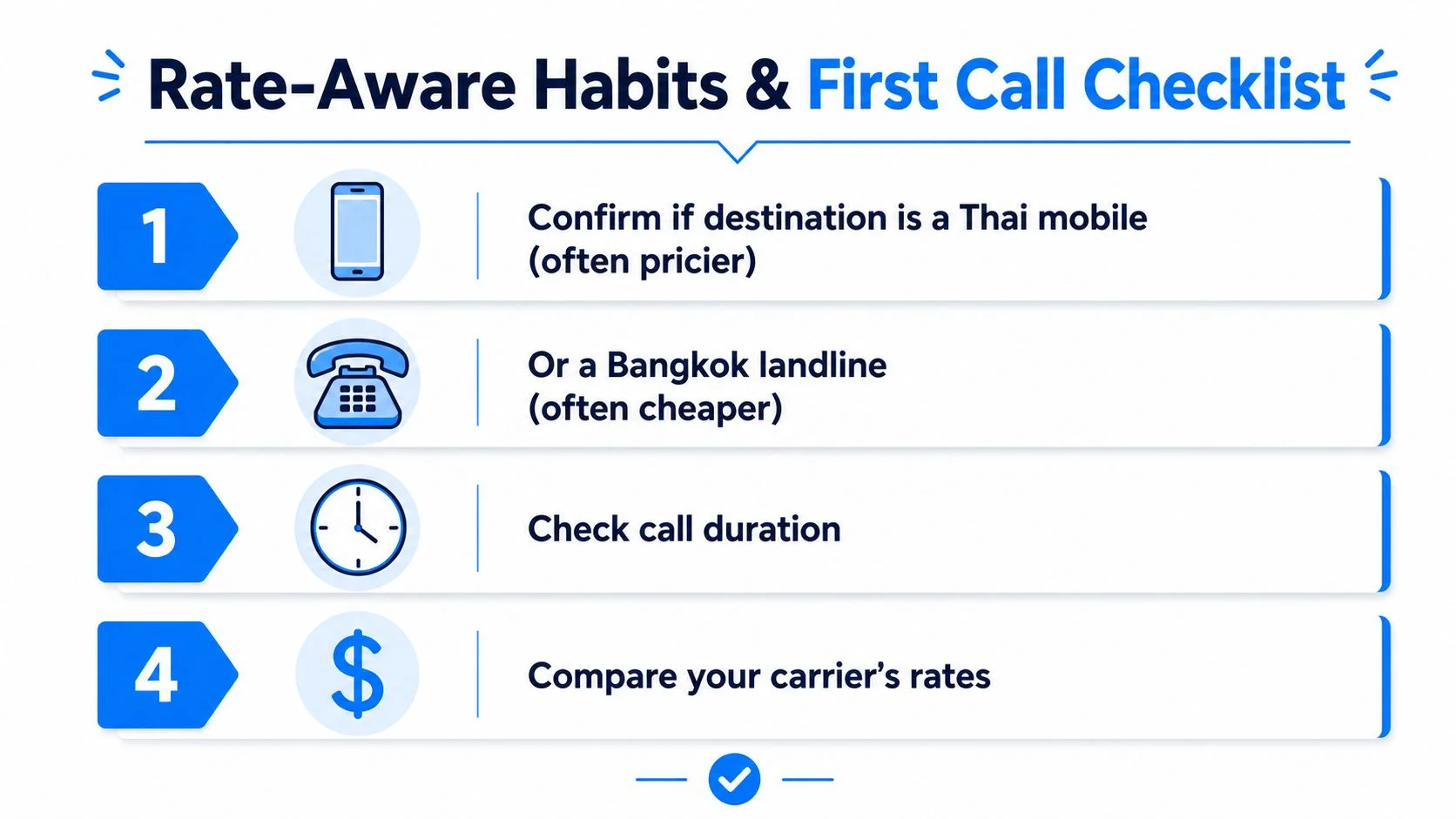
Before you press dial, check the destination type, the time of day, and how long you need to talk. A Thai mobile can cost differently from a Bangkok landline, and short calls can feel more expensive than they should if your billing rounds up per minute.
Use this checklist before your first call:
- Confirm the destination type: A Thai mobile, landline, or business line can affect what you pay.
- Check the timing: If your carrier has off-peak options, place the call inside that window.
- Set a time limit: Decide how long you need before you start, then stay focused.
- Watch rounding: If billing rounds up to the whole minute, a 20-second test still counts as a full minute.
If you want to sanity-check what a call could cost before you dial, the call cost calculator is the quickest place to do it. Traditional carriers and web calling platforms can bill in different ways, so a quick check helps you avoid surprise charges.

Your first call should be simple. Dial the international format, listen for a greeting that confirms you've reached Thailand, and keep the first test short so you can judge audio and latency before a longer conversation.
If you want a no-install way to place the call, try BubblyPhone. It works in any browser, the person in Thailand doesn't need an app or account, and credits start at $5 and never expire.