How to Call to Italy from Any Device (2026 Guide)
Table of Contents
- Dial strings to reach Italy by origin country
- Set up the call
- Know what happens after you press call
- Entry point and permission check by device
- Keep contacts and audio consistent
- Run a quick validation check
- Watch for spreadsheet damage
- Billing rules that affect an Italy call
- Budget for the calls you actually expect
- Connection problems, causes and fixes
- Emergency calls are different
- Choose translation for a specific need
- Make the final check
Dial your country's international access code (or + on a mobile), then 39, then the full Italian number, including the leading 0 on landlines. For example, use 011 from the US or Canada and 00 from the UK before 39 and the Italian number.
The familiar advice to “drop the first zero when calling abroad” can break a call to Italy. Getting the country code right isn't enough if a spreadsheet has already deleted a digit or you've guessed the rest of the number from its prefix.
Dial Codes to Reach Italy From Any Country
To reach Italy, enter your international access code, then 39, then the Italian number exactly as supplied. On a mobile, the plus sign is usually the simplest way to enter the international part.
The International Telecommunication Union's Italian numbering-plan bulletin identifies Italy's country code as +39, geographic numbers as beginning with 0, and mobile and personal-service numbers as beginning with 3. That geographic zero remains part of the number when you call internationally.
Dial strings to reach Italy by origin country
For Brazil, Mexico, Nigeria, or a managed office phone system, confirm the current access method rather than assuming a prefix works everywhere. A mobile's plus-sign format avoids manually choosing an international access code.
Press and hold 0 on your mobile keypad until + appears. A Rome landline then looks like +39 06 followed by the remaining digits; a typical Italian mobile looks like +39 3 followed by the remaining digits.
Selecting Italy in the BubblyPhone country-code lookup tool sets the country prefix for you, so enter only the national number in the destination field. Before pressing call, write out the full string and confirm that the country code appears directly after the access code or plus sign.
Practical rule: Replace the international access prefix when changing dialing methods. Don't remove digits from the Italian number itself.
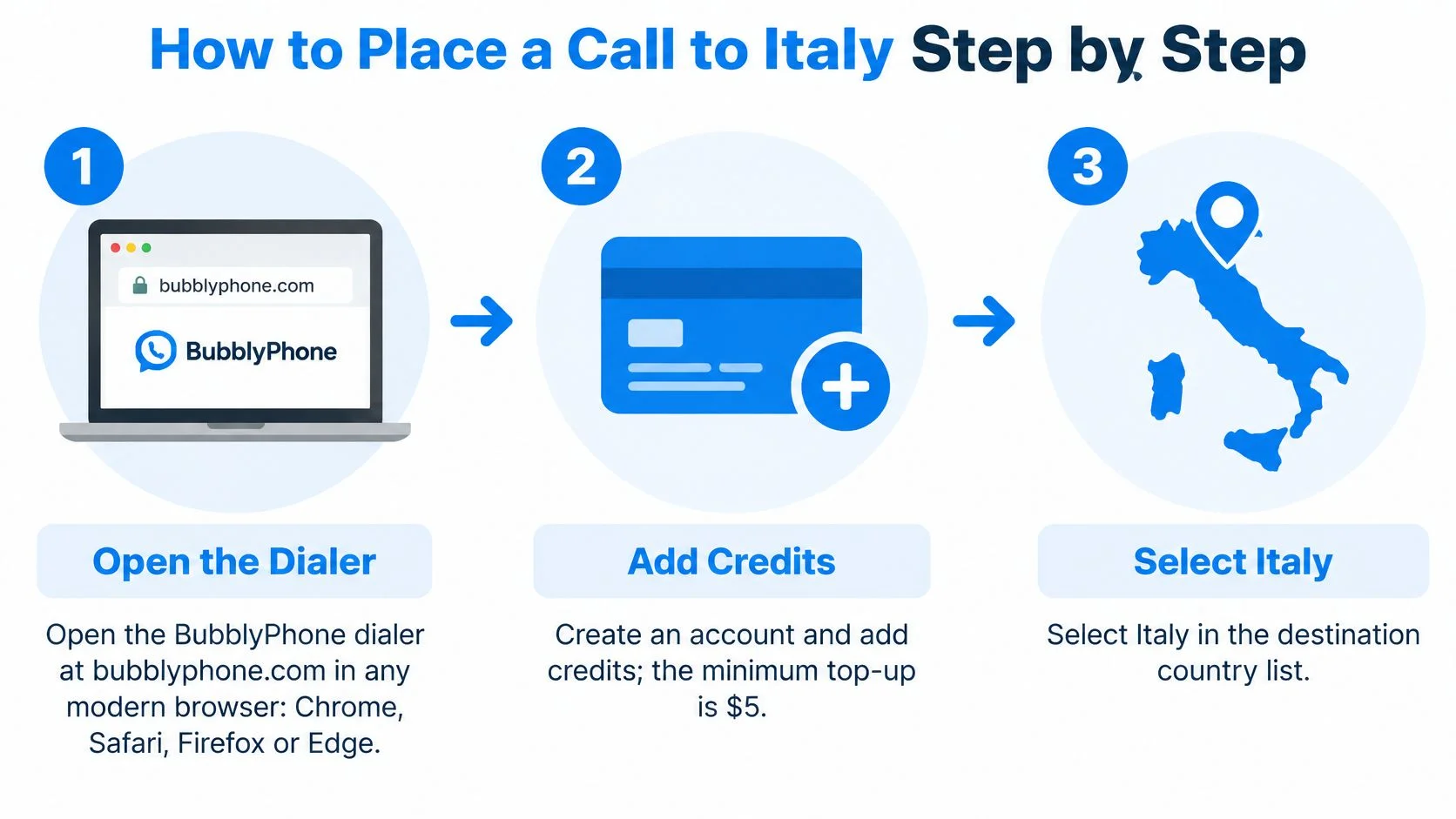
How to Place a Call to Italy Step by Step
A call can have the right country code and still go to the wrong place if the number changes during entry. Follow the dialer's prompts, then compare the complete destination on screen with the number the recipient provided.

Set up the call
- Open a browser dialer. Sign in using a supported browser such as Chrome, Safari, Firefox, or Edge. You need an internet connection; browser calling does not require installing software.
- Create an account and add credits. The minimum top-up is $5. An account lets you manage the calling balance, while the person answering does not need an account.
- Choose Italy in the country selector. If the dialer separates the country code from the number, select Italy before entering the national number. If you paste a full international number, check that the selector has not added the country code again.
- Enter the number provided by the recipient. Avoid retyping it from memory, especially if it came from a text or email. Copying it reduces the chance of skipping or changing a digit.
- Check the dialing format. If the saved number begins with an international access prefix such as 00 or 011, remove that prefix when using a plus-format number. An access prefix and a plus sign should not be combined.
- Review the destination field. Confirm that it shows the Italian country prefix and the intended national digits, with no repeated country code, letters, or stray symbols. Compare the displayed number with the original message before calling.
- Press call and allow microphone access. When your browser asks to use the microphone, choose Allow. If you are using a headset, check that the dialer has selected its microphone rather than an unused input.
Know what happens after you press call
The recipient's phone rings like an ordinary call. They do not need to install an app or create an account.
You'll usually hear ringback while the call is connecting. That sound means the call is ringing, not that both microphones are working. After the recipient answers, check that you can hear each other. If you hear them but they cannot hear you, check the selected microphone and its browser permission.
Check the applicable rate before starting a call; billing details are covered in the Credits section.
Calling Italy From iPhone, Android and Desktop
The number format stays the same on iPhone, Android, and desktop. Only the entry point and microphone permissions change.
Entry point and permission check by device
A browser is useful when you're borrowing a laptop or don't want another app installed. Sign in, open the dialer, and respond to the microphone prompt on that device, even if you've already granted permission on another phone or computer.
The native mobile apps suit repeat callers who want their contacts and call history available from the home screen. On iPhone, check the app's microphone permission in iOS Settings; on Android, grant the microphone request when you first call.
Keep contacts and audio consistent
Save an Italian contact in +39 international format, such as a Rome landline written as +39 06 followed by its remaining digits. That avoids keeping separate versions for a phone's native keypad and an internet dialer.
Your balance syncs across devices when you use the same account. A top-up made on your phone can therefore cover a later call from your laptop.
If an iPhone microphone still fails after you've allowed access, use the Used Mobiles 4 U guide to check your iPhone microphone and distinguish a permission issue from a device problem. On a laptop, use headphones so the speakers don't feed the other person's voice back into your microphone.
Checking an Italian Number Before You Dial
A correct +39 prefix cannot rescue a number with a missing digit. Italian landlines and mobile numbers have different formats, so check the national number before calling. Geographic landlines begin with zero, while mobile numbers begin with three. Rome's geographic prefix is 06, and Milan's is 02. The zero remains part of the national number, even when the number is written with Italy's country code.
AGCOM's published numbering plan sets a maximum of 11 digits for geographic numbers and 10 digits for mobile and personal communications numbers. Count the national number only, without +39. For example, a Rome landline written nationally as 06 12345678 has 10 digits: the 0 and 6, followed by eight more. It is within the geographic maximum. The limit is not a target, so a shorter number is not automatically incomplete.
Run a quick validation check
- Identify the category. For an ordinary landline or mobile, check that the national number starts with zero or three. For a business or other unfamiliar service number, ask the recipient to confirm the complete number, including its country code, rather than changing its digits based on the prefix.
- Count national digits. Exclude +39 when checking the length. Include a landline's leading zero.
- Check for copying errors. Remove labels, letters, and stray punctuation from the dialing field, then compare the digits with the recipient's message or official contact listing.
- Validate the format. The phone validator can help flag formatting problems, but a format check cannot confirm who owns a number or whether it will be answered.
Watch for spreadsheet damage
Spreadsheets can treat phone numbers as quantities and strip a leading zero. Set contact columns to text before importing, or store numbers in international format and check that the plus sign and every digit remain after import.
If a number looks incomplete, ask the recipient to send the full number again. Don't guess missing digits.
A mobile prefix can indicate the broad number category, but number portability means it may not identify the current provider. Use the prefix to check the number's format, not to guess its provider, tariff, or missing digits.
Credits, Billing and Checking the Rate First
The minimum top-up is $5, credits never expire, and calls are billed per minute, rounded up to the whole minute. Check the destination's number type before deciding how much credit to add.


Billing rules that affect an Italy call
For example, a call lasting 2 minutes and 10 seconds bills as 3 minutes. Each call rounds separately, so several brief check-ins can cost more per second of conversation than a longer call at the same rate.
Italy landlines and mobiles can have different prices. Check the live Italy calling rates for the destination type rather than assuming every number in the country costs the same.
Budget for the calls you actually expect
Estimate how many minutes you'll use each week, then apply the published rate for the number type you'll call. Allow for rounding on separate calls and any optional translation you choose.
The call-cost calculator helps turn that estimate into a top-up amount. You can add credit from the browser or app using the available payment options, and unused credit can wait until your next call.
You don't need a calling subscription for occasional family conversations or supplier calls. The optional dedicated-number plan is a separate recurring product, not a requirement for outbound calling.
Fixing Calls That Fail to Connect
Start with the number format and microphone permissions when a call fails or connects without usable audio. These are quick checks, although a network or recipient-side problem may take longer to resolve.
Connection problems, causes and fixes
Change one setting at a time, then test again. If you switch headsets while the dialer is open, recheck the selected input and output because the browser may still be using the previous device.
A ringing call and a rejected number need different responses. Don't change a correctly formatted number just because the recipient hasn't answered.
Emergency calls are different
Inside Italy, dial 112 directly through the local cellular or fixed network for an emergency. The Italian Ministry of Health's emergency guidance identifies 112 as the free European emergency number and states that it can be called even without a SIM, with a locked handset, or with no credit.
This isn't an ordinary overseas destination. Don't add Italy's country code or your home country's international access prefix, and don't rely on a browser dialer, internet connection, prepaid account balance, or live translation feature.
Before traveling, save the address where you're staying and consider how you'll explain your location and language needs. For an ordinary Italian contact abroad, use the international dialing format; for emergency assistance while physically in Italy, use direct local emergency access.
Troubleshooting order: If an ordinary Italian number fails twice, check its format first, microphone permission next, and account balance after that.
Start Your First Call to Italy Today
Live AI translation is worth paying for when you and the recipient don't share a language. If you can already communicate comfortably in English or Italian, skip the add-on and keep the cost down.
BubblyPhone's optional translation supports 62 languages, shows bilingual captions during the call, and saves a full transcript to call history afterward. It's charged as an optional per-minute add-on; check its current pricing on the rates page.
Choose translation for a specific need
- Family conversations. A son in Toronto calling a grandmother who speaks only Italian can use translation to bridge the language gap.
- Supplier coordination. A sourcing manager in Chicago confirming a delivery with a supplier in Naples who speaks no English can follow bilingual captions and verify the details aloud.
- A written record. A remote worker who also needs language help can review the saved transcript afterward. Confirm important names, quantities, and commitments during the call rather than treating automated text as infallible.
If a written record is your only need, consider whether translation is necessary at all. Let the other person know when you're using a feature that saves a transcript.
Make the final check
- Confirm the Italian number is in +39 format with all its national digits.
- Check the rate for its number type.
- Top up at least $5.
- Place the call from any browser and allow microphone access.
Call Italy's landlines and mobiles with BubblyPhone, which works in any browser and requires no app or account for the person you're calling. Credits start at $5 and never expire, so you can add a balance and make your call when you're ready.