Programmable Voice API: Build Calling Workflows in 2026
Table of Contents
- Where software control helps
- Routing and connection capabilities
- Audio and automation capabilities
- Keep signaling separate from media
- Verify before applying events
- Match records without guessing
- Keep downstream outages off the call path
- Put the gate before the queue
- Recording requires a separate decision
- Build the durable path
- Reserve human approval for consequential actions
- Allocate time across the whole exchange
- Change the Stage That Costs the Most Time
- Use an outcome scorecard
- Alert on the segment, not the average
- Run a bounded pilot
A programmable voice API is a software interface that lets your code create, control and monitor phone calls to landlines and mobiles. Starting a call is the easy part; making it timely, lawful and recoverable when something fails is the core engineering work.
The popular advice is to connect an endpoint, add a voice model and start dialing. That produces a demo, not a dependable calling workflow. Your application still needs to decide who may be called, distinguish an answered call from working audio, and recover without dialing someone repeatedly.
What a Programmable Voice API Does
Phone calls used to live on a PBX or a direct carrier connection. A programmable voice API moves initiation, number selection, routing and participant control into web requests, then returns machine-readable outcomes your application can store.
The practical change is that calls become data your code can act on. Calling joins the business workflow instead of staying a task someone has to remember.
Say a repair shop saves a booking. The application schedules a reminder, calls the customer when permitted, collects a confirmation and writes that result onto the appointment. What you keep is the appointment record: confirmed, unanswered, or answered with no usable reply.
Watch more than the dial. Voicemail, silence and a one-way audio path can all follow a call that left on schedule. I leave the appointment unconfirmed until a real reply is stored.
Where software control helps
Teams usually need this control for:
- Appointment reminders, where the booking supplies the destination and purpose.
- Support lines, where incoming calls need routing and escalation.
- Callbacks, where an application connects a customer to an available person.
- AI voice agents, where a conversational system needs a normal telephone number.
The telephone network still rings a regular mobile or landline. The recipient does not install the caller's application, which matters for customers, relatives and suppliers who will not add another app.
Build-or-dial rule: Use an API when code must decide when to call and what happens afterward. Use a dialer when a person needs to place a few calls.
Key Terms Behind Voice API Calls
Voice calling uses separate components for business control, session setup and audio transport. Knowing which component failed prevents you from debugging the wrong layer.
- CPaaS, communications platform as a service, is the broader category that exposes communications capabilities through cloud APIs. Voice is one capability within it.
- SIP, Session Initiation Protocol, establishes, changes and ends sessions. It handles signaling, not the audio itself.
- RTP carries real-time audio packets once a session exists.
- WebRTC supports real-time browser audio and video, including calling from a browser tab.
- Webhook means an HTTP callback that delivers an event to your server.
- E.164 identifies the international numbering structure used to represent destinations unambiguously.
- Speech-to-text and text-to-speech convert incoming audio into text and outgoing replies into spoken audio.
- Correlation ID means the application identifier that connects a business record with its requests, events and logs.
For manual checks, our free tools include a Country Code Lookup, Call Cost Calculator, Phone Validator and Voice Recorder. These help inspect inputs and audio, but they don't replace validation or telemetry inside an automated workflow.
Core Capabilities and the Workflows They Serve
A saved booking that should trigger a reminder, a published support number, and an agent that answers a scheduling question mid-call are three different jobs. The API can run each of them. Turning every one on before the workflow needs it is how consent, storage, and audio timing show up as production failures.
Routing and connection capabilities
Outbound calling fits work the application starts. Inbound calling fits a number customers can dial themselves. Number management attaches those paths to a team, a branch, or a country.
Check the specific country and number type before you design the journey. A number that can receive support calls may not share the same features, identity checks, or provisioning steps as another category.
Conferencing keeps several people in one session, such as a customer, a purchasing manager, and an interpreter. A support escalation often needs only a handoff, with the first agent leaving after the second leg connects.
Audio and automation capabilities
Recording, transcription, and streaming expose the conversation. A connect-and-disconnect flow never had to decide where the audio is stored, who can open it, or when the caller was told. A transcript on a customer record is useful only when the app ties it to the correct call and limits who can retrieve it. I would leave recording off until that access path exists.
A voice agent needs interruption handling, permission to use tools, and a route to a person when it cannot finish the task. Live audio also has a timing limit. If speech-to-text and the spoken reply run long, the caller talks over the agent. Treat that delay as part of the capability, not as a setting you fix in the model later.
Call status events are how logs, billing, and the CRM learn what followed the request. Watch three outcomes apart: whether the call connected, whether the audio stayed usable, and whether any transcript landed on the right record. One accepted request does not cover the other two.
Select each capability for the business result it must produce, and leave out the rest.
Call States and Webhook Events
A call is a sequence of states, not a single successful HTTP request. An accepted request confirms that the platform accepted work; it doesn't prove that anyone answered or heard audio.
The normal progression and alternate failure path should be visible in your application.

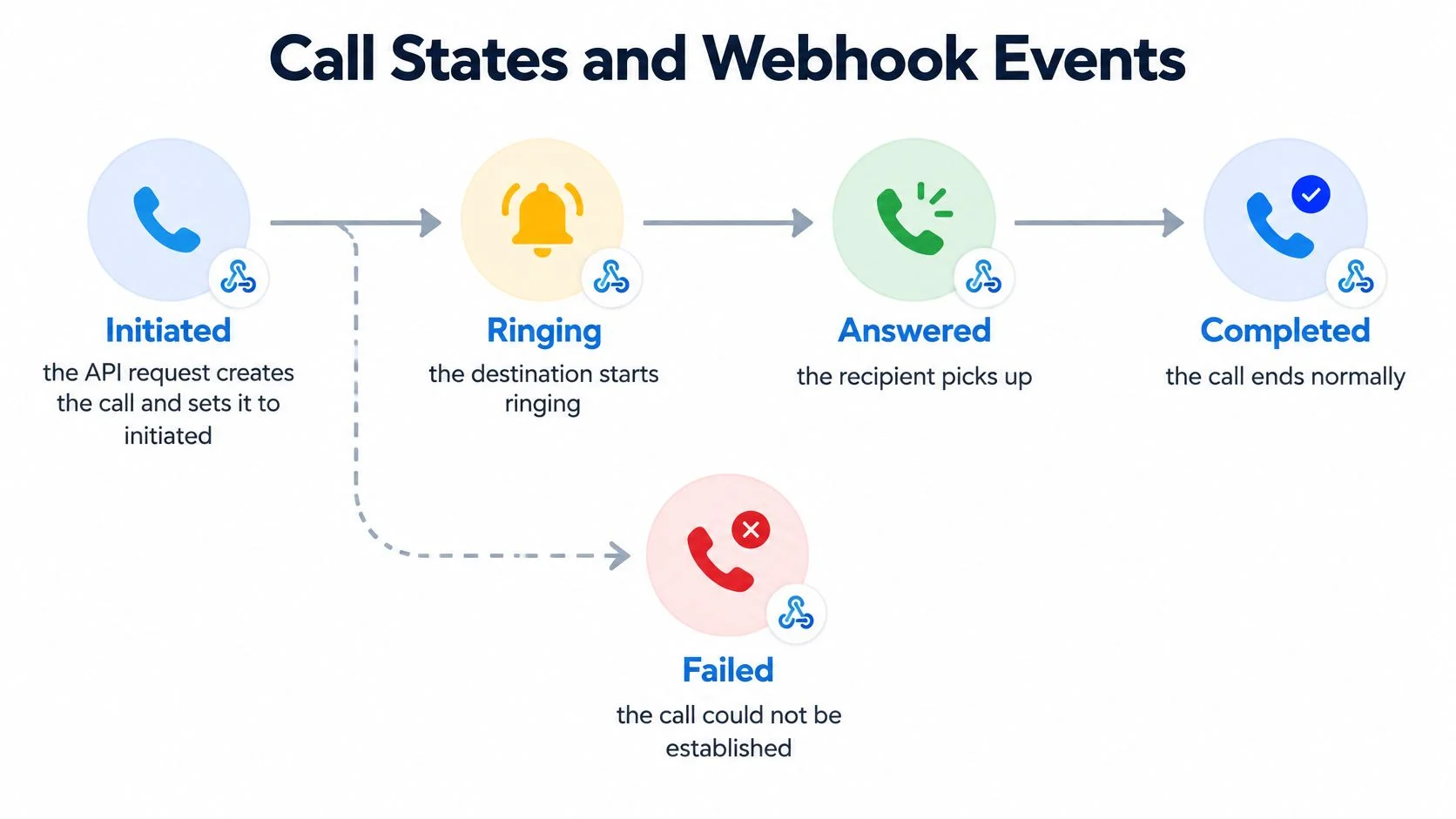
Treat these as your application model and map the platform's actual event names into it. Some systems represent busy, unanswered and canceled outcomes separately; don't discard that detail during normalization.
Keep signaling separate from media
An HTTPS request creates work, session signaling establishes the connection, and a separate media path carries audio. The ETSI voice-service specification describes SIP/RTP interconnection and WebRTC-compatible alternatives, supporting this separation.
Keep one correlation ID across requests, session records, media diagnostics, recordings and events. An answered event with silent audio is a media incident, not a successful conversation.
Verify before applying events
The OWASP Webhook Security Cheat Sheet recommends authenticated delivery, timestamp checks and event deduplication. Implement the receiver in this order:
- Authenticate the raw body. Verify the documented signature before parsing JSON, using constant-time comparison where applicable.
- Check freshness. Reject stale authenticated timestamps within a defined tolerance.
- Accept durably. Atomically store the event identifier and payload before returning success.
- Apply idempotently. Expect retries and out-of-order delivery; prevent backward transitions while retaining legitimate late metadata.
- Isolate the endpoint. Separate it from browser-facing routes, rate-limit it and log verification failures without call content.
A forged answered or completed event can advance a workflow or corrupt usage accounting. Signature verification isn't an optional hardening task.
Common Integrations for Calling Workflows
Calling integrations should write a business result back to the system that requested the work. A call log alone doesn't tell the scheduling team whether to keep an appointment or the support team whether a customer still needs help.
Match records without guessing
For scheduling, distinguish reached the customer from confirmed the appointment. A voicemail shouldn't mark an appointment confirmed, and an answered call shouldn't automatically close a support ticket.
For helpdesk matching, normalize the caller's number before searching. Otherwise, domestic and international representations can create separate records for the same caller. A matching number can suggest a contact, but it isn't sufficient authentication for disclosing sensitive account details.
Billing integrations need their own reconciliation path. A completed event can create a provisional usage record; the final billing record should resolve discrepancies rather than overwrite them.
Keep downstream outages off the call path
Use an authenticated event receiver, an internal event queue and idempotent writes keyed by event ID. If the CRM is unavailable, retry the CRM update without asking the telephone platform to replay the entire business action.
For voice AI, prepare the human-transfer payload before connecting the queue: customer identifier, reason for escalation, confirmed facts and unresolved questions. Attach a permitted transcript where useful, but don't force the receiving person to read the entire conversation.
Evaluate target-country number types, webhook authentication and recording controls before committing to an integration. Missing infrastructure capabilities are harder to fix than a field mapping.
Consent and Compliance Before Calls Are Queued
Non-emergency autodialed or prerecorded calls to wireless phones generally require prior express consent under the TCPA, while telemarketing robocalls require written consent and an opt-out mechanism during each call, according to the FCC's unwanted-communications guidance. An API credential establishes technical access, not permission to contact someone.
AI speech doesn't bypass these restrictions. The FCC's artificial-voice guidance confirms that AI-generated human voices fall within artificial-voice restrictions.
Put the gate before the queue
Apply these checks before creating executable calling work:
- Store consent evidence. Preserve its source, scope and timestamp, linked to the person and intended purpose. A generic contact-import flag isn't enough to explain what someone agreed to.
- Apply suppression. Drop contacts who have withdrawn permission. Recheck when executing delayed jobs so an old queue entry can't override a recent opt-out.
- Prepare caller identification. Configure the business identity and originating number in the execution payload.
- Provide a stop mechanism. Make withdrawal actionable during the interaction and propagate it to pending retries.
- Flag synthetic speech. Record whether the workflow uses AI-generated voice so audits don't mix it with ordinary human calling.
For prerecorded messages, the FCC's disclosure guidance requires identification of the initiating entity at the beginning and provision of the calling number during or after the message. Treat those requirements as call-flow behavior, not merely metadata in a database.
Recording requires a separate decision
Permission to place a call isn't automatically permission to record it. Review destination-specific requirements with the relevant regulator and use our call-recording laws guide as a starting point, not a substitute for legal advice.
Policies must also cover staff who bypass the main calling system. Recepta.ai's guidance on recording calls from personal cell phones is useful when defining how those recordings enter company workflows.
Consent is executable state: A withdrawal should prevent the next attempt, not just appear in an audit report afterward.
How to Build an Outbound Calling Workflow
Build outbound calling as a durable job with explicit permissions, identifiers and outcomes. Don't place a telephone request directly inside a booking-page submission and assume the browser response proves success.
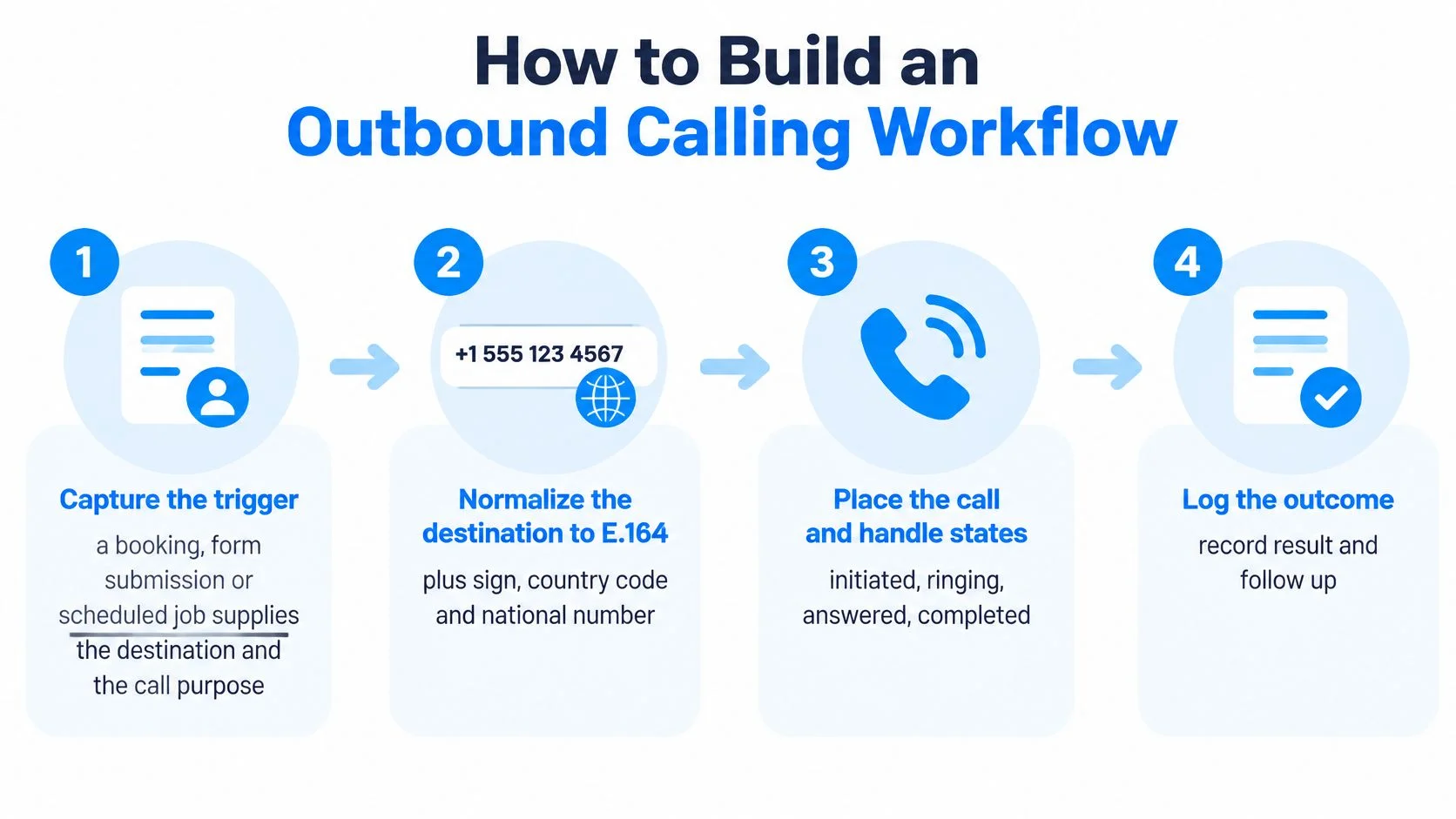
The compact flow below shows the main stages; the implementation also needs consent, retry and reconciliation controls.

Build the durable path
- Capture the trigger. Store the booking, form submission or scheduled event with its destination and call purpose. Give the business action a stable identifier so a repeated submission doesn't create another call.
- Normalize the destination. Represent it with a plus sign, country code and national number; ITU-T Recommendation E.164 sets a maximum of 15 digits, excluding the international dialing prefix. Require country context for domestic input, reject ambiguous results and preserve the original entry for troubleshooting.
- Run the consent gate. Validate permission, suppression status, purpose and required disclosures before queuing. If evidence is missing, stop the job rather than letting a later reviewer discover the problem after dialing.
- Create the call. Send the callback URL and correlation ID, and save the returned call ID against the business record. Keep credentials server-side; our guide to calling a REST API from a browser helps distinguish browser interaction from privileged backend execution.
- Receive and apply events. Feed verified events into the state machine through durable storage. If the create request times out, reconcile its outcome before retrying, because the platform may have created the call even though your application missed the response.
- Branch on the result. Run the script when answered, and apply a capped retry policy only to eligible failures. For unanswered calls, choose voicemail or skip according to permission and purpose; an invalid destination needs correction, not repeated dialing.
- Enforce local calling windows. Calculate quiet hours from the callee's time zone, not the server's. Check the window when an attempt executes, including retries that were scheduled earlier.
- Close and reconcile. Write the final outcome, duration and attempt count, then compare usage with billing records. Keep task completion separate from telephone completion so an abandoned conversation doesn't become a successful booking.
Reserve human approval for consequential actions
An agent can collect a rescheduling request without receiving unrestricted authority to change an account. Use approval for sensitive changes, uncertain identity or actions that can't be reversed safely.
Freeform Company's guide to adding human review gates to automation provides useful context for placing those checkpoints. Approval should block the consequential action, not merely generate a notification after it happens.
Latency Budgets That Decide Whether Calls Feel Natural
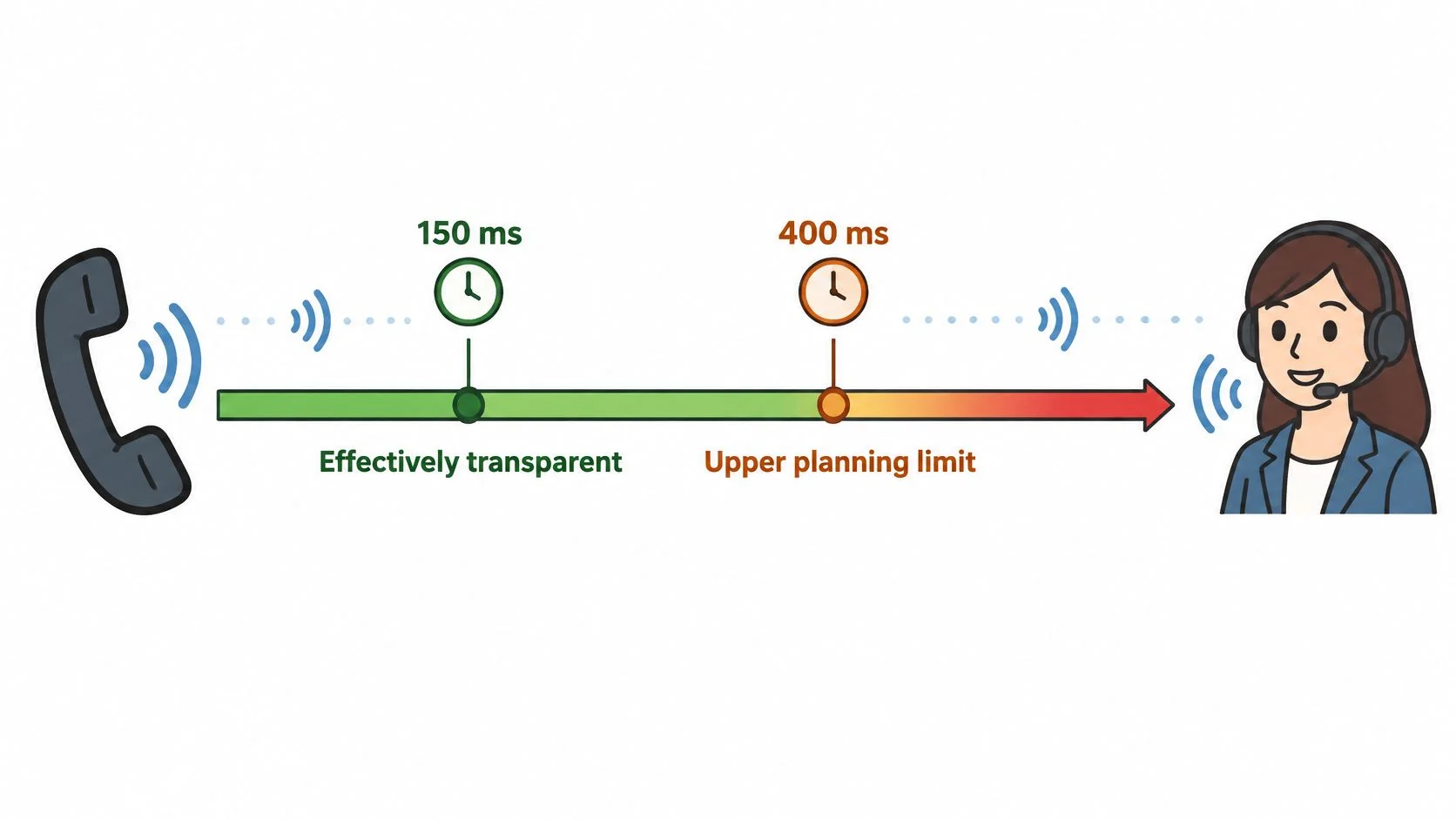
Transport delay and the pause before the agent replies are separate measurements. A call can have acceptable network latency and still feel slow if speech recognition, turn detection, model output or audio generation takes too long.
These reference values come from published voice-latency guidance. Use them as planning benchmarks, then measure the complete exchange at the caller's handset.

Allocate time across the whole exchange
A cascaded agent waits for speech recognition, model output and synthesized audio. Telephone transit, buffering and end-of-turn detection add delay. A fast model cannot compensate for turn detection that waits too long after the caller stops speaking.
Measure the turn gap at the caller's handset, from the end of caller speech to the start of audible response. Track P50 and P95 separately. P95 shows how often slower responses affect callers, while P50 describes the midpoint.
Collect post-dial delay, answer-seizure ratio, time to first audio and one-way-audio incidents as separate measures. Define answer-seizure ratio consistently as answered calls relative to attempted call setups, including a clear rule for excluded attempts.
Change the Stage That Costs the Most Time
- Barge-in handling: Stop outgoing speech and buffered audio when the caller interrupts.
- Silence detection: Tune turn detection to avoid cutting off hesitant speakers or leaving long pauses.
- Streaming synthesis: Start useful audio before the complete reply is ready.
- Regional placement: Reduce unnecessary distance between media processing and callers.
- Human transfer: Set a bounded fallback so callers are not left in indefinite silence.
For browser-side troubleshooting, guidance on improving VoIP call quality can help distinguish local audio and network problems from agent-processing delays.
Review audio playback alongside timing traces. A trace may show when a response began, while playback reveals whether the caller could understand it and whether interruptions were handled cleanly.
Run the same script across destination countries and compare P95 turn gaps. Set deployment targets from handset measurements, not server-only benchmarks.
Measuring Whether Your Voice Workflow Works in Production
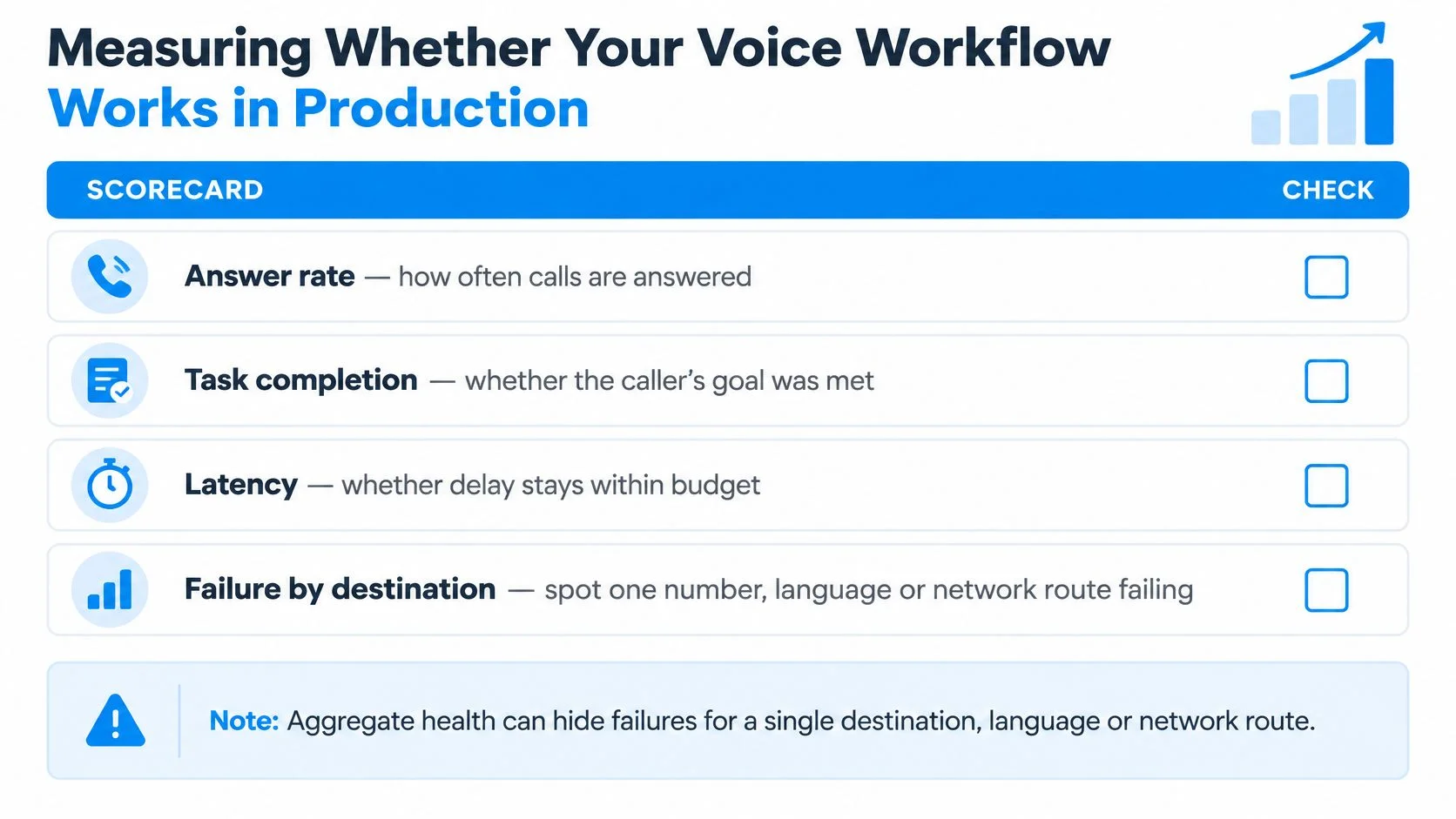
A healthy aggregate can hide a broken route. Split outcomes by destination, language, time zone and network path, because one group of callers can hit unusable audio or failed transfers while the rest of the traffic looks fine.
Static transcript tests miss delayed webhooks, changing mobile conditions, and an interruption that stops playback and drops the caller's next sentence. Production evidence has to come from live calls, segmented the same way you alert on them.
Answer rate and handset latency percentiles already sit in the latency budget. Import those P50 and P95 figures; do not rebuild them from backend timers. What those timings leave out is whether the caller finished the job.
Use an outcome scorecard
- Task completion: Confirm the booking, confirmation or support write landed in the destination system. A rejected write is a failed task, even when the agent logged a successful tool call.
- Escalation accuracy: Check that transfers cover the right cases and skip unnecessary handoffs.
- Barge-in success: Confirm the caller can interrupt and that the next sentence is kept, not discarded with the stopped audio.
- Hang-up rate: Separate early exits from callers who leave after the task is done.
- Cost per successful outcome: Count failed attempts and optional processing, not only minutes on connected calls.
- Human-review sampling: Review permitted recordings or transcripts on a schedule, including a weekly sample of calls marked successful.
Machine events and business-system records have to agree. Treat the destination system's accepted write as the completion signal.
The visual summary highlights why overall health isn't enough.

Alert on the segment, not the average
Misheard names, wrong language routing, lost transfer context, late events and audio that degrades in one region often produce no HTTP error. Each one still blocks the task.
GoReplay's explanation of measuring real user experience is useful for separating internal service health from what callers hear.
Page when a segment's completion rate drops below its own baseline, not only when the global average dips.
- Destination country: Completion falls on calls to one country while others hold. Check the route and audio path before changing the model.
- Language: Task completion for one language lags the account baseline. Inspect language routing and whether barge-in kept the caller's correction.
- Time zone: Hang-ups cluster in a local evening window. Compare traffic mix and sample size before treating it as an agent fault.
- Network route: Cost per success rises on one path because retries and failed transfers pile up. Hold any route change until the sample is large enough to trust.
Test accents, noisy mobile links and concurrent calls, then watch those segments near real time. A fixed-dataset rerun will not catch a route that only fails after the call is already live.
Test One Real Call Path Before You Commit
An appointment reminder to one consenting recipient will tell you more than a lab script that never leaves your network. One permitted path, run live, shows missing events, a broken audio leg, and a destination that does not behave the way the integration assumed. It will not prove the workflow holds at volume.
Run a bounded pilot
- Choose a narrow path. Start with that reminder. Leave recording, AI, and conferencing off until this path completes.
- Exercise destinations. Place five test calls to each of two destination countries. Validate the numbers and consent before the first dial.
- Inspect evidence. Log every state change, check webhook signatures, and measure the gap before handset audio returns. Record that gap only with permission.
- Compare results. Treat a small-sample P95 as a direction check against the latency thresholds you already set. If one of the two destinations misses them, fix that path before you add calls.
On a manual check of the same destination, BubblyPhone shows the rate before you dial. Billing is per minute, rounded up to the whole minute. Calling itself has no subscription. The optional dedicated-number plan is the only recurring product.
Make a real call with BubblyPhone before building a larger calling workflow: it works in any browser and reaches ordinary landlines and mobiles without an app or account for the recipient. Credits start at $5, never expire and are delivered immediately after successful payment, so you can test the destination and conversation path without a calling subscription.