Live English Translation: How It Works on Phone Calls

Table of Contents
- What you hear and read
- What you can check afterward
- From microphone to recognized words
- From recognized words to usable translation
- Latency bands and what they mean on a call
- Notice drift before it causes confusion
- Speech conditions that reduce translation quality
- Test your speakers, not the language count
- Check before sharing sensitive details
- Everyday calls and official details
- Stakes and checks by calling scenario
What good is an instant translation if it misses the word that changes the meaning? Live English translation converts speech between English and another language while a call is still running, but useful translation requires a balance between speed, accuracy and privacy.
You might hear translated speech, read captions or receive a written transcript afterward. Knowing which output you're using, and what still needs checking, matters more than an instant-translation promise.
What You Actually Get During a Translated Call
Live English translation gives the listener one or more outputs during the conversation, with a saved record afterward if that feature is enabled. Translated speech, captions and transcripts aren't interchangeable, and not every service includes all of them.
Say you're calling a relative about a family visit. They describe the journey aloud, you hear the translation, and you glance at the captions when they mention the station name. It's similar to film subtitles: words appear alongside speech, except live captions must work with an unfinished conversation rather than a prepared script.
What you hear and read
Translated speech plays a spoken version of a phrase shortly after the original. It's useful when you want to keep your eyes free or find listening easier than reading. The main limit is overlap: if you answer before playback finishes, you can miss the end of the translation.
Live captions show translated text while the speaker talks. They can help a hard-of-hearing caller follow the exchange or let you inspect an unfamiliar address. Their wording can change as the system receives more context, so an early caption isn't necessarily settled.
A documented streaming translation workflow distinguishes translated audio, translated captions and optional source-language transcription. That distinction matters when you're trying to understand whether an error began with hearing the original words or translating them.
What you can check afterward
The source-language transcript shows what the system recognized in the original language. It helps someone who can read that language inspect a confusing phrase, but it isn't proof of exactly what the speaker said. Recognition mistakes appear there too.
A saved written record lets you review the conversation after hanging up, where available and enabled. Treat it as a review aid, not a certified account.
- For conversation: Listen to translated speech and leave room for playback.
- For exact details: Inspect captions, then ask the speaker to confirm.
- For later review: Check whether a transcript will be saved.
The task also determines the right format. If you only need to translate menu to English, TopFoodApp provides a resource focused on written menu content rather than a phone conversation.
Use translated speech as the main conversational channel and captions as a safety net for names and figures. Neither removes the need to ask a clarifying question.
How a Live Translation Call Works, Step by Step
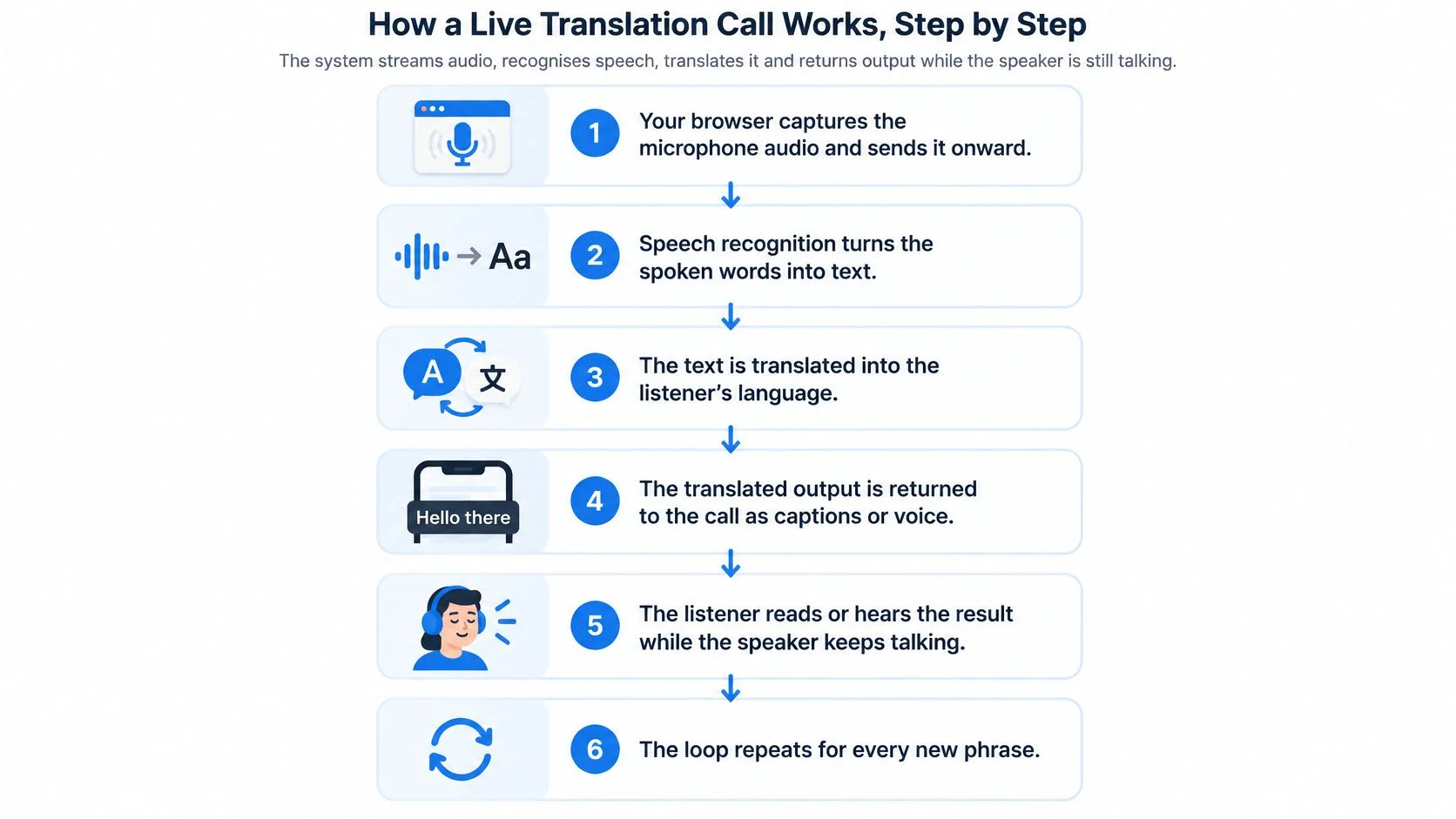
A translated call moves through a series of stages while the conversation is underway. Audio is captured, speech is recognized, the words are translated, and the result is delivered as text or speech. Each stage depends on the one before it, so a missed word can affect everything that follows.
Realtime translation documentation describes streaming audio into a session and receiving translated audio alongside transcript updates. Systems may arrange these parts differently, but this pipeline shows what happens from a caller's perspective.

From microphone to recognized words
- Your browser captures and sends the audio.After you grant microphone permission, the browser sends your voice through a real-time connection, such as WebRTC. That connection carries the audio, but it cannot restore speech the microphone failed to capture clearly. Keep the microphone close, avoid rubbing it against clothing, and check that the browser is using the intended headset rather than a distant laptop microphone.
- Voice-activity detection identifies speech.This component helps separate speech from silence and divide audio into useful segments. Background sounds can still cause trouble: a television may be mistaken for another speaker, and a long pause may make an unfinished thought seem complete.
- Speech recognition turns audio into text.As the audio arrives, the recognizer estimates words in the source language. You may see a partial word or phrase before the speaker finishes. If a family name is recognized as an ordinary word, the translation may accurately translate the wrong input. The error began in recognition, so checking the source words can help locate it.
From recognized words to usable translation
- The translation component waits for enough meaning.It converts recognized speech into English or the other selected language. Languages place verbs, negatives, and qualifiers differently, so translating each word immediately can create misleading fragments. A caller might begin with “I can…” and finish with “…only accept delivery after the inspection.” The full condition changes the meaning of the opening words.
- Captions appear and may be revised.The interface displays translated text and can update earlier wording when later speech clarifies a phrase. Treat a caption as an evolving draft, not a human-edited statement. Wait for the complete thought before copying a deadline or treating an apparent agreement as final.
- A synthetic voice plays the translated phrase.If spoken translation is enabled, the system generates audio from the translated text. Playback may start after the text appears because the system still needs to prepare the speech. Let it finish before replying, particularly when the final phrase contains an exception or instruction.
The cycle repeats throughout the call, and each cycle can revise earlier output. Watch whether captions arrive within the current sentence, revisions stay small, and interruptions leave the conversation able to continue. Treat these as indicators to watch for, since no performance level is guaranteed.
If the system repeatedly loses sentence endings, check microphone placement, overlapping speech, and connection quality. Those factors can affect the input before translation begins, so checking them helps distinguish a sound-capture problem from a language-recognition problem.
Why Translation Lags and How Much Delay Is Normal
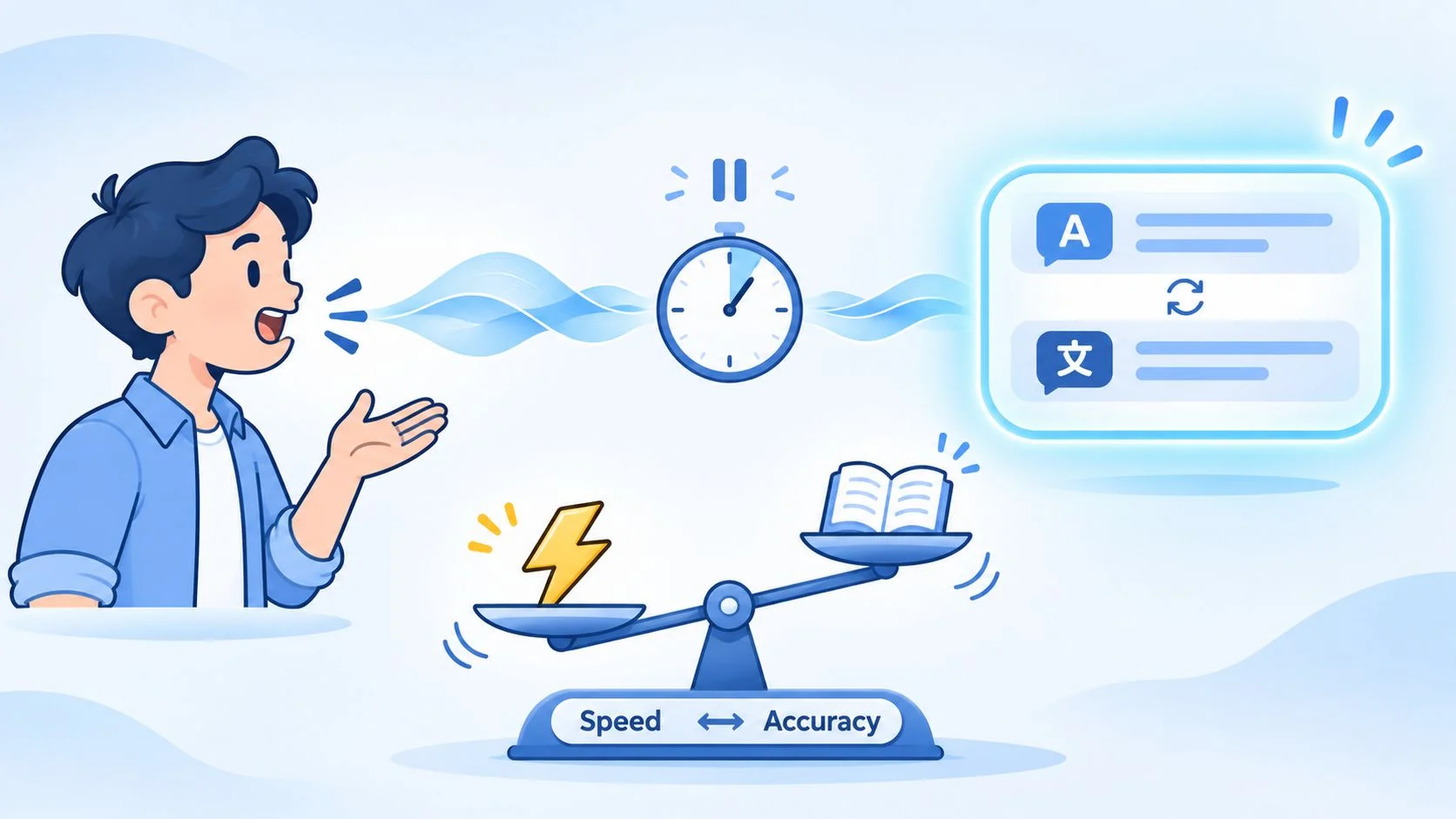
Live translation can run a few seconds behind the speaker because it must balance prompt output against enough context to translate accurately. Zero delay isn't a sensible expectation, and a fast first caption doesn't necessarily mean the final wording is ready.
Latency bands and what they mean on a call
A streaming speech-translation evaluation uses average-lagging thresholds of 1,000 milliseconds or less for low latency and 2,000 milliseconds or less for medium latency. These are evaluation conventions, not a promise that every call will feel equally responsive.
The long-call row comes from a computation-aware latency analysis, in which length-adjusted average lagging increased from 6,850 milliseconds for a 25-second input to 23,460 milliseconds for a 100-second input. That experimental result illustrates accumulated delay, not what every family or business call will experience.
Waiting for a longer phrase can resolve ambiguity. Producing a translation sooner can keep the exchange moving, but may require revisions. The useful question isn't whether output appears quickly, but whether participants can follow it without guessing.

Notice drift before it causes confusion
A short greeting can sound responsive even when a longer explanation exposes buffering problems. Network jitter, processing demands and language-specific speaking speeds can all change the delay you experience.
Watch for changes during the call rather than judging everything by the opening exchange:
- Captions lose their place: You're reading an earlier topic while the speaker has moved on.
- Silence follows a finished turn: The speaker has stopped, but substantial translation is still arriving.
- Playback crosses the reply: Translated speech continues after the other person starts answering.
Don't compensate by speaking unnaturally slowly between individual words. Use short, complete thoughts and pause at sentence boundaries, giving the system meaningful segments rather than isolated fragments.
At the end of a long discussion, review the latest captions against what each person believes was agreed. If the display is still catching up, stop adding new information until both participants are discussing the same point.
Accents, Dialects and Mixed-Language Speech
A translation can work well for one speaker and struggle with another, even when both use a supported language. Regional pronunciation, mixed-language sentences and informal vocabulary can make words harder to recognize, so test with the people and phrases likely to come up on your call.
A 2025 code-switching benchmark examined Bengali-English, Hindi-English, Marathi-English and Telugu-English. A specialized model improved results by up to 3.5 BLEU points over competing approaches. BLEU compares a generated translation with a reference translation. It is not a percentage of words understood correctly, and a benchmark result cannot guarantee that a system will recognize a family nickname or local shorthand.
Speech conditions that reduce translation quality
The goal is to make key words easy to distinguish while keeping your natural accent. Start at your usual pace, then slow slightly if the same word keeps appearing incorrectly in the captions.
Code-switching means moving between languages during an exchange, sometimes within a single sentence. For example, a caller might use English for an invoice term and another language for the surrounding explanation. If the term is unclear, finish the thought in one language and say the specialist term separately.
Test your speakers, not the language count
Slang depends on intended meaning, while an unfinished sentence may leave that meaning unclear. Ask, “Do you mean the shipment is delayed?” rather than repeating the same unclear phrase more loudly. Recognition can vary across speakers and varieties, so check how the system handles the voices you expect to hear.
A longer supported-language list doesn't show how well a system handles your family's dialect.
Before relying on translation, listen for whether the system recognized the speaker's words correctly, then check whether it conveyed their meaning accurately. This distinction is especially useful for names, informal expressions and sentences that switch languages. Our guide to AI call translation accuracy explains how recognition and translation errors differ.
Speak naturally but clearly. Before acting on a translated detail, confirm that names, numbers and dates match what the speaker intended.
Privacy, Recording and Data Handling Before You Call
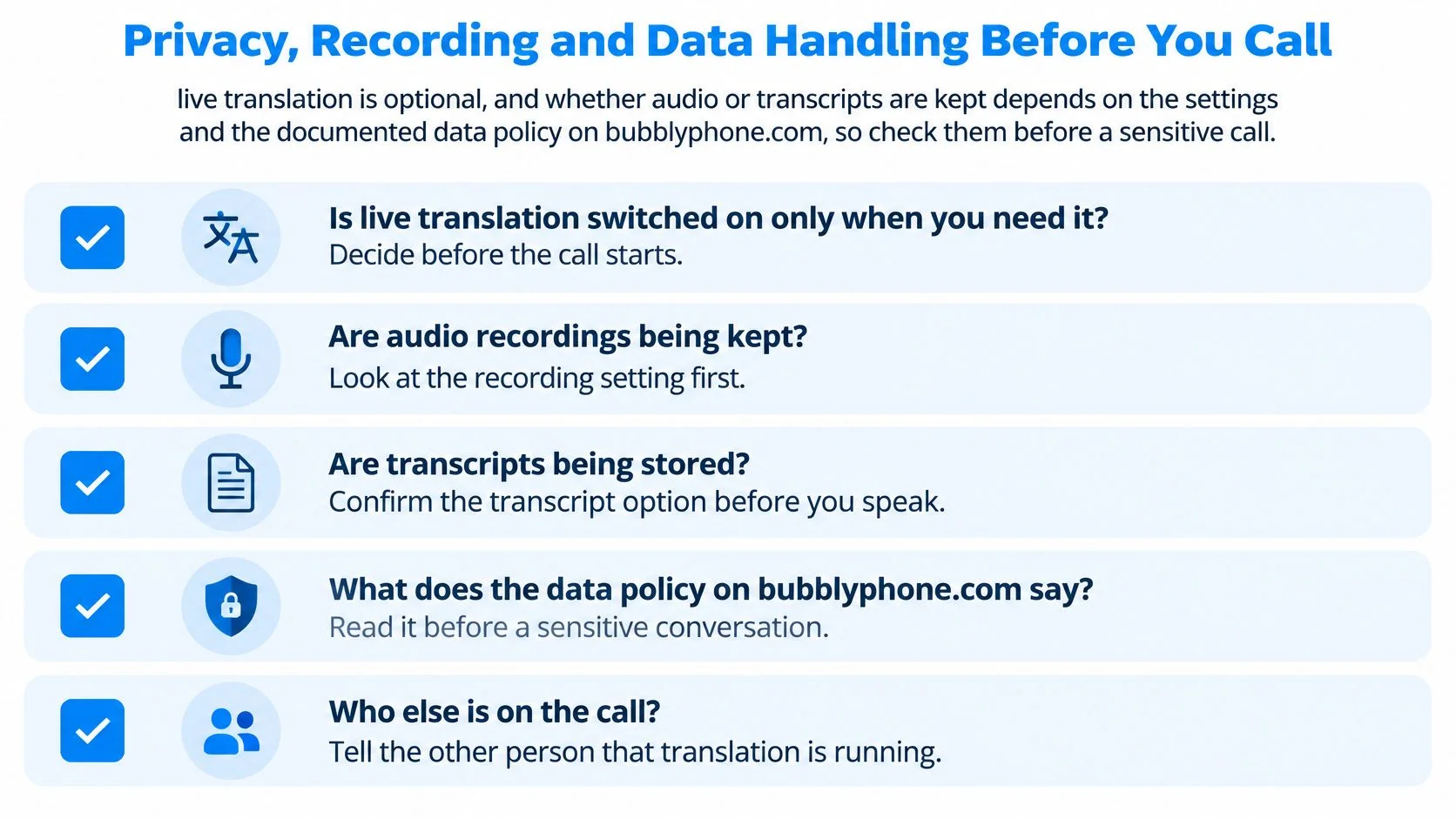
Live translation is optional, and whether audio or transcripts are kept depends on the enabled settings and documented data policy. Check storage and recording behavior before sharing sensitive information, rather than assuming a live feature leaves nothing behind.
A cross-lingual speech-recognition deployment study identifies low latency, accuracy and privacy as joint requirements. Faster output isn't automatically better if it creates errors, and on-device processing can reduce data leaving a device while facing hardware, language-coverage and accuracy constraints.
Acoustics matter too. Reverberation, the lingering echo in bathrooms or bare offices, can degrade recognition even when moderate background noise remains manageable. A quiet room with hard surfaces isn't necessarily a good recording environment.

Check before sharing sensitive details
For medical, legal, financial or private family conversations, establish whether audio goes to cloud processing, whether audio or text is retained, and whether enabling translation changes recording behavior. Also establish what happens to an incomplete phrase if the connection drops.
- Read the data and recording policy. Check the documented policy and current settings before dialing. Our calls aren't recorded unless you explicitly enable a recording-dependent feature such as transcription. For consent considerations, consult our call recording laws tool, without treating a general guide as legal advice for every situation.
- Decide whether you need a saved transcript. Enable it only when you need a record, and tell the other participant that translation or transcription is running. Don't assume that reading captions and saving a transcript are the same setting.
- Choose a room with soft furnishings. Curtains, rugs and upholstered furniture help reduce reflections. Move away from loudspeakers and avoid speakerphone feedback.
- Confirm critical details aloud. Check the caption against the intended meaning, especially for negatives, conditions and instructions. After a dropped connection, repeat the incomplete statement rather than asking the listener to infer its ending.
- Keep a second channel for exact information. Use email or a suitable messaging channel for figures and documents that must be exact. Avoid sending sensitive material through a channel the recipient hasn't confirmed is appropriate.
A privacy-conscious call is one where you decide what gets stored and understand the operating model. It isn't one where you assume that temporary-looking captions disappear without a record.
Where Live Translation Fits Family, Business and Travel Calls
Live translation fits everyday cross-language calls best, and the consequences of a mistake determine how much checking you need. Casual conversation can tolerate a clarification; an instruction that moves money or changes treatment cannot.
Everyday calls and official details
Calling family abroad: Say a parent describes a celebration and switches quickly between relatives' names. Captions can help you follow, and a misunderstood anecdote is usually easy to repair. A travel date or money request still deserves a direct confirmation.
Calling an institution: A diaspora caller asking a bank, tax office, pension service or embassy about a delayed payment needs precise reference numbers and dates. Read identifiers back from the original document, then request written confirmation of any required action.
Calling suppliers or clients: A small importer may understand the general delivery discussion but miss whether a date means dispatch or arrival. Use explicit questions about milestones, responsibilities and conditions, then send a written recap. Our guide to calling a foreign supplier or customer service team helps with planning that exchange.

Stakes and checks by calling scenario
Customer support and healthcare intake: An order-status call may require checking an account identifier. A healthcare intake call requires more caution because a symptom description, medication name or allergy can be misunderstood. Use automated translation to help establish contact, not as the final authority for clinical decisions or legal obligations.
Travel without a local SIM: A traveler changing a booking needs the correct entrance, pickup location and local time. With internet access, browser calling can help when ordinary mobile calling isn't available. If you're arranging an airport transfer, a resource on flight-monitored Cancun airport pickups from Unique Private Transportation can help you prepare questions about flight changes and meeting instructions before calling.
Before committing: Ask the other person to send the exact detail you will act on, not just a general confirmation that you understood.
Translation shouldn't be the final word for medical decisions, legal signing or irreversible actions. Treat every high-stakes row as a reason to secure written confirmation or qualified human interpretation.
Decide Whether to Use Live Translation on Your Next Call
Use live translation for everyday conversation, and add a written check for official or costly details. Decide based on the risk of misunderstanding, not whether a demonstration sounds fluent.
- Consequences: How serious would a mistake be?
- Speech: Will participants use regional accents, specialist terms or mixed languages?
- Records: Do you need a saved account of the discussion?
- Verification: Can you confirm consequential details in writing?
A simultaneous speech-translation evaluation shows why timing and quality need separate assessment: a system can lead under one delay constraint and lose under another. Average lagging describes how far output trails speech; translation-quality scores address a different question.
Place a test call with a relative or colleague. Use real names and ordinary vocabulary, and note whether corrections change the meaning.
Our browser calling reaches ordinary landlines and mobiles without an app, account or smartphone for the recipient. Live AI translation is in beta across 62 languages and costs $0.20 per minute on top of the web call rate. Check the current supported-language list before calling and review destination calling rates. Calling is billed per minute, rounded up to the whole minute, without a subscription; only the optional dedicated-number plan is recurring.
Make a short test call with BubblyPhone to see how live English translation handles your conversation. It works in any browser, and the person you're calling needs no app or account, even on a landline. Credits start at $5 and never expire, so you can try a call before relying on translation for an important discussion.