How to Dial Out to Australia from Any Phone (2026)
Table of Contents
To dial out to Australia, enter your country's international exit prefix, then 61, then the Australian number with its leading 0 removed. In short form, that's +61 followed by the number, for example +61 2 1234 5678 for a landline or +61 412 345 678 for a mobile.
You're probably staring at a number someone sent you in local format. It starts with 02, 03, or 04, and you're not sure which digits stay, which one goes, or whether the + replaces something. That one leading zero causes most failed calls, not the country code itself. Get the conversion right once, and every Australian landline and mobile follows the same pattern.
The Dial Sequence You Need Before Anything Else
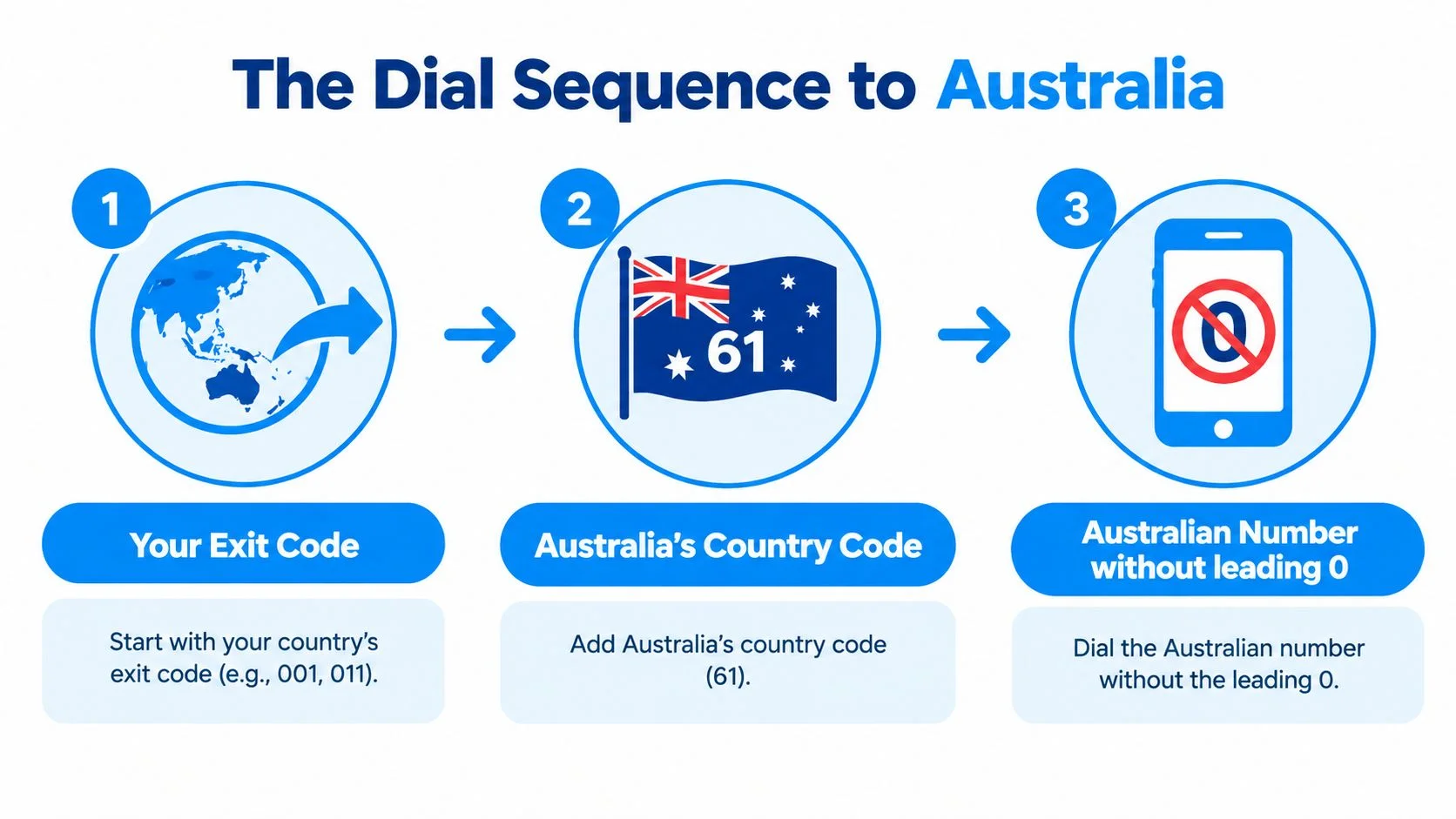
Every international call to Australia is your exit code + 61 + the Australian number without its leading 0. A Sydney landline written locally as (02) 1234 5678 becomes +61 2 1234 5678 internationally.

Find Your Exit Code First
The exit code tells your network you're calling another country. It's 011 from the United States or Canada, or 00 in many other countries, including the UK and most of Europe. Australia's own exit code for calls placed from inside Australia is different, so don't copy an Australian contact's outbound prefix for your inbound call.
You only ever use one exit code, and it's always the one for the country you're calling from. If you're traveling, use the exit code of the network you're on now, not your home country.
Why the Plus Sign Works on Mobile
Holding 0 to get a + on a mobile is a shortcut. The phone swaps that + for the correct exit code for your current network, then sends 61 and the rest of the number.
That means +61 already includes the exit step. Don't type an exit code and a plus together, and don't add the Australian domestic 0 after it. +61 0412 and 011 +61 are both malformed, even though they look close.
- From the US or Canada: 011 61, then the number without its 0
- From the UK and most of Europe: 00 61, then the number without its 0
- On any mobile or browser dialer: +61, then the number without its 0
Once you know which of those three rows is yours, you've got the whole skeleton. Everything else is just checking the Australian part is written correctly.
How Australian Phone Numbers Are Actually Structured
Most ordinary Australian landlines and mobiles are nine digits after +61. You can tell what you're calling from the first digits: 04 is a mobile, and 02, 03, 07, and 08 are geographic landlines.

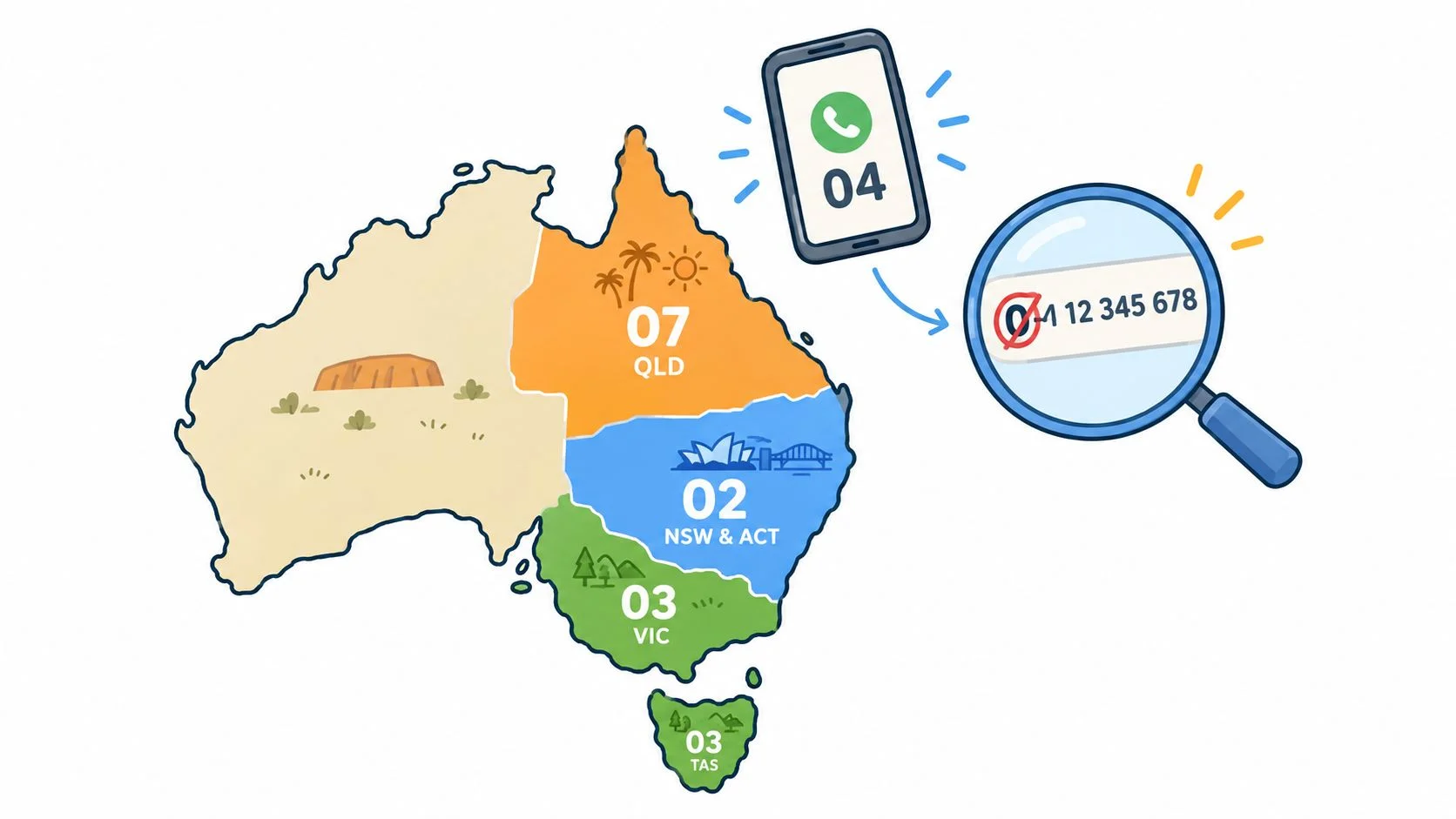
The geographic prefixes map to large regions. 02 covers New South Wales and the Australian Capital Territory, 03 covers Victoria and Tasmania, 07 covers Queensland, and 08 covers South Australia, Western Australia, and the Northern Territory. Mobiles use the 04 range and aren't tied to a city, which is why a contact can keep the same mobile after moving states.
Why Numbers Look This Way
That structure isn't arbitrary. Australia reorganized its numbering between 1994 and 1998, after having more than 60 area codes by 1990. The reform produced eight-digit local numbers paired with a single-digit geographic identifier, and the 04 range became associated with digital mobile services.
Before that shift, capital cities generally used seven-digit local numbers while other regions used six. If an old document shows a shorter number, don't try to pad it out yourself. Ask the contact for the current full number instead.
Numbers That Don't Follow the Pattern
Some Australian numbers start with 13, 1300, or 1800. These are service lines, not ordinary geographic or mobile numbers, and they don't convert by swapping the 0 for +61. They may connect from overseas, but don't assume they're free or local rated when you're calling internationally.
If you're unsure which type you've been given, check the prefix against a guide to phone number formats by country before you dial. Once you can label a number as mobile, geographic, or service line, the conversion step becomes mechanical.
Rewriting a Pasted Australian Number the Right Way
To convert any pasted Australian number, remove exactly one leading 0, then add +61 in front. A mobile copied as 0412 345 678 becomes +61 412 345 678, and a Melbourne landline copied as (03) 9876 5432 becomes +61 3 9876 5432.
That format is called E.164, the international standard phones and dialers expect. Australia's numbering plan identifies mobile services through ranges beginning with 4, so after +61 a mobile should start with 4, never 04. Australian government style guidance, covered earlier, also requires omitting that first 0 in international format.
Worked Examples Side by Side
Take the mobile first. 0412 345 678 has ten digits domestically. Drop the first 0, add +61, and you get +61 412 345 678. The wrong version, +61 0412 345 678, keeps the domestic trunk prefix after the country code, so networks can't match it to a valid Australian range.
The landline works the same way. (03) 9876 5432 loses its 0 and becomes +61 3 9876 5432. Writing +61 03 9876 5432 repeats the same mistake in a different shape. Parentheses and spaces don't matter to the network, but that extra zero does.
Screenshot rule: strip exactly one leading 0, prepend +61, then count the digits after +61. Nine is right for most landlines and mobiles.
Australian Number Types at a Glance
Contacts apps sometimes auto-format a pasted number and keep the 0, especially if your phone's region is set to Australia. If a call fails, open the contact, delete the saved version, and re-enter it manually in full +61 format rather than editing around the app's version.
Placing the Call From a Browser in Three Steps
In a browser dialer you paste the +61 number, check the destination and rate shown, then press call. The person in Australia answers on their normal landline or mobile and doesn't need an app or account.

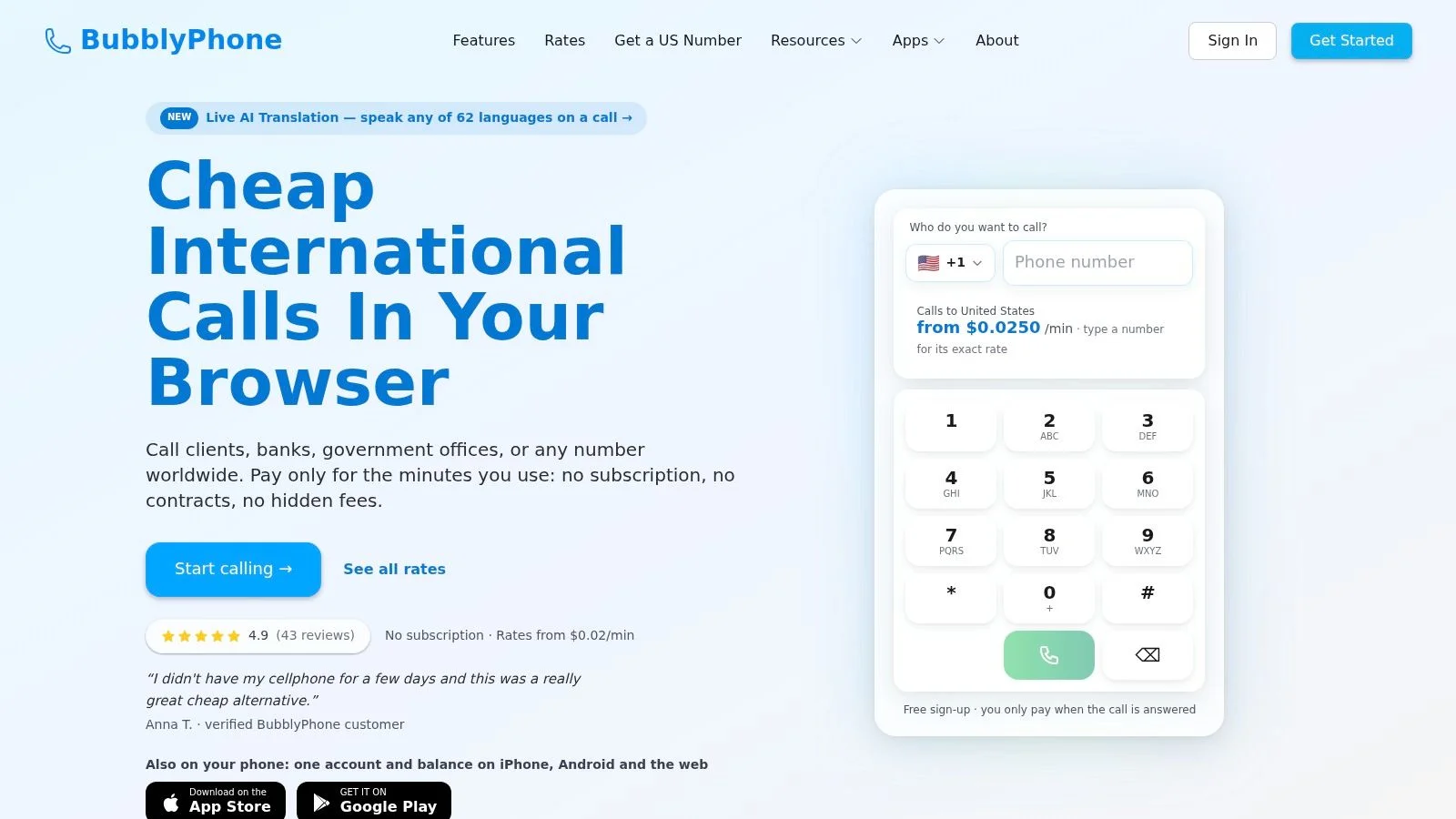
Here's the flow with BubblyPhone. Open the dialer in your browser, paste or type the number in E.164 format, and confirm the screen shows Australia as the destination with a live per-minute rate before you connect. That confirmation step catches a pasted 0 or a missing digit while it's still free to fix. If you want the general sequence first, this walkthrough on how to place an international call step by step covers the same habits for any country.
Watching the dialer in action helps if you've never called from a browser tab before.
Billing is per-minute, rounded up to the whole minute, using prepaid credits. There's no subscription needed for calling, and you can check the current price on the live international calling rates page instead of guessing. The same page works as a quick cost check when you're deciding whether to call now or later.
Businesses that take a lot of inbound calls face the mirror problem, making sure someone answers reliably. That's why some operations teams pair outbound browser calling with dedicated support like HVAC call answering solutions for their incoming lines.
Before You Dial Back an Unknown +61 Number
A +61 display doesn't prove the caller is in Australia or who they claim to be, so don't automatically return a missed call from an unknown Australian number. Verify first, then decide if a callback is worth it at all.

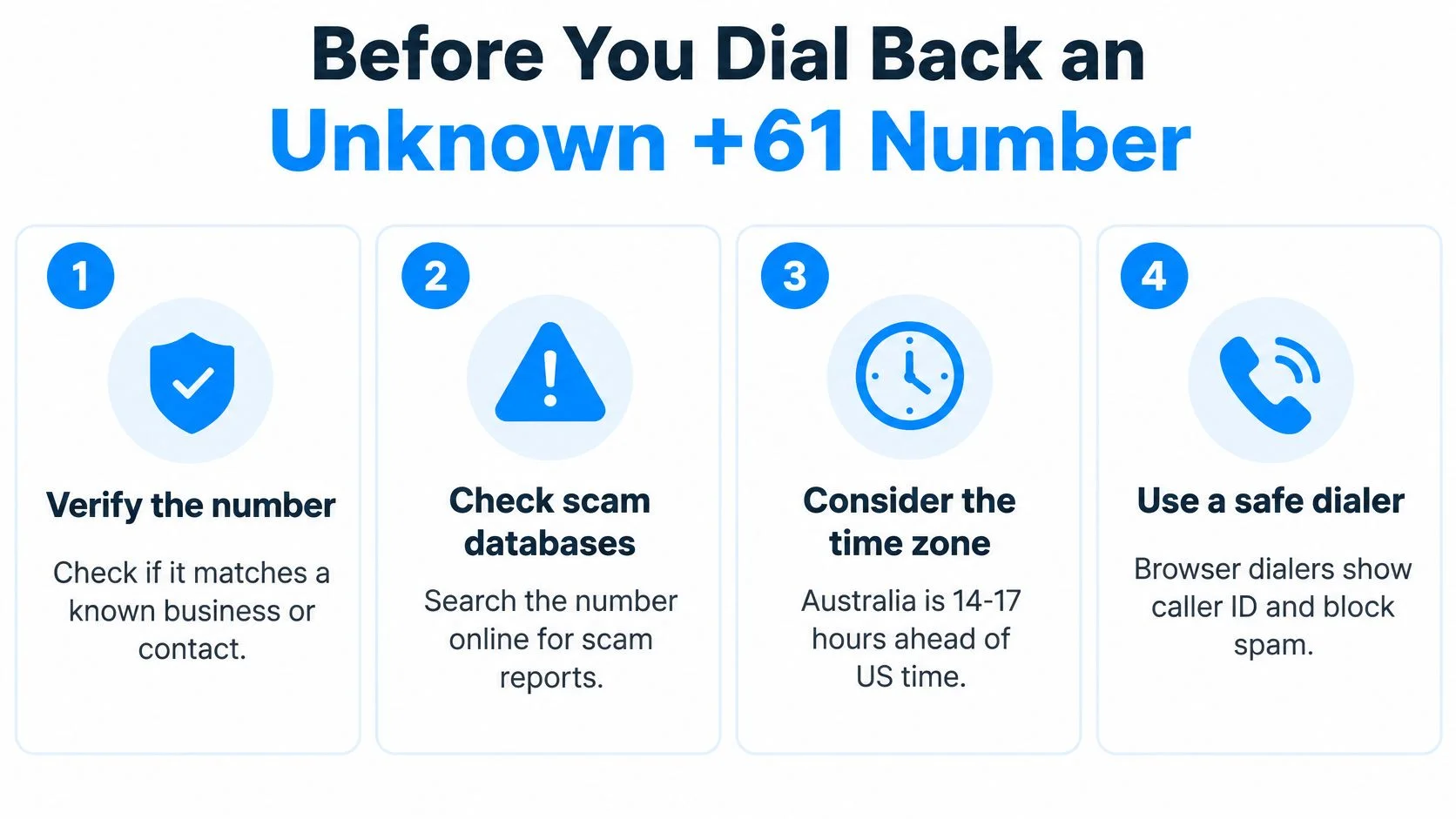
The scale of the problem is large. Australian authorities report that telcos blocked more than 2.8 billion scam calls from December 2020 through the end of 2025, alongside more than 1.0 billion scam SMS messages since July 2022. Caller ID can be manipulated, and scammers plant numbers in fake invoices, emails, and pop-up warnings specifically to trigger a callback.
Four Checks Before You Call Back
- Find the number independently: Look up the organization on its official website and compare digits, don't trust the number in the message.
- Treat unsolicited numbers as suspect: A number inside an unexpected invoice, email, or warning pop-up is a reason to pause, not to dial faster.
- Never share codes or payment details: Don't read out one-time codes or card numbers on a call you didn't initiate to a verified number.
- Verify through a second channel: Message the person or company somewhere else first, and only call once they've confirmed the number.
There's a real difference between calling a known Australian contact who gave you their number directly and dialing an unknown number that merely carries +61. The first is routine. The second deserves the checklist above, every time.
Calling back can also cost you twice. You may pay international charges for the return call, and answering or returning the call can confirm your line is active, which is exactly what the scammer wanted to learn.
Common Mistakes That Make Calls Fail or Cost More
Most failed calls to Australia come from one formatting error or one skipped check, not from the network. Run through these five before you redial.
Keeping the 0 after +61 is the classic failure. It creates an invalid international number, as covered in the examples above, and the call fails or goes nowhere useful. Stacking prefixes is the close cousin. Typing an exit code like 0011 together with a + doubles the international step, when your device only needs one of them.
Money and Safety Traps
Don't assume 13, 1300, or 1800 numbers are cheap from overseas. They aren't ordinary local lines, and treating them as the free option can produce an unexpected charge. If cost matters, this breakdown of what drives the cost of international calls explains why number type changes the price before length of call does.
Trusting caller ID logos is the safety version of the same habit. A bank or government name on your screen isn't verification, so use the independent lookup from the previous section instead. And never treat an ordinary internet calling service as an emergency line. Australia's primary emergency number is 000, which connects callers with police, fire, or ambulance services, with 112 also available from mobile phones.
Normalize the number to E.164, confirm the destination and rate on screen, then dial. That one habit prevents nearly every mistake on this list.
If a call still fails after those checks, change one thing at a time. Re-enter the number manually instead of pasting, try the + form instead of a typed exit code, and confirm you've got a mobile or geographic number rather than a service line.
Make the Call in Your Browser
You now have the full workflow: exit code or +, then 61, then the Australian number with its leading 0 removed, plus a quick check of the destination and rate before you connect. Nothing else stands between you and the call.
Open BubblyPhone in Chrome, Safari, Firefox, or Edge, paste your +61 number, confirm Australia and the live rate on screen, and dial. Your contact answers on an ordinary landline or mobile with no app and no account on their end. Calls run over enterprise-grade global carriers, billed per minute with no subscription for calling.
This suits diaspora callers ringing family, travelers who don't want a local SIM, small businesses calling Australian suppliers, and developers who need reliable dialing habits baked into their workflows. The optional dedicated-number plan is the only recurring product, and SMS on those numbers is receive-only.
You've done the careful part by formatting the number correctly. Make the call while the sequence is fresh, and save the contact in +61 form so you never have to convert it again.
Ready to call Australia without wrestling with exit codes on a phone keypad? Open BubblyPhone in any browser, paste your +61 number, and connect to any Australian landline or mobile, no app or account needed for the person you're calling. Credits start at $5 and never expire, so you can top up once and call whenever you need to.