How to Call Dubai from the United States (2026)

Table of Contents
- How to write a UAE number from the United States
- The country code isn't a Dubai-only code
- From a US landline
- From a mobile or browser
- Hours Dubai is ahead of US time zones
- Anchor recurring calls to Dubai time
- Check the destination and billing method
- Prepare the browser before connecting
- Choose a window for the person you're calling
- Make the opening easy to understand
- Nothing to install on the receiving end
To call a Dubai landline from the United States, dial 011 971 4 plus the seven-digit local number from a US landline, or +971 4 plus those seven digits from a mobile or browser. Drop the domestic 0 in Dubai's 04 area code.
The familiar advice to “just add the country code” misses the most common mistake: keeping that domestic zero. And getting the digits right is only half the job. Dubai's clock stays fixed while most US clocks change seasonally, so a familiar calling hour can suddenly reach someone at the wrong time.
Dubai Dial Strings from a US Phone
From the United States, a Dubai landline uses 011 971 4 followed by the local number, or the equivalent plus-sign format on a mobile or internet dialer. The ITU numbering plan identifies Dubai's geographic code as 4, excludes the national escape digit 0 from overseas dialing, and distinguishes national numbers containing eight or nine digits after the country code.
That distinction explains why you shouldn't copy a UAE domestic number unchanged into an international dialer. The initial zero tells the domestic telephone system how to handle the call. It isn't part of the destination you enter after the UAE country code.
How to write a UAE number from the United States
The rows show the domestic-to-international conversion, not interchangeable ways to reach the same destination. Choose the row that matches the actual number, rather than assuming every person located in Dubai has a Dubai landline.
A UAE mobile keeps its mobile prefix after the domestic zero is removed. It doesn't acquire Dubai's geographic area code just because its owner lives or works there. Adding a city code to a mobile number changes the destination string and can stop the call from connecting.
The country code isn't a Dubai-only code
The UAE Ministry of Foreign Affairs lists +971 as the UAE international dialing code and distinguishes domestic codes including 04 for Dubai, 02 for Abu Dhabi, and 03 for Al Ain. Replacing another emirate's area code with Dubai's code won't route you to the intended office.
Practical rule: Remove the domestic trunk zero, but preserve the destination's actual area or mobile prefix.
If a contact sends only a local number, ask for the complete international version rather than guessing the emirate. Our UAE country-code guide can help you recognize the structure. Before picking up the phone, match your number to the correct table row and check that you haven't used the deliberately incorrect extra-zero row.
How to Place the Dubai Call
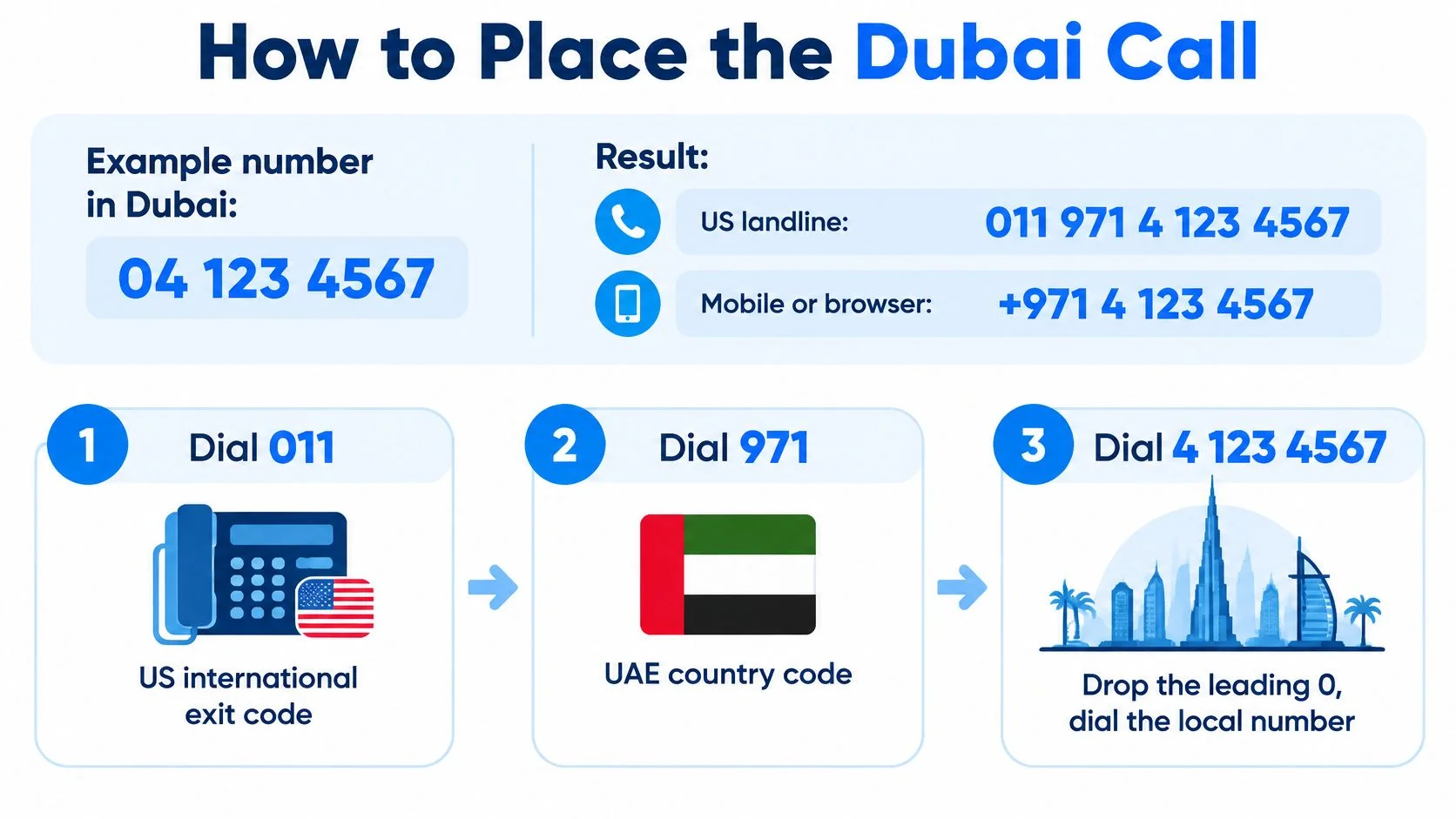
For the example domestic number 04 123 4567, the US landline string is 011 971 4 123 4567, and the mobile or browser string is +971 4 123 4567. This conversion follows the Dubai landline structure in the TDRA National Numbering Plan, with the domestic trunk zero removed for international dialing.
Treat this as a formatting example, not a number to call for assistance. Use your contact's actual subscriber digits in its place.

From a US landline
- Dial 011. This starts the international path for
011 971 4 123 4567. If your line provides an international tone, wait for it before continuing. - Add 971. Your partial string is now
011 971. Without the country code, the telephone system doesn't have the UAE destination. - Enter 4, not 04. You now have
011 971 4. Leaving the domestic zero in place creates the wrong international format. - Dial the subscriber number, 123 4567. The completed example is
011 971 4 123 4567. Don't leave out the area digit or substitute an extension for the main number. - Stay on the line while the call connects. International setup can take longer than a domestic call. If you immediately hear a fast busy or reorder tone, recheck the digits first, especially the extra zero, rather than repeatedly redialing the unchanged string.
A hotel or office telephone system may require an outside-line access digit, such as 9 or 8, before the international string. That's a property-specific dialing rule, not part of the Dubai number. Check the telephone's instructions or ask reception if the line won't accept an international call.
From a mobile or browser
- Enter the plus sign. On a mobile keypad, hold the zero key until
+appears. In a browser dial field, type it directly. - Enter 97141234567 after it. The complete saved example becomes
+97141234567, without spaces or punctuation. - Press call. Check the displayed destination before you proceed, particularly if you pasted the number from a message.
The plus sign replaces the international access code. Don't put both at the beginning of the same number.
Before calling, separate the destination mentally into country code, Dubai area digit, and subscriber digits. That check catches both a missing area code and a retained domestic zero.
Save the contact in E.164 international form, using the plus sign and complete destination number. This avoids restoring the domestic format when you later call from another device. If the office also gives you an extension, keep it separately and enter it when the receptionist or automated menu asks.
Dubai Hours Ahead of Each US Zone
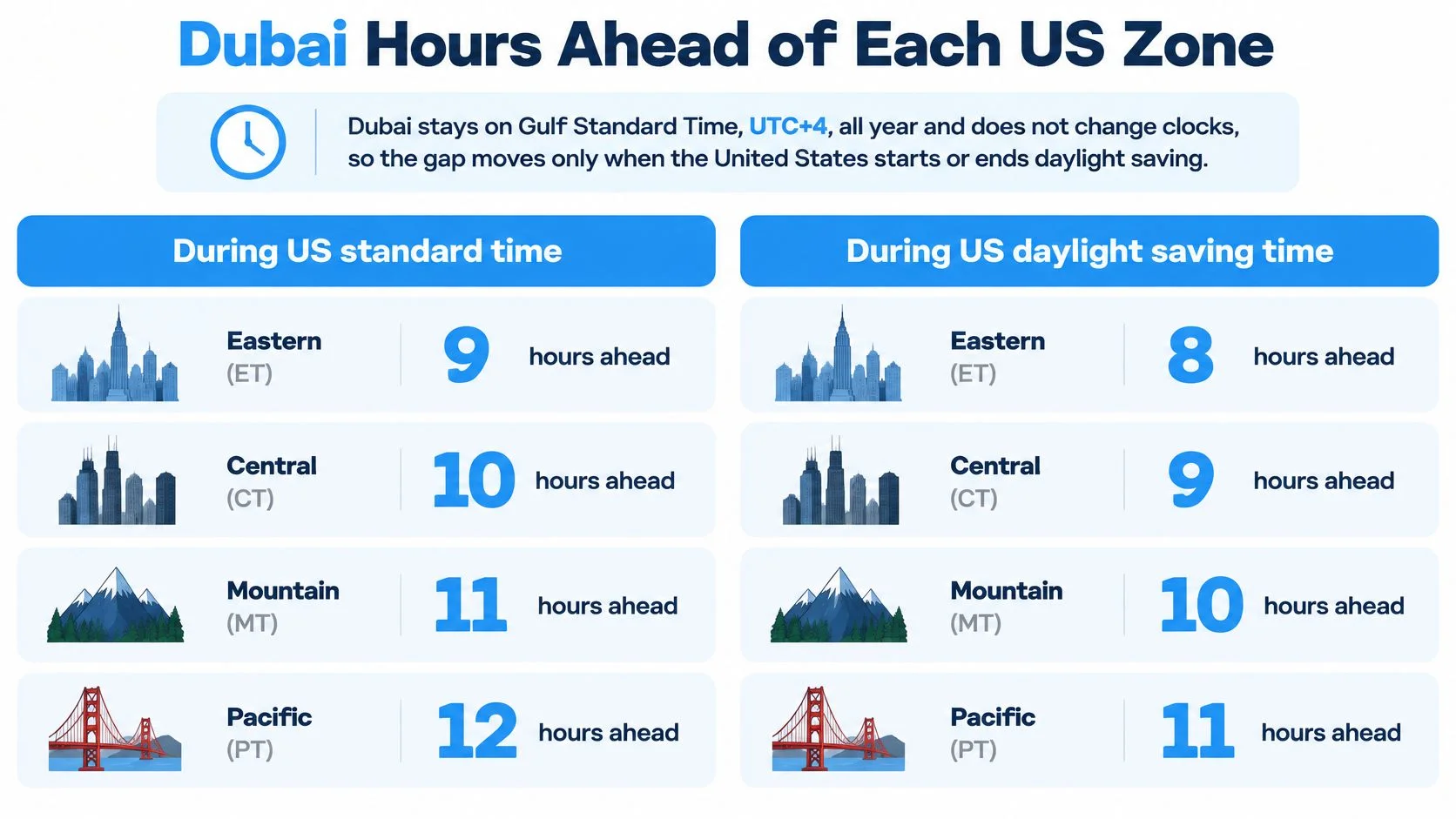
Dubai stays on Gulf Standard Time, UTC+4, all year and doesn't change its clocks, according to timeanddate's Dubai time-zone reference. For callers in US locations that observe daylight saving, the American clock is the moving part.
That matters when someone says Dubai is “nine hours ahead.” That can describe New York during standard time, but it isn't a permanent scheduling rule. Use the season and the caller's actual time zone together.
Hours Dubai is ahead of US time zones
The seasonal offsets and New York example below follow that time-zone reference; the other calling-time examples are calculated by adding the listed offsets.
Here, winter means the US standard-time period, and summer means the US daylight-time period. Those labels describe the caller's clock setting, not a seasonal clock change in Dubai.

Anchor recurring calls to Dubai time
For a regular supplier meeting or family call, create the calendar event using Dubai as the event's time zone. Let your calendar adjust the American display when local clocks change.
If you instead freeze the US hour, the recipient's Dubai appointment moves. That's how a previously convenient call can begin interrupting dinner or arrive after an office closes.
Keep the recipient's local appointment fixed, not a remembered difference between the clocks.
Arizona and Hawaii generally don't follow the daylight-saving pattern used by the example cities. Check your actual locality and time-zone setting, especially where local exceptions apply, rather than choosing an offset from the state name alone.
A best-time-to-call tool is useful as a final check against the table. Enter both locations and the intended date, and verify the calendar day as well as the hour.
In practical terms, late morning on the US East Coast reaches Dubai in the evening. An evening call from the Pacific coast reaches the following Dubai morning, so check that you haven't accidentally chosen the recipient's weekend.
Check the Live Rate Before You Dial
Check the live destination rate before placing your call rather than relying on a remembered price. Open the current calling-rate table and match the destination to the correct UAE number type.
A landline and a mobile can have separate pricing entries. Someone's physical location in Dubai doesn't make their mobile number a Dubai landline, so use the telephone number's structure when selecting the destination row.
Check the destination and billing method
Before pressing call, review these details:
- Number type: Confirm whether you're calling a geographic landline or a UAE mobile. Don't select the landline entry merely because you're contacting a business.
- Displayed rate: Use the rate shown for the destination you entered. A previously saved note or screenshot may no longer reflect the current table.
- Billing increments: Calling is pay as you go, billed per minute and rounded up to the next whole minute. Estimate billed minutes rather than assuming second-by-second charging.
- Account balance: Make sure your prepaid balance suits the conversation you expect to have, including time spent navigating an office menu or waiting for a transfer.
Our call-cost calculator helps you estimate a conversation before you dial. Treat the result as a planning aid, then confirm the live destination rate on the calling screen.
There's no connection fee and no subscription required for calling. The optional dedicated-number plan is a separate recurring product, not a prerequisite for making an outbound Dubai call.
Prepare the browser before connecting
Enter the complete international destination in the dial field, review the rate, and allow microphone access when your browser prompts you. A blocked microphone can leave the recipient unable to hear you even when the call connects.
Use headphones if you're calling from a shared room, and check that the browser has selected the microphone you intend to use. Keep your account details or business questions ready so you don't spend the opening of the call searching through documents.
Optional live translation can help when the participants don't share a language. It provides captions during the conversation and is a separately priced per-minute option, so review its displayed charge before enabling it.
Before you connect: Confirm the destination, the rate, and the microphone. They're separate checks, and getting one right doesn't guarantee the others are ready.
The browser doesn't introduce a special Dubai dialing code. It uses the same international destination format you would save in an address book.
When a Dubai Office or Family Will Answer
A correctly formatted number can still go unanswered if your call arrives outside the recipient's local hours. Choose the Dubai appointment first, then convert it to your own calendar.
Don't assume every office follows the older Friday–Saturday weekend pattern. Many UAE organizations now use Saturday and Sunday, but a government desk, clinic, retailer, and private employer may have different opening hours. Confirm the specific office's published schedule rather than treating the weekend convention as a guarantee.
Choose a window for the person you're calling
For a business call, a reasonable proposed window is 10:00 a.m. to 4:00 p.m. Dubai time, subject to that organization's opening hours. This is a scheduling suggestion, not a universal Dubai office-hours rule.
For an East Coast caller, that generally means calling very early. From the Pacific coast, an appointment near the beginning of Dubai's workday can fall on the previous American evening.
Family calls often fit better after the Dubai workday. For example, proposing 7:00 p.m. Dubai time gives the recipient an evening appointment, while you can calculate your corresponding morning hour from your current seasonal offset.
- Office calls: Check the department's hours, not just the building's opening time. A receptionist may answer when the team you need is unavailable.
- Family calls: Ask when dinner, commuting, or bedtime makes conversation difficult. An evening slot isn't automatically convenient.
- Ramadan and holidays: Confirm current hours and meal arrangements instead of reusing a familiar appointment without asking.
Make the opening easy to understand
Start with a brief hello and your name. On a business call, identify your company and reason for calling immediately, since an international caller ID may be unfamiliar.
If Arabic and English are both involved, offer to slow down or use live captions. Speak in short, complete sentences, and confirm names or reference details rather than repeating the same sentence more loudly.
The Dubai-to-US time converter helps verify the seasonal relationship when scheduling a recurring call. The day before a standing monthly appointment, check whether the US has changed clocks and confirm that the intended Dubai hour hasn't shifted.
Call Dubai from Your Browser
Open your browser, enter the complete international number, check the displayed destination rate, and press call. For a Dubai landline, use the international form of the domestic code identified in the UAE government fact sheet, which lists +971 for the UAE and 04 for Dubai.
We place a normal international call from your browser or phone to the UAE telephone network. The person you're calling answers on their ordinary landline or mobile, not through a matching internet-calling account.
Nothing to install on the receiving end
You can reach UAE phones whether or not their owners use a calling app. There's nothing for the recipient to download or configure, which is useful when contacting a relative, reception desk, supplier, or clinic.
Our guide to placing an international call covers the general dialing process if you're setting up your first overseas call. You can use Chrome, Safari, Firefox, or Edge, and enable live translation if language is the barrier.
Make your Dubai call with BubblyPhone, which works in any browser and requires no app or account for the person answering. Credits start at $5 and never expire, so check the current UAE calling rates, enter your number, and place the call.