International Calls from Philippines: Complete 2026 Guide
Table of Contents
A cousin in Cebu may be trying to reach her mother in Riyadh, an OFW in Dubai may need to phone a Manila landline, or a freelancer in Davao may be waiting for a US client to answer. In each case, the best choice depends on more than the advertised per-minute rate.
The key question is who needs to install what. You need to decide what you and the person receiving the call are willing to install, carry, top up, and learn. That matters just as much as signal quality and destination pricing. If you're also looking for flexible remote work that makes regular overseas communication useful, you can explore JobGlance remote listings while comparing your calling options.
What This Guide Helps You Decide
The right international calling method depends on the caller's device, the recipient's phone, and how often the call happens. A browser dialer may be ideal for a freelancer calling a client, while a prepaid card may be easier for a relative who only uses a basic handset.
Four practical paths cover most international calls from the Philippines:
- Traditional operator-assisted or direct-dial international calling, usually activated through a mobile or fixed-line account. It's familiar and works through the normal phone keypad, but it can involve account restrictions, destination-based billing, and carrier-specific access rules.
- Prepaid calling cards, which let callers buy credits and use an access number or dialing sequence. They're useful when someone wants a physical top-up to hand to family, but connection charges, maintenance rules, and confusing instructions can reduce the usable balance.
- App-based VoIP, which uses Wi-Fi or mobile data. It can work well for frequent callers with compatible smartphones and stable internet, but both sides may need the right app, an account, and enough data.
- Browser-based dialers, which let you place calls from a laptop or desktop without installing software. They're practical for travelers, remote workers, and shared computers, although the receiving person still needs a normal landline or mobile number that the service supports.
Use the recipient as your first filter
If your mother uses a basic mobile phone, an app-to-app service is a poor fit. If you're calling a business landline, a browser or direct-dial service that reaches ordinary phone numbers makes more sense. If both people are comfortable with apps, internet calling can remove some of the friction, but it introduces dependence on data, permissions, and device batteries.
Practical rule: Choose the method that asks the least from the person answering the call.
This guide focuses on that decision rather than declaring one universal winner. You'll see how the Philippine system developed, how to format numbers correctly, what each calling route requires, where unexpected charges appear, and how to test quality before committing to a larger top-up.
How International Calling From the Philippines Got Here
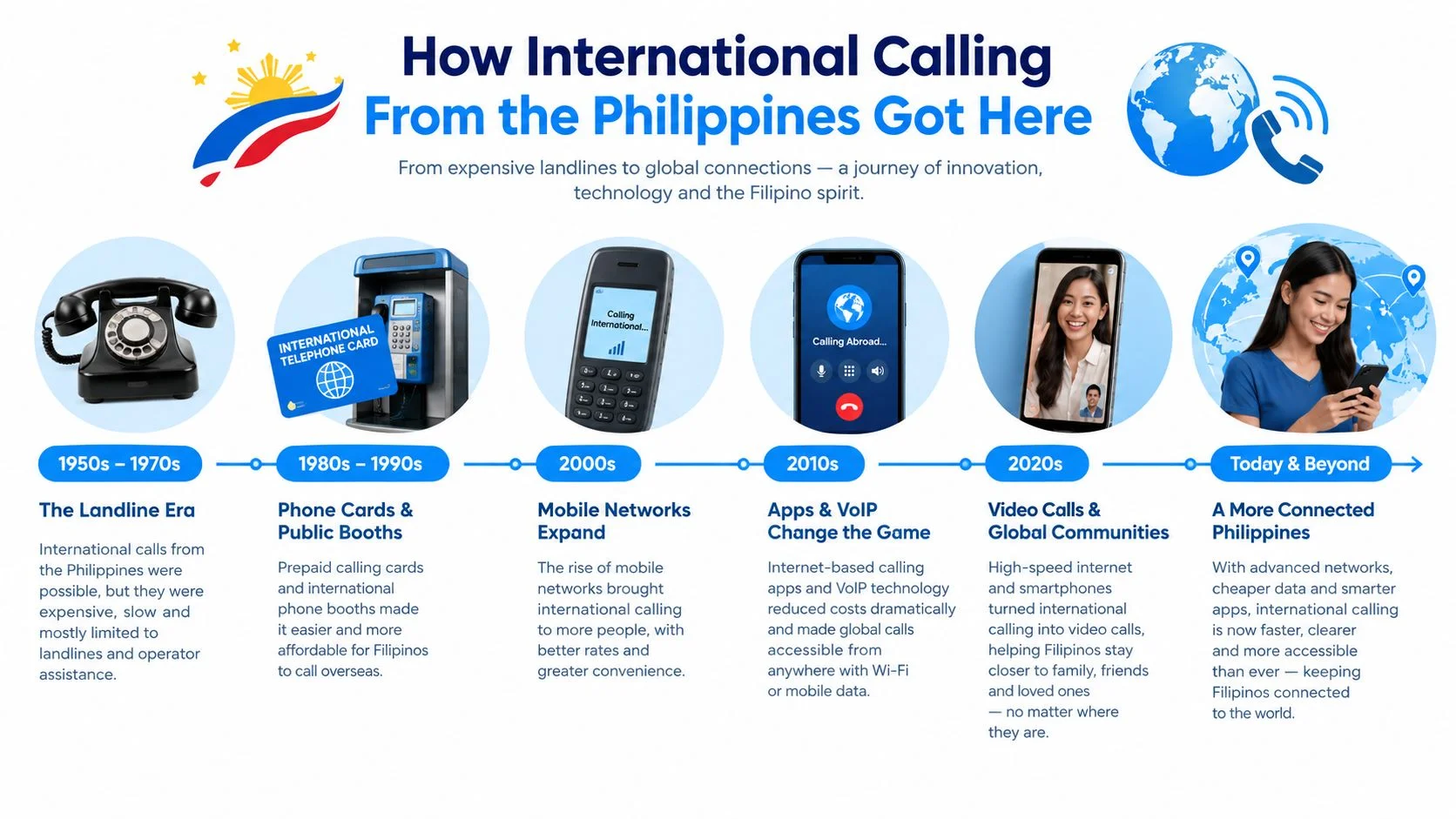
A caller in Manila may still choose between a carrier dialer, a prepaid card, an app, or a browser. The key question is not only which route costs less. It is who needs to install what, create an account, buy credit, or maintain a reliable data connection. That practical friction has shaped international calling in the Philippines for decades.
The system began with operator-assisted connections and fixed-line expansion. A Manila to Baguio connection enabled the first national long-distance calls in 1929. Overseas radio-telephone service with the United States and other parts of the world followed in 1933, as recorded in this history of Philippine telecommunications.
By 1982, callers could directly reach nine major Philippine cities and 22 countries, connecting to more than 400 million overseas telephones. By 1985, National Direct Dialing and International Direct Dialing, commonly called NDD and IDD, had reduced reliance on an operator. Direct dialing made the caller responsible for entering the route correctly, but it also removed a major barrier to overseas calls.

Why prepaid calling became normal
Affordability pushed the next shift. A P200 international calling card in 2011 provided 25 minutes to Japan and up to 80 minutes to the United States, showing how much the same prepaid amount could vary by destination, according to this contemporary report on international calling affordability.
Prepaid cards suited Filipino families, travelers, and businesses because callers could buy credit without a long-term contract. They also gave relatives a physical way to share calling access, especially when the person overseas did not handle online payments.
Broadband, mobile data, and smartphones later made app-based voice calls routine. Browser dialers gave callers another option without requiring software installation, although the recipient still needed a supported ordinary phone number.
The result is a layered system, not a simple replacement cycle. Carrier IDD, prepaid cards, app calling, and browser calling now serve different combinations of devices, data plans, payment habits, and destinations. Choose based on setup responsibility first. If only one person can install or configure a service, that limitation matters more than a low advertised rate.
Dialing Format From the Philippines Explained
The person placing the call may not be the person who needs to install anything. That distinction matters. A normal international call uses the phone's keypad, while app or browser-based calling can require setup on the caller's side, the recipient's side, or both. Start by checking who controls the device, account, and payment method before comparing calling options.
To call abroad from the Philippines, enter the international access or exit code, the destination country code, and the number in the destination's international format. On most mobile phones, the plus sign can replace the exit code. The international dialing guide for callers in the Philippines provides a reference for the Philippine sequence and mobile-number format.
Use this sequence:
- Start with the international exit code. The Philippines uses 00. A mobile phone can usually use + instead.
- Add the destination country code. The United States uses 1.
- Enter the area code without its domestic leading zero, if the destination's numbering rules require that change.
- Add the local subscriber number.
For a US number, enter 00 + 1 + 415 + 555 0123. You can normally save the same number as +1 415 555 0123, which makes it easier to reuse while traveling or across different devices. A saved international format also reduces the chance that a relative overseas has to troubleshoot the number for the caller.
Save contacts in a consistent format
Use the + country-code format for stored contacts. It avoids memorizing which exit code applies in each country and reduces mistakes when a number moves between a mobile phone, a browser dialer, and a business contact system.
For Philippine mobile numbers, international formatting uses +63, followed by the mobile prefix and the seven-digit subscriber number. Remove the domestic leading 0. Businesses should standardize contacts this way before automating calls, so the same person does not appear as separate local and overseas entries.
Watch for these mistakes:
- Confusing exit codes and country codes. The exit code tells the Philippine network that the call is leaving the country. The country code identifies the destination.
- Keeping a domestic trunk prefix. A leading 0 used inside a country may need to be omitted internationally.
- Using the wrong number type. Mobile numbers, area codes, and local numbers follow different rules. Taiwan, Singapore, and Hong Kong may require the relevant area or mobile information in the complete number.
If the call fails, check the digits from the country code onward. Then confirm that international calling is enabled on the chosen service and that the person answering has the required app or account, if any. Use this international dialing guide to verify the sequence before dialing.
The Four Main Ways to Call Abroad Today
The four main options are direct carrier calling, prepaid cards, app-based VoIP, and browser dialers. The decisive difference is the setup burden, especially whether the recipient needs a matching app or account.
Match the method to the person answering
Traditional international dialing suits someone who wants a familiar number on a mobile or fixed-line bill. It's straightforward once the account is enabled, but the caller must understand the applicable access code and billing arrangement.
Calling cards remain useful for OFW relatives who want a top-up they can hand to family. They don't require the recipient to learn a new app, but the caller has to follow the card's access instructions and watch for deductions that aren't obvious from the printed balance.
App-based VoIP is a sensible fit for daily callers with dependable Wi-Fi. It becomes less attractive when one person has an older phone, limited data, or no interest in creating another account. Calling an ordinary landline or mobile number also requires a service that supports phone termination, not just app-to-app conversations.
Browser dialers are strongest when the caller wants no installation on the device. A traveler can use a laptop, a freelancer can keep client calls separate from a personal phone, and a small team can work from shared computers. Before paying, confirm that the destination country and number type are supported. For a deeper explanation of the technical trade-offs, use this guide to VoIP and landline calling.
Where Hidden Costs Appear

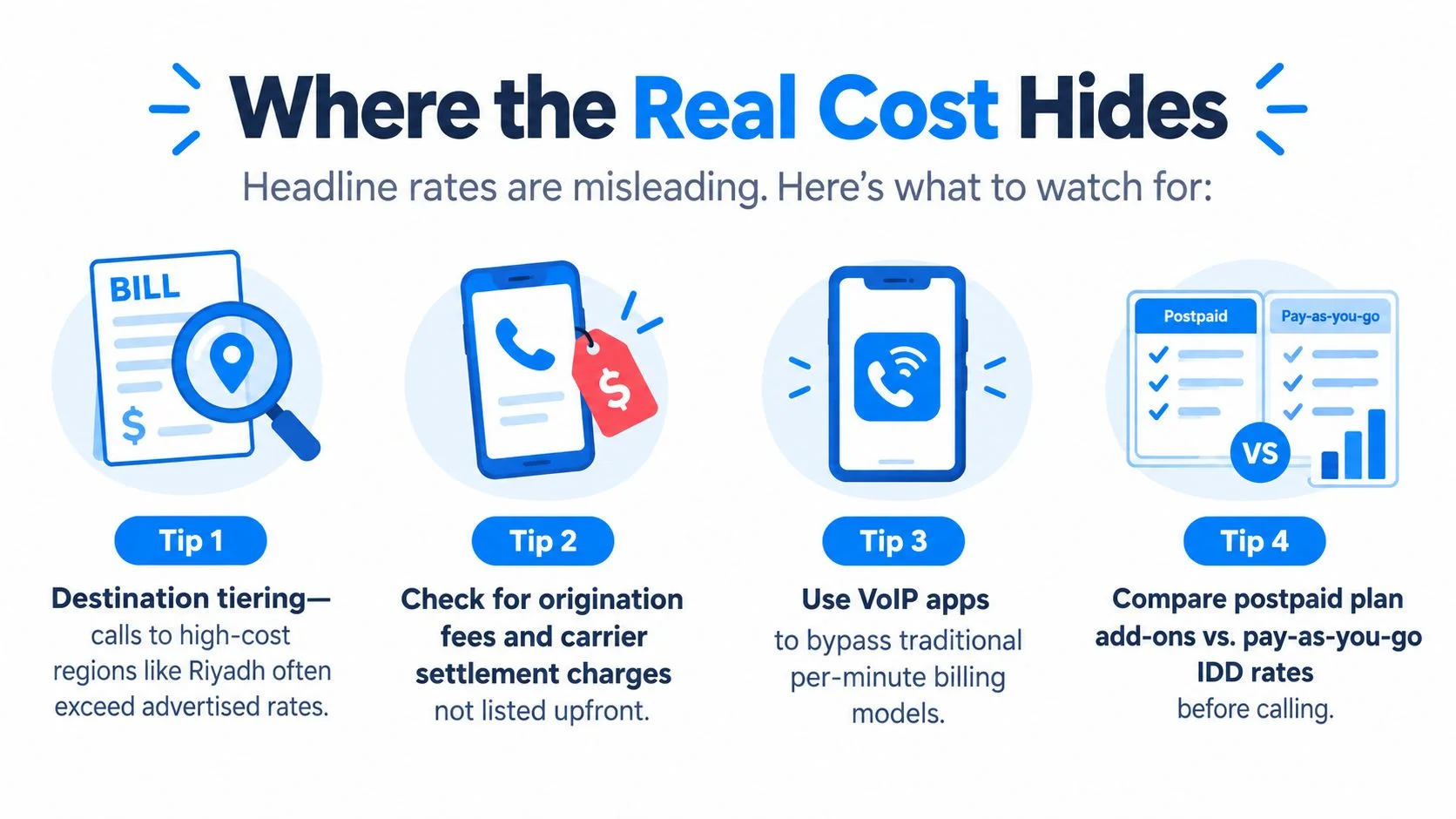
A low per-minute rate can still produce an expensive call. The bigger question is who must install, register, or configure what before the conversation starts. A caller in Manila may be ready, while a relative overseas lacks the required app, account, data connection, or compatible number. Check that setup friction before comparing rates.
The amount deducted depends on more than the destination. Publicly posted retail rates from the Philippines vary by carrier, route, destination, and prepaid promo structure, as shown by the destination differences in this report on international calling prices.
Riyadh may fall into a different pricing tier from Toronto. Mobile and landline numbers may also receive different treatment. A country-level price does not automatically apply to every number in that country.
Check these deductions before a long call
- Connection charges: Some services deduct a fee when the call connects, even if the conversation lasts only briefly.
- Minute rounding: A service that rounds up to the next whole minute can charge a full minute for a call lasting only part of one. BubblyPhone's billing model, for example, charges by the minute and rounds up to the whole minute.
- Roaming treatment: Calling abroad with a Philippine SIM follows different access and billing rules when the caller is overseas. Country-code and access-code steps can change, and outgoing IDD charges may be handled separately under roaming. Review your carrier's official international calling and roaming guidance before dialing from overseas.
- Promo expiry: Bundled minutes and prepaid offers may expire. An unused balance can disappear even when the caller has not used the advertised allowance.
Use the headline rate only as a starting point. Before paying, confirm the connection fee, rounding rule, roaming treatment, and expiry date. Rates and promotions change, so check the current terms immediately before a long call instead of trusting an old screenshot.
A useful comparison shows the destination, number type, connection treatment, rounding rule, promo expiry, and any roaming change. It should also state who installs the app or completes the setup, the caller, the recipient, or both.
Getting a Stable Call on Philippine Networks
A stable call depends on two decisions: who installs the calling app and which connection each person uses. If only the caller installs it, the recipient may still answer through a regular phone line. If both sides use internet calling, both need a reliable connection and compatible setup. Decide this before blaming the service for poor audio.
For internet-based international calls, prioritize steady broadband, sensible Wi-Fi placement, and a headset. A Philippines-to-US call can still sound good with typical round-trip latency of about 150 to 220 milliseconds when jitter buffers are properly tuned, as described in this technical overview of international voice calling from the Philippines. G.711 uses 64 kbps when bandwidth is sufficient, so a stable connection matters more than choosing the highest available speed.
Improve the connection you already have
- Use the cleaner Wi-Fi band when available. Choose 5 GHz over 2.4 GHz when both are offered and the device is near the router. Keep the router and caller in the same room when possible.
- Reduce competing traffic. Close video-heavy apps, cloud backups, and downloads on the calling device. Continuous background traffic can make voice audio break up.
- Avoid network jumping on mobile data. If the phone repeatedly changes connection modes, VoIP audio may pause or drop. Use the most stable available setting instead of chasing the highest label.
- Plug in earphones with a microphone. A headset reduces speaker echo and prevents the phone microphone from picking up the other person's voice.
- Check power settings. Low-power mode can restrict network activity or microphone behavior on some devices. Disable it for an important call if interruptions appear.
Run a short test call before scheduling a serious conversation. Listen for delay, repeated words, robotic audio, or one-way sound. If problems continue, try a wired headset and a different network before concluding that the destination route is poor.
Checking Country-Specific Rates Before You Dial
Check the same destination across several channels before paying. Compare the live rate, connection treatment, rounding rule, and number type, not just the large per-minute figure.
Use this process:
- Choose one exact destination. Compare a US, Saudi Arabian, or UK number, but don't mix a mobile quote with a landline quote.
- Open two or three current rate pages. Use a carrier IDD table, an app's rate screen, and a browser dialer's destination selector.
- Enter the same country and number type. Some services reveal the final price only after you enter the full number.
- Record the conditions. Note the displayed rate, connection fee, rounding method, roaming status, and whether a promotion is required.
- Check special categories. Look for toll-free restrictions, mobile surcharges, peak-hour changes, and unsupported number ranges.
- Save the evidence. Screenshot or bookmark the quote with the date shown, especially if you're calling for work or expect to challenge a billing error.
Rates can change, so an old comparison is only a reference. Use the international call cost calculator to estimate the call, then verify the final destination-specific terms before you top up.
Don't compare a promotional bundle with a standard pay-as-you-go quote until you've checked expiry and eligibility. They may not measure the same thing.
Choosing the Right Option and Making the Call
A family call can fail before anyone dials. The caller may have credit, while the relative overseas lacks a suitable app, data connection, or patience for a new setup. Choose the method by who needs to install what, then check the call quality and billing. Per-minute price comes after that.
Pick the channel that fits the household
An OFW calling family every week should start with an internet-based option when the household has steady broadband and can use the required app or browser. Wi-Fi calling can reduce mobile data use, while a prepaid balance helps control spending. Check expiry terms before adding credit.
A retiree who prefers a landline handset will usually manage better with a prepaid calling card and a memorized access sequence. The caller should write the instructions beside the phone, then confirm connection charges and how unused balances are handled. The relative should not need to install anything.
A small team speaking with overseas clients can use a browser dialer when staff call from laptops or shared workstations. Set a consistent contact format, test each microphone, and confirm that the destination number type is supported. If clients must install an app, create accounts, or buy data, choose a setup that keeps those tasks on the team's side.
An occasional one-off caller can use direct international dialing through a mobile account or another pay-as-you-go route. Installing a new app adds friction for a single call, especially if the recipient also has to configure it.
Run one controlled test
Start with the destination that matters most. Use the same number across three available channels, check each channel's fees and rounding, then place a five-minute test call. Judge audio quality, delay, setup time, and every step required by the recipient before adding more credit.
For calls from abroad to the Philippines, use the caller's international exit code, then +63, followed by the Philippine number with its domestic leading 0 removed. Within the Philippines, callers generally do not need an area code for numbers in the same area code. Calling another area code requires the domestic long-distance prefix 0. Overseas callers omit that prefix, as described in this Philippine telephone numbering reference.
Price alone gives an incomplete answer. Installation, account creation, mobile data, permissions, and troubleshooting all belong in the decision. Test the complete path, from the first click to the person answering.
Make international calls from the Philippines through BubblyPhone in a browser, with no app or account required for the person receiving the call. It reaches regular landlines and mobiles, bills per minute with whole-minute rounding, and offers credits starting at $5 that never expire.