AI Real Time Translation for Phone Calls Explained
Table of Contents
- The basic caller experience
- Where it fits and where it doesn't
- Step one turns sound into words
- Step two translates partial meaning
- Step three creates audio and captions
- AI translation accuracy by language pair
- Why the fastest system isn't always the most useful
- The messy audio problem
- The high-stakes boundary
- Family, travel, and everyday administration
- Small business and support teams
- Set up the call
- Prepare both speakers for the system
You're on a call with a relative, customer, or supplier who speaks another language. The conversation is live, interruptions are unavoidable, and waiting for a later transcript won't help. AI real time translation converts speech into another language while the call is still happening, using translated audio, captions, or both.
That makes ordinary international calls more accessible, but it doesn't make them error-proof. The systems work best when speakers take turns, use clear language, and leave enough time for the translation pipeline to catch up. They become much less dependable when several people speak at once, accents are unfamiliar, or a single misunderstood phrase could create legal, medical, or financial risk.
What AI Real Time Translation Actually Does on Phone Calls
AI real time translation turns spoken language from one caller into translated speech or captions for the other caller during the conversation. An immigrant might use it to help a parent communicate with a doctor abroad, while a small business owner might use it to discuss a shipment with an overseas supplier without arranging a separate interpreter.
The important distinction is timing. A post-call transcription creates a record after people finish speaking, and text translation handles written messages one at a time. Live call translation operates while both parties are still talking, so each person can respond instead of waiting for a later translation.
The basic caller experience
In a typical setup, one person speaks into a phone or browser microphone. The system recognizes the words, translates them, and either plays a translated voice to the other participant or displays translated captions on screen. Some systems begin translating before a sentence ends, rather than waiting for a complete sentence boundary, as described by Soniox's explanation of live translation.
That early commitment is what keeps the exchange moving. It also explains why a translation can change slightly as more context arrives. The system is trying to balance two competing needs, preserving the speaker's meaning and responding before the conversation has moved on.
Practical rule: Treat live translation as conversational assistance, not as a perfect duplicate of what a professional interpreter would deliver.
The technology doesn't remove the need for cooperation. Speakers should avoid talking over one another, pause briefly after a thought, and rephrase when the translated sentence sounds confusing. Clear speech gives the recognition system better input, while captions give callers a second way to check whether the spoken output matches what they intended.
Where it fits and where it doesn't
Routine family calls, travel questions, appointment scheduling, and straightforward supplier discussions can benefit from this approach. A professional interpreter remains the safer choice for legal proceedings, formal medical decisions, sworn statements, and other conversations where a subtle omission or incorrect term could cause harm.
The promise is practical rather than magical. Two people who otherwise couldn't sustain a basic phone conversation may be able to exchange useful information through a browser or phone interface, but they still need to manage pace, ambiguity, and sensitive decisions carefully.
How the Translation Pipeline Works During a Live Call
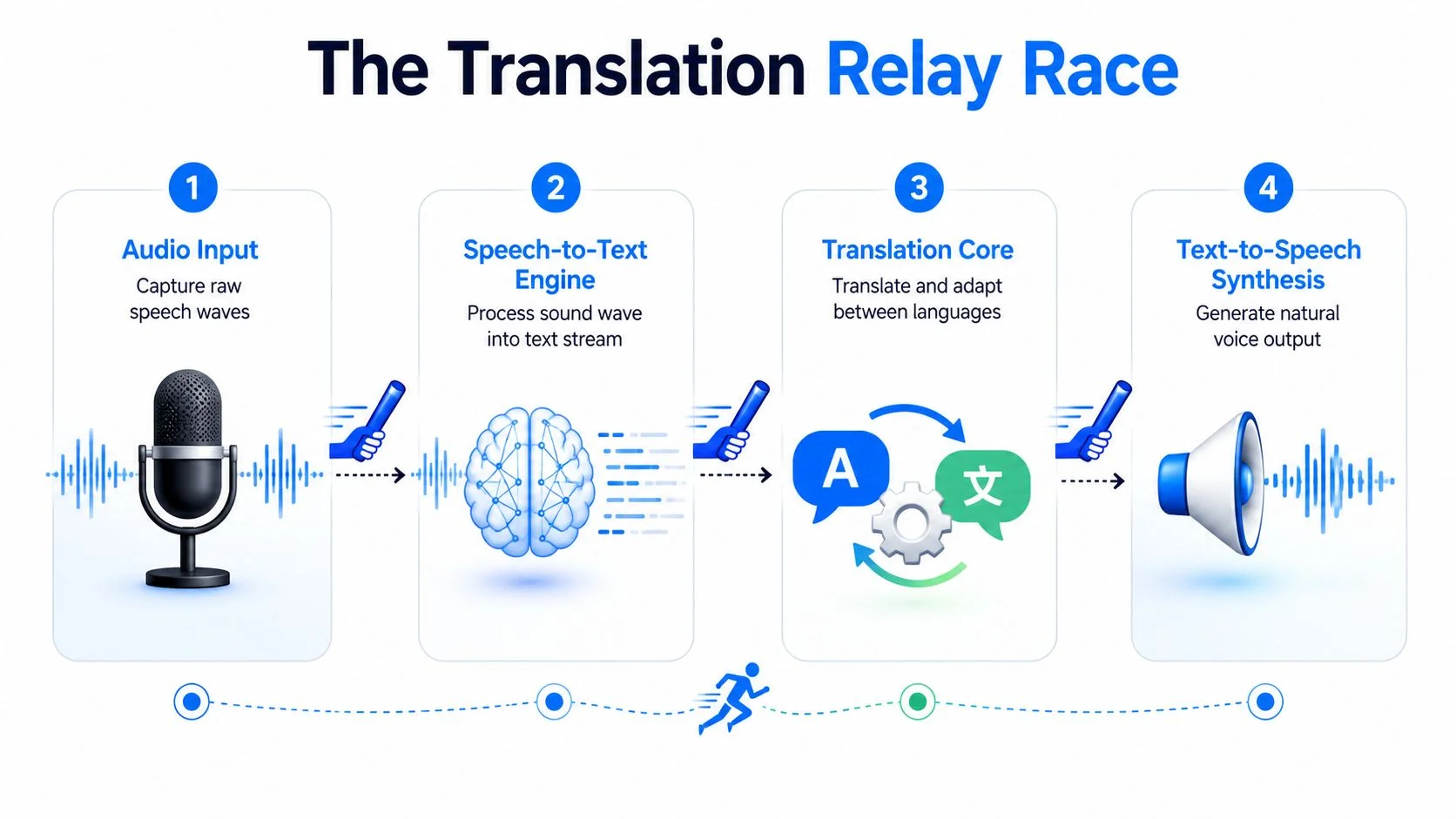
A live translation system behaves like a relay race. One stage passes partial information to the next before the previous stage has finished processing the entire conversation. That overlap is what makes translated audio and captions usable during a call instead of producing a delayed transcript.

Step one turns sound into words
The microphone captures speech as an audio stream. A streaming automatic speech recognition system analyzes small portions of that stream and predicts the words being spoken. It doesn't wait for the caller to finish an entire paragraph, because that would create an obvious delay.
This stage has to detect more than vocabulary. It must estimate when words begin and end, identify pauses, handle pronunciation differences, and decide whether a speaker has finished a turn. Background noise, poor microphones, and overlapping voices make those decisions harder before translation even begins.
For teams working with recordings rather than live calls, a separate workflow can convert audio to editable text. That process is useful for review and documentation, but it isn't the same as streaming recognition during an active conversation.
Step two translates partial meaning
The recognized text moves into a machine translation model. Because the speaker may still be talking, the model often receives an incomplete phrase. It must make a provisional decision about grammar, word order, and meaning before the full sentence is available.
This is especially difficult for languages that place important context later in a sentence. A system may begin producing a translation and then revise its interpretation when the remaining words clarify the speaker's intent. Short chunks can reduce waiting, but they can also make the output less fluent or less precise.
Step three creates audio and captions
The translated text can follow two paths. A text-to-speech engine generates spoken output in the target language, while a caption layer displays the translated words on screen. Published live-translation services commonly combine live captions with a saved transcript for later review, as shown by Maestra's live translation workflow.
These stages run concurrently. While one phrase is being spoken, the recognizer can process the next audio segment and the translation engine can prepare the following output. This overlapping architecture reduces perceived delay, but it doesn't eliminate buffering, turn detection, or the need to wait for enough context.
Accuracy Benchmarks and the Latency Trade-Off
AI translation quality depends on audio conditions, language pair, and how aggressively the system prioritizes speed. Clean English speech can reach 85–95% speech-to-text accuracy, while multilingual calls with background noise or accent variation can fall to 65–80%, according to a 2026 benchmark of real-time AI translation accuracy.
Translation quality also varies by language pair. Common pairs such as English to Spanish and English to French are reported at roughly 88–92%, while English to Chinese and English to Japanese are reported at 75–82% in the same benchmark. Those figures are useful for setting expectations, but they shouldn't be treated as a guarantee for a particular caller, dialect, microphone, or subject.
AI translation accuracy by language pair
Streaming creates a direct speed penalty. The same benchmark notes that systems may sacrifice 3–8% accuracy to achieve sub-second latency, because the model has to translate before the speaker finishes. A simultaneous speech-to-speech study found that a Chinese-to-English system reached a 5-word latency while incurring a 3.4 BLEU-point quality drop compared with full-sentence offline translation, as reported in this study of simultaneous speech translation.
Why the fastest system isn't always the most useful
End-to-end performance includes recognition, buffering, translation, turn detection, and audio output. A 2026 benchmark reported median final-transcript latency of 1,518 milliseconds for a production WebSocket streaming system, compared with 4,755 milliseconds for a streaming speech-translation setup and 26,736 milliseconds for a speech-recognition-plus-translation stack on the same conversational clips, according to the LiveLingo benchmark report.
That difference shows why “real time” doesn't mean instant. A delay around one to a few seconds can remain usable, while longer pauses make callers interrupt, repeat themselves, or assume the other person didn't hear them. For a deeper explanation of how buffering and processing choices affect responsiveness, the Isolate Audio latency guide provides useful technical context.
For a buyer-focused discussion of failure modes and expectations, see how accurate AI call translation is. The right question isn't whether a system is fast in a demonstration. It's whether its delay and error pattern are acceptable for the specific call.
Where Real-Time Translation Breaks Down in Practice
AI real time translation often performs well in a quiet, structured exchange and struggles in the exact situations people encounter on ordinary calls. A 2025 review rated fast-paced dialogue with overlapping speech at 1/10 and idiomatic speech at about 4.1/10, while structured business and technical settings performed much better, according to the review of real-time translation in practical conversations.


The messy audio problem
A single speaker who uses complete sentences gives the system a manageable stream. Real calls rarely stay that clean. People interrupt, restart phrases, answer before the previous sentence ends, and switch languages when a familiar word comes to mind.
Common breakdowns include:
- Overlapping speech: The recognizer may combine two voices, assign words to the wrong person, or omit both partial statements.
- Accents and dialects: Regional pronunciation can reduce recognition quality even when the speaker's grammar is straightforward.
- Code-switching: Switching languages mid-sentence can cause the system to select the wrong source language or translate only part of the thought.
- Idioms and slang: Literal translations can preserve the words while losing the intended meaning.
- Background noise: Traffic, machinery, television, echo, and poor phone audio contaminate the signal before translation starts.
A useful way to improve a call is to test the connection and microphone before adding translation complexity. The BubblyPhone VoIP speed test can help identify basic connectivity problems, although a strong connection can't solve every recognition or language issue.
Listen for meaning, not just fluency. A smooth synthetic voice can sound confident even when a key noun, number, or qualification is wrong.
The high-stakes boundary
Unedited machine translation still falls short in high-stakes situations because semantic coherence and contextual fidelity matter more than conversational convenience. Recent evaluation work on real-time voice translation in online meetings reached that conclusion for situations where an incorrect interpretation could affect decisions, records, or obligations, as discussed in this evaluation of real-time voice translation.
Use live translation for routine business calls, family conversations, travel logistics, and initial customer contact when both parties can confirm important details. Bring in a qualified human interpreter for legal advice, medical consent, contract language, regulatory matters, safety instructions, and disputes.
A practical compromise is to use AI for access and a human for verification. Let the system establish basic communication, then pause and confirm names, dates, quantities, diagnoses, obligations, and next steps through a qualified interpreter or written documentation.
Practical Use Cases for Live Translated Calls
AI real time translation delivers the clearest value when the goal is understanding and coordination, not legally exact interpretation. The best candidates are calls where both parties can slow down, repeat important points, and correct misunderstandings without serious consequences.

Family, travel, and everyday administration
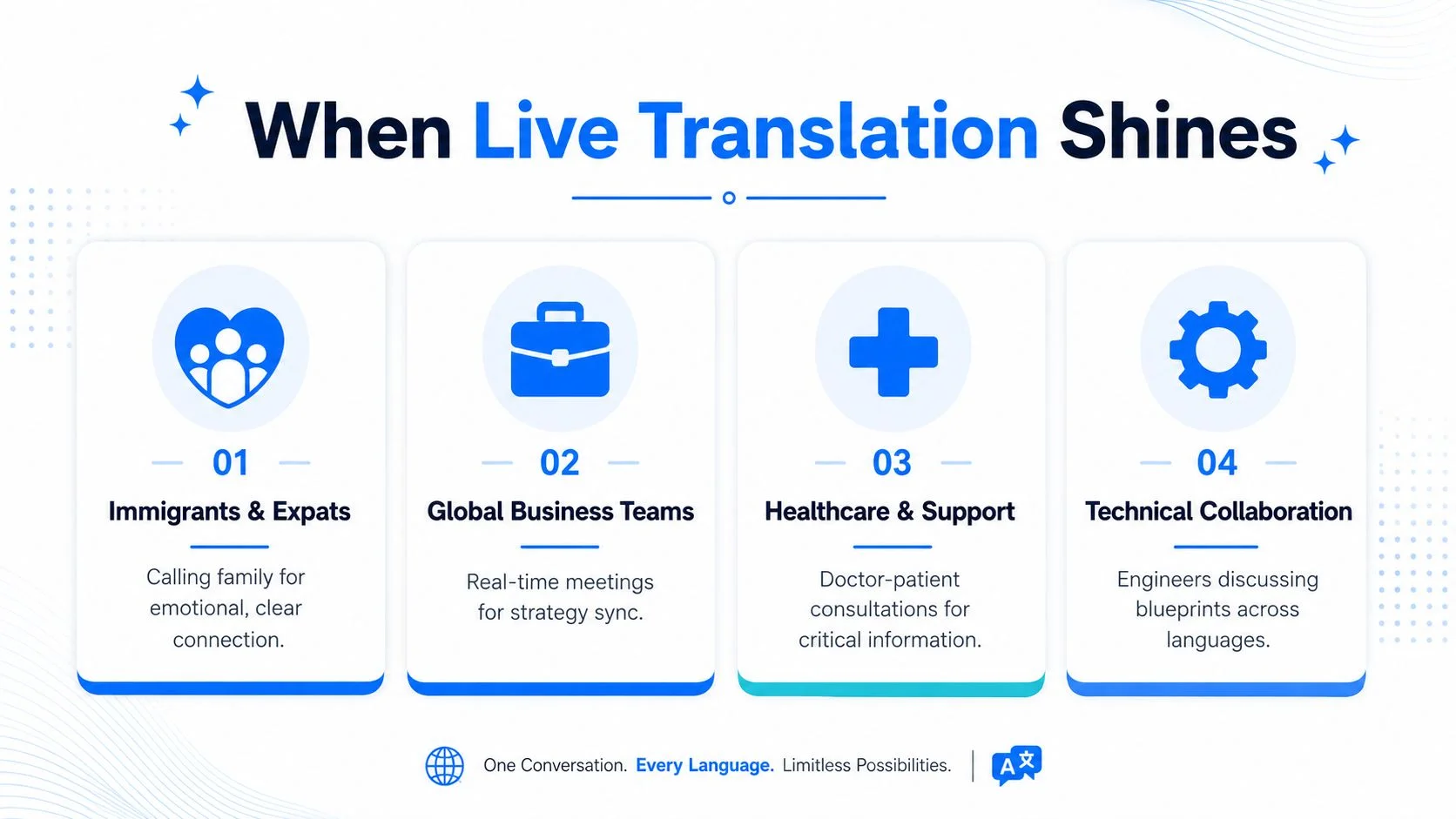
Immigrants and expats often need to communicate across generations and locations. A translated call can help someone check on a parent, arrange a local service, ask a government office a basic question, or coordinate a repair while abroad.
Travelers and remote workers can use the same approach for accommodation problems, transport changes, appointments, and conversations with local service providers. These calls usually benefit from short questions, repeated confirmation, and visible captions when a name or booking detail matters.
For family and routine logistics, AI is often sufficient if callers cooperate. For a medical consultation or official legal process, it should support, not replace, an interpreter.
Small business and support teams
A small company can use live translation for an initial supplier conversation, a delivery update, a simple product question, or customer support triage. It can also help an operations team establish what happened before a specialist joins the call.
Support managers should create a simple escalation rule. If the conversation moves from troubleshooting into liability, safety, contract interpretation, or a sensitive complaint, switch to a human-supported workflow. Teams exploring broader language coverage can also consult this AI-powered multilingual support guide for operational considerations.
The browser model matters here. The caller can place the call from a browser, while the recipient answers a regular landline or mobile call without installing an app or creating an account. That makes the method more practical for elderly relatives, local offices, and small suppliers that don't share the same communications software.
Best fit: Use AI translation to open access, exchange routine information, and identify the next action. Use human interpretation when precision carries consequences.
The following video provides another visual way to understand how live translation can support multilingual communication.
Making Your First Translated Call Without Apps or Accounts
You can place a live translated call from a browser, add translation when needed, and let the recipient answer a normal phone call. The recipient doesn't need an app, an account, or a special device.
Set up the call
With BubblyPhone, the workflow is straightforward:
- Create an account: Register through the browser and open the calling interface.
- Add credits: Credits start at $5 and never expire, so you can fund occasional calls without a recurring calling subscription.
- Choose the destination: Select the country and enter the landline or mobile number.
- Enable live translation: Turn on the optional translation feature when the call requires it.
- Dial from your browser: Use Chrome, Safari, Firefox, or Edge, then keep the caption window visible if you want bilingual text during the conversation.
Calls are billed per minute and rounded up to the whole minute. Translation is an optional per-minute add-on, and current destination pricing is available through the live international calling rates. No subscription is needed for calling. The optional dedicated-number plan is the recurring product, and its SMS capability is receive-only.
Prepare both speakers for the system
The first minute sets the tone. Tell the other person that a translation delay may occur, agree to pause after each sentence, and confirm critical details aloud.
Use these habits:
- Speak clearly: A moderate pace gives recognition and translation stages more usable audio.
- Pause between thoughts: Short pauses help the system separate turns and finish output.
- Reduce noise: Move away from traffic, machinery, television, and echo when possible.
- Avoid idioms: Use direct wording instead of slang, jokes, or culturally specific expressions.
- Confirm details: Repeat names, dates, amounts, addresses, and next steps in simple language.
A browser-based call is especially useful when the recipient can't or won't install another application. For related guidance on browser calling and live translation options, see these alternatives for live translation calling.
If the conversation becomes legally, medically, or operationally sensitive, stop relying on unedited output and bring in a qualified interpreter. Live captions and a saved transcript can help with review, but they don't automatically make an imperfect translation authoritative.
Make your next cross-border conversation easier with BubblyPhone, a browser-based calling service with optional live AI translation, bilingual captions, and a saved transcript. Credits start at $5 and never expire, and the person you call needs no app or account, so you can place a translated call to a landline or mobile when the conversation matters.