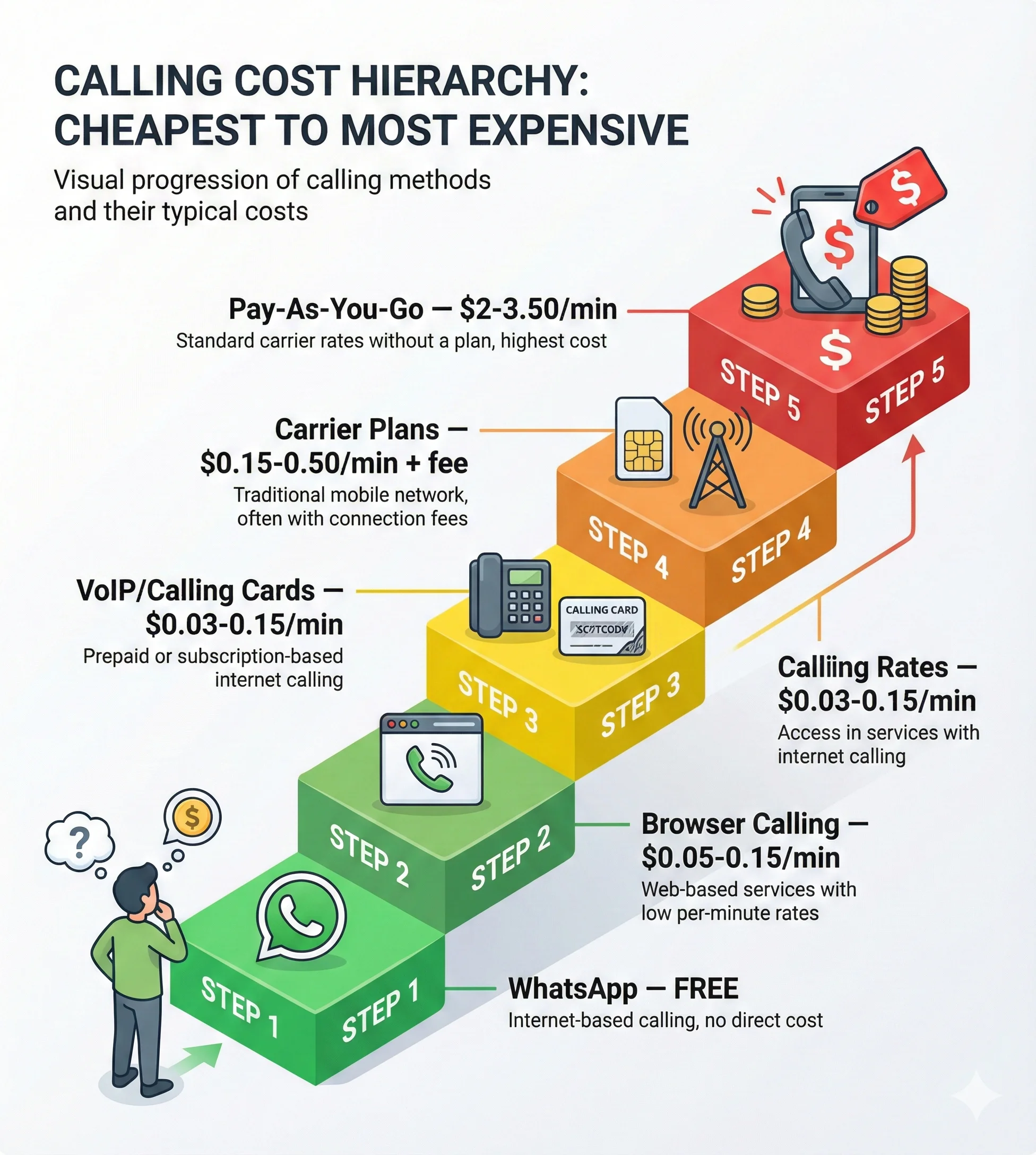
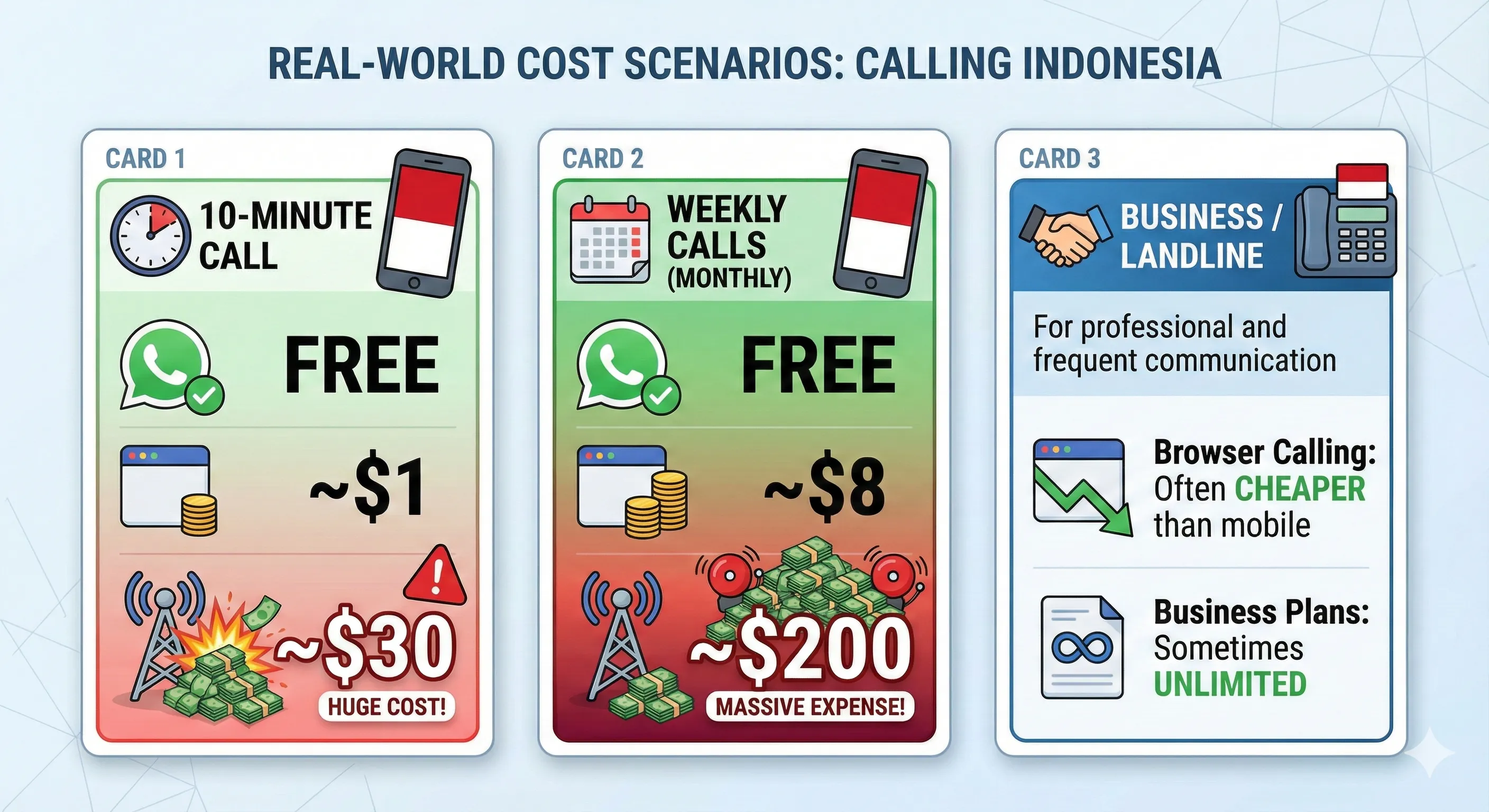
The cheapest way to call Indonesia depends on your call frequency and whether the recipient has internet access. Free options exist for internet-connected contacts, while paid services offer the best value for calling any Indonesian phone number — mobile or landline.
This guide compares all your options so you can choose the most cost-effective method for your situation.
If your Indonesian contact has reliable internet access, these options cost nothing:
WhatsApp Voice/Video Calls
Cost: Free (data/WiFi only)
WhatsApp dominates Indonesian communication. With over 280 million people, Indonesia ranks among the world's largest WhatsApp markets. If your contact uses WhatsApp, you're set.
Pros:
Completely free
Video calling available
Works on mobile data or WiFi
Most Indonesians already have it
Cons:
Requires recipient to have app and internet
Quality depends on connection speed
Can't call regular phone numbers
Facebook Messenger
Cost: Free (data/WiFi only)
Similar to WhatsApp but requires Facebook accounts. Less universal in Indonesia than WhatsApp.
Telegram/Signal
Cost: Free (data/WiFi only)
Growing in popularity but not as widespread as WhatsApp in Indonesia.
Paid Options: Calling Any Indonesian Phone
When you need to reach someone on their regular phone number — mobile or landline — these paid options work regardless of whether the recipient has internet:
Browser-Based Calling (WebRTC)
Cost: Typically $0.05-0.15 per minute
Browser-based calling uses WebRTC technology to place calls directly from your web browser. No app downloads, no monthly fees, no contracts.
How it works:
Open the calling website in your browser
Enter the Indonesian number (+62 format)
Call connects through the internet to regular phone networks
While Indonesia's major cities have good internet coverage, rural areas and smaller islands may have limited connectivity. If your contact is outside major urban areas, don't assume WhatsApp will work reliably — have a backup calling method.
Choosing the Right Method
Use WhatsApp/Free Apps When:
Your contact has reliable internet
You can coordinate call timing
Video calling is beneficial
Cost is the primary concern
Use Browser-Based Calling When:
You need to reach any phone number
The recipient doesn't have internet or apps
You want no monthly commitments
You prefer transparent, pay-as-you-go pricing
You're calling businesses, hotels, or landlines
Use VoIP Services When:
You already have an account with credit
You make international calls to multiple countries
You prefer dedicated calling apps
Use Carrier Plans When:
You call Indonesia very frequently
You prefer everything through your phone bill
Convenience outweighs cost optimisation
Avoid Pay-As-You-Go Carrier Rates:
Unless it's a genuine emergency
The cost difference is dramatic
Tips for Saving Money on Indonesia Calls
1. Default to Free When Possible
If your contact has WhatsApp, use it. No cost, good quality, video option.
2. Batch Your Calls
If using paid services, combine topics into fewer, longer calls rather than many short ones — connection fees and minimum charges add up.
3. Compare Rates Before Calling
Services change pricing. Check current rates before assuming one option is cheapest.
4. Watch for Hidden Fees
Calling cards especially — connection fees, maintenance charges, and expiration can make "cheap" rates expensive.
5. Consider Time of Day
Some services offer off-peak discounts. Check if your provider has different rates for different hours.
6. Test Quality First
Cheaper isn't better if you can't hear each other. Test a short call before committing to a long conversation.
Frequently Asked Questions
What is the cheapest way to call Indonesia?
WhatsApp is free if both parties have internet. For calling regular phone numbers, browser-based calling and VoIP services offer the lowest rates at $0.05-0.15 per minute without monthly fees. Traditional carrier rates ($2-3/minute) should be avoided except for emergencies.
Can I call Indonesia for free?
Yes, if your contact has WhatsApp, Facebook Messenger, or similar apps. These use internet data rather than phone networks. You cannot call Indonesian phone numbers for free — services that connect to regular phones always have costs.
How much does it cost to call Indonesia from the US?
Pay-as-you-go carrier rates run $2-3.50 per minute. Carrier international plans reduce this to $0.15-0.35 per minute plus monthly fees. Browser-based calling and VoIP services typically charge $0.05-0.15 per minute with no monthly commitment.
Is it cheaper to call Indonesian mobile or landline?
Landline calls are often slightly cheaper, but the difference is minimal with most services. Some carrier plans include "unlimited" landline calls while charging per-minute for mobiles.
Do calling cards really save money?
Advertised rates are low, but hidden fees often increase actual costs: connection fees per call, maintenance charges, minimum call durations, and expiring credit. Calculate your true cost per minute before committing.
Can I call Indonesia from my computer?
Yes. Browser-based calling services let you dial Indonesian numbers directly from your web browser. VoIP services like Skype also support computer-based calling. Both connect to regular Indonesian phone networks.
For calling any Indonesian phone number without monthly commitments, browser-based calling offers the best combination of low cost, convenience, and reliability.