Calls to Australia: A Practical Dialing Guide

Table of Contents
- Why the format matters
- Landlines, mobiles, and service numbers
- What to type, and what to drop
- How to think about common overlap windows
- What happens after you enter the number
- Browser workflow versus app-first calling
- Why the destination type changes the price
- What to watch before you click call
- Match the symptom to the likely cause
- A simple triage order
Calls to Australia start with +61, and you drop the leading 0 from the Australian number when you dial from abroad. A Sydney landline becomes +61 2, and an Australian mobile becomes +61 4 before the rest of the number.
When searching this topic, individuals typically aim to accomplish one of three things: stay in touch with family, reach a client or vendor, or schedule a travel or remote-work call without making a formatting error. The number itself is only half the job. The other half is ensuring the call connects cleanly and doesn't surprise you with the wrong route, the wrong destination type, or the wrong time of day.
Why People Search for Calls to Australia Today
A call to Australia often starts with one small problem, the number looks familiar, but the dialing format does not. People know there is a country code, yet they still have to work out whether they are calling a landline, a mobile, or a service number, and that split changes how the number should be entered. Australia's international calling setup uses +61, part of the broader numbering system that keeps calls routed across borders in a predictable way telephone country codes shorthand history.
The leading zero causes most of the confusion. Australian numbers often begin with 0 inside the country, but that digit is a domestic prefix, so it is removed for international dialing. Once you understand that step, a local-looking number becomes much easier to convert into the right +61 form XE calling codes for Australia.
Why the format matters
The search is practical. A parent wants to reach family without calling the wrong line. A business wants a supplier to pick up on the first try. A traveler or remote worker wants one clean attempt, not a series of failed formats while someone waits on the other end.
Practical rule: if you remember only one thing, drop the leading 0 and use +61.
That rule matters because Australian numbering is structured, not improvised. A domestic number follows local prefix rules, then loses that trunk prefix once it becomes international. If you are calling from a browser or a phone, the job is still the same, get the number into the right international shape before you press call Vodafone Australia international calls.
There is also a pricing side that guides the search. Landlines and mobiles do not always cost the same, so people checking calls to Australia usually want more than the country code. They want to know how the number is written, what type of line it is, and whether the route they choose will change the cost or the result.
That is why this topic gets searched so often. The question is not just “What is Australia's code?” It is “What exactly do I type, and what kind of number am I reaching?”
Australia's Dialing Format in Plain English
A call to Australia is easier once you separate the parts. The country code sets the destination, the trunk 0 drops out, and the rest of the number keeps its local shape. If you can read the number type, you can enter it without guessing.
Landlines, mobiles, and service numbers
A Sydney landline written inside Australia as 02 XXXX XXXX becomes +61 2 XXXX XXXX from abroad. A mobile written as 04XX XXX XXX becomes +61 4XX XXX XXX. That is the basic pattern most callers need, and it is the reason the Australian country code guide is useful before you dial.
Service numbers work differently. Australian numbering separates ordinary geographic lines from non-geographic service numbers, so 13, 1300, and 1800 do not follow the same path as a normal landline or mobile Australian telephone numbers.
Check the first digit after +61. A landline usually starts with a geographic area code. A mobile starts with 4. A service number needs separate handling.
What to type, and what to drop
The rule is simple. Domestic format is for callers already in Australia. International format is for everyone else. So the leading 0 comes off, while the rest of the number stays in place. If your phone or browser lets you enter the number in E.164 format, use it. It gives the call a standard structure before routing.
That same logic helps with service numbers. 13, 1300, and 1800 often route to a business line rather than behaving like a direct geographic number, so treat them as a separate case Australian telephone numbers. A short-looking number is not always a simple one.
Use this checklist before you dial:
- Start with +61: That sets the international destination.
- Remove the leading 0: It belongs to the domestic version.
- Keep the area code or mobile prefix: The rest of the number still matters.
- Treat 13, 1300, and 1800 separately: They are service numbers, not ordinary geographic lines.
Calling Australia at the Right Time
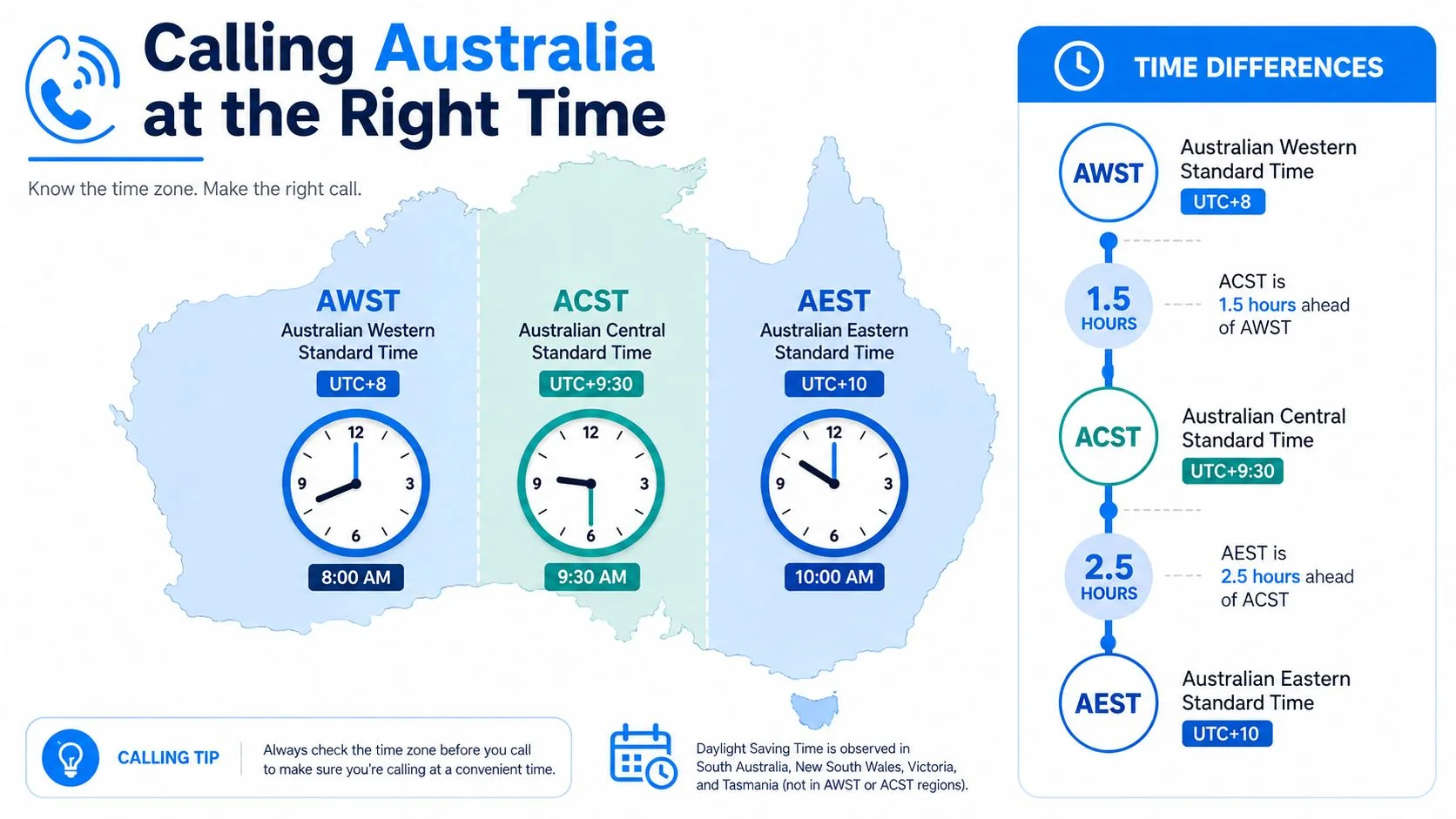
A number can be right and the timing still be wrong. Australia spans Australian Western Standard Time (UTC+8), Australian Central Standard Time (UTC+9:30), and Australian Eastern Standard Time (UTC+10), with daylight saving changing local hours in some regions calling code Australia. That is why a good call plan starts with the clock, not the keypad.

How to think about common overlap windows
The easiest way to handle timing is to line up your morning with theirs. If you are on the US East Coast, an early morning call often falls inside Australian business hours. From the US West Coast, you usually need to start even earlier relative to your own day. From the UK, late evening often matches an Australian morning, which is usually a better target than calling in the middle of your afternoon. Across much of Europe and Asia, the overlap is often more forgiving, but the exact window depends on whether the number is in Perth, Adelaide, Sydney, or Melbourne. A best time to call tool can help you check that overlap before you dial best time to call tool.
Daylight saving changes the calculation in some states. Sydney and Melbourne shift in summer, while Perth does not. The same weekday call can land at a different local hour depending on the season. People often book one good time, repeat it months later, and find they have called outside business hours.
Check the state first, then set the time.
A caller in New York can have a correct number and still hit voicemail if they forget that Perth and Sydney live in different zones. The country code gets the call to Australia. The state tells you whether the person is likely to answer.
How Browser Calling Removes the App Barrier
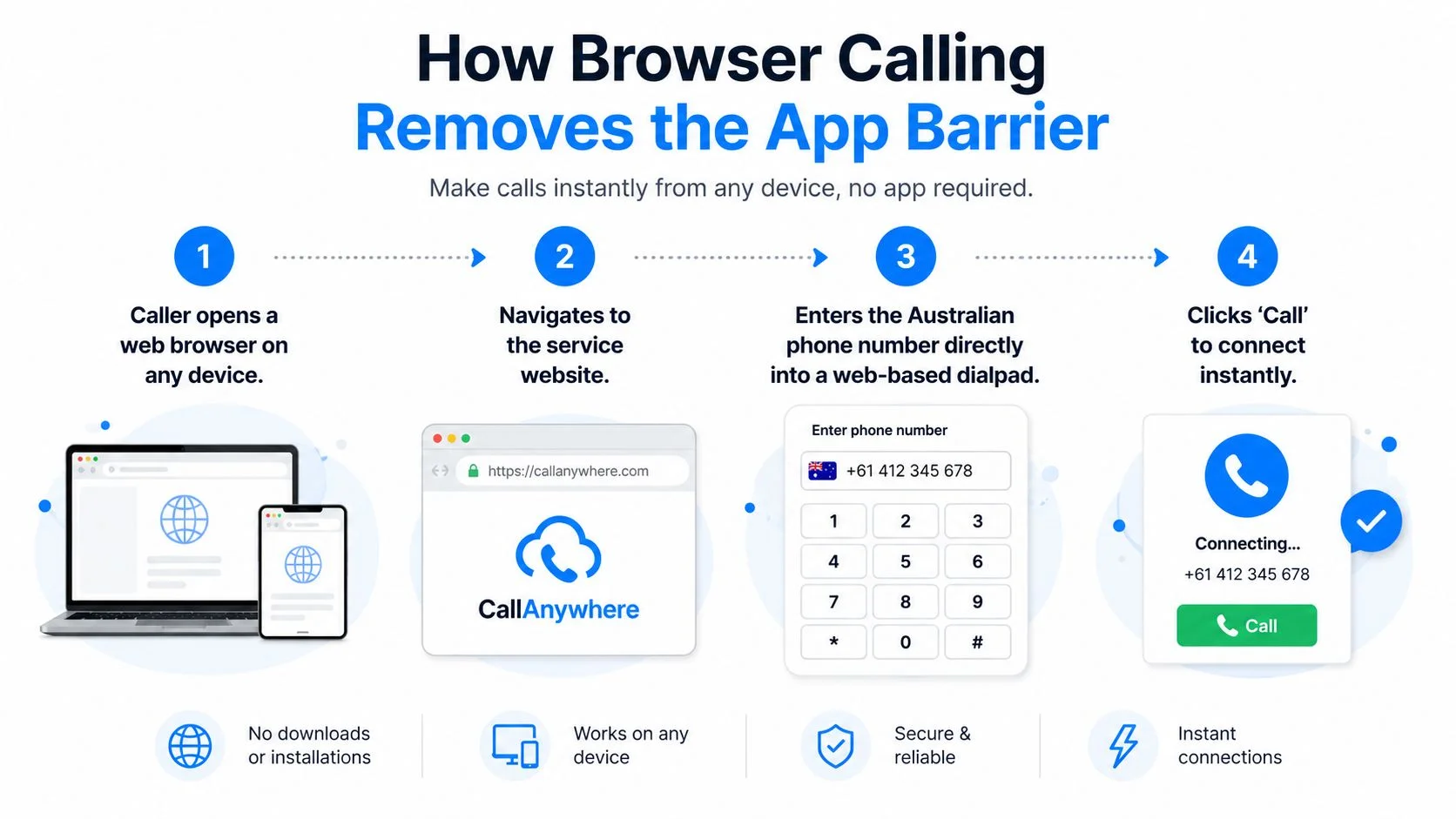
A browser dialer removes a common roadblock for calls to Australia. You enter the number in a web page, the system cleans up the format, and the call reaches a regular Australian landline or mobile on the other end.

What happens after you enter the number
A well-built browser dialer reads the local style of the number, converts it into E.164, and removes the leading domestic 0 before routing. International calling depends on that cleaned-up format, not on the way the number was typed. If the number is malformed, the call can fail before it gets anywhere near Australia.
The difference from app-based calling is on the receiving side. The person you call does not need an account, an app, or a setup step. They answer a normal phone number, just as they would for any standard Australian call. That makes browser calling practical for family calls, supplier follow-ups, and support teams reaching people who are not on the same platform.
Browser workflow versus app-first calling
The main convenience is simple. A web dialer that shows the formatted number before the call goes out catches mistakes early, especially when you are switching between local format and international format. That preview matters because a single wrong digit can send you to the wrong line, even if the country code is right.
For teams that want browser-based outbound calling without asking the other person to install anything, BubblyPhone is one option that routes calls through enterprise-grade global carriers and lets you enter international numbers directly in the browser.
Rates, Landlines vs Mobiles, and Transparent Pricing
The biggest pricing mistake is assuming every Australian number costs the same to call. Landlines and mobiles are different, and service numbers such as 13, 1300, and 1800 can be handled differently again. That is why a caller who only checks the country code can still end up with a bill that does not match the destination they reached.
Why the destination type changes the price
A landline in Sydney is not the same billing problem as a mobile in Melbourne. The route, termination, and charging structure can differ, so a clear dialer shows the destination type before you place the call. If you are evaluating a browser dialer, the useful question is not “Does it call Australia?” It is “Does it show the destination category clearly enough that I can compare the cost?” Use the call cost calculator to check how that difference plays out before you dial.
Headline prices can hide important details. A rate card may look simple, but rounding rules, call setup, or destination-specific handling can change what you pay. The clearest pricing view is the one that shows the number, the route, and the billed minute logic in the same place.
What to watch before you click call
If you are calling a business, check whether the listed number is a geographic line, a mobile, or a service number. If you are calling family, check whether the stored contact is the landline or the mobile, because that changes the route you need. If you are comparing options, use the published rate view rather than guessing from a marketing headline.
Transparent pricing matters most when the destination type changes. One number format does not mean one cost.
The practical value here is clarity. You do not need to memorize every tariff rule, but you do need to know that Australian landlines, mobiles, and service numbers do not all behave the same way. Once you can see that split before the call connects, surprises drop fast.
Common Quality and Connection Issues and Fixes
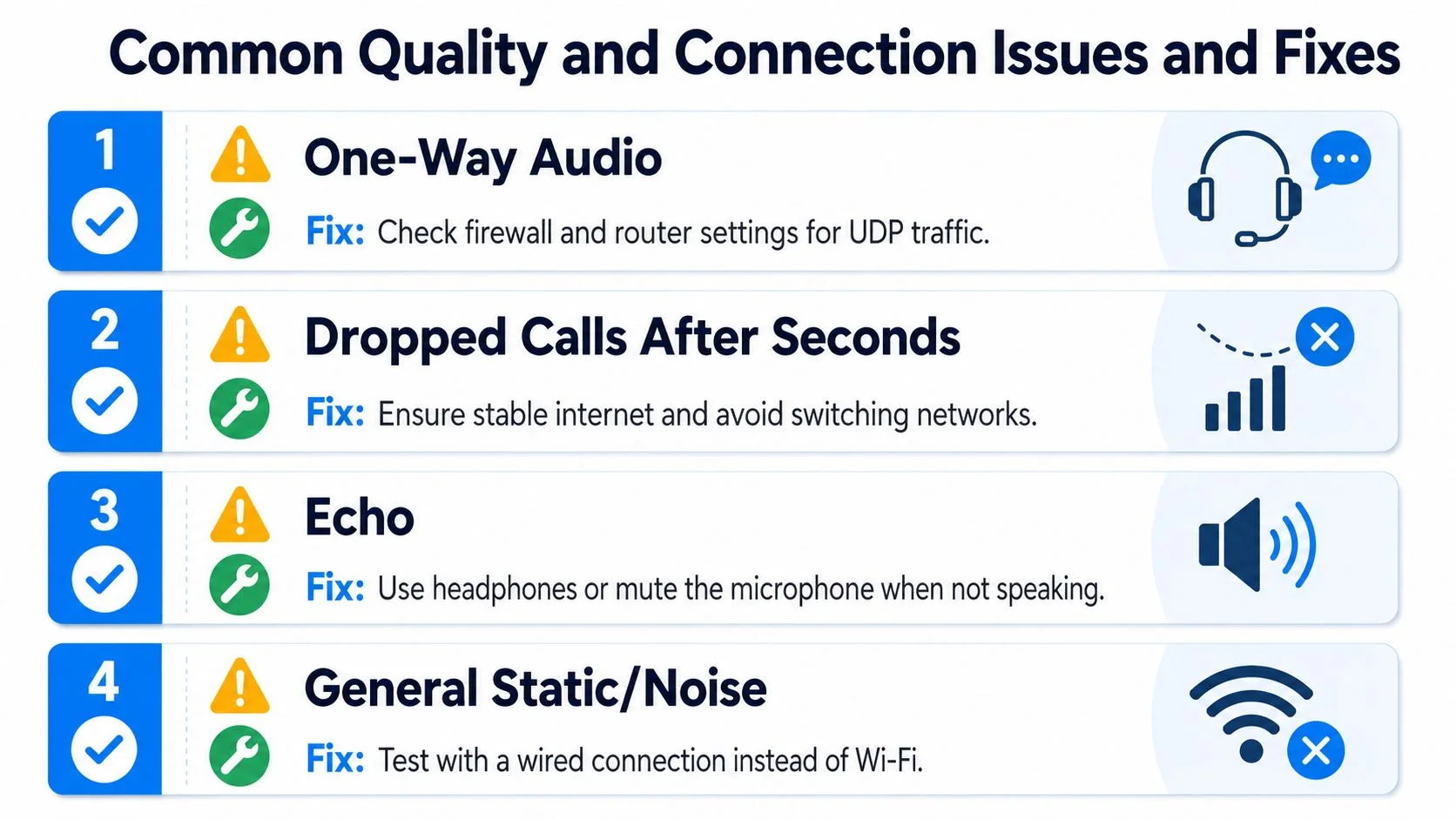
A call to Australia can sound fine at first, then fail in a very specific way. The pattern usually points to one of four places, the network path, the audio device, the number format, or the connection itself. Once you match the symptom to the cause, the fix is usually straightforward.
Match the symptom to the likely cause
- One-way audio: One person can hear, the other cannot. That often points to UDP traffic being blocked somewhere between the browser and the network, so check firewall or router settings, or use a setup that can fall back to TCP.
- Dropped calls after a few seconds: Recheck the Australian number in +61 format and make sure the domestic 0 has been removed. A call can fail early if the number is entered in the wrong international shape.
- Echo: Your microphone may be picking up the speaker output, creating a loop. Headphones usually help, and muting when you are not speaking can reduce the feedback.
- Static or robotic voice: That usually comes from jitter or an unstable connection. A wired connection is often steadier than Wi-Fi on longer calls.
If you want more context on how voice traffic is typically set up in small-business environments, the Australian VoIP systems guide is a useful reference. It helps separate routing problems from formatting mistakes.

A simple triage order
Start with the number, then the network, then the audio path. If the call fails before it connects, fix the +61 formatting first. If the call connects but the sound breaks up, check firewall behavior, device audio, or connection stability.
Test the same number twice before you blame the route. Most bad calls are bad inputs, not bad destinations.
That order saves time because each layer tells you something different. Number format is like the address on the envelope, network settings are the road, and audio devices are the handset at each end. When the address is correct and the road is open, the call usually has a clear path through.
Make Your Next Call Without the Hassle
If you're ready to make calls to Australia, enter the number in E.164 format, use +61, and drop the leading 0 from the Australian national number. That keeps landlines and mobiles in the correct international shape before the call is routed, and it helps you see the destination clearly before you connect.
A browser-based call can reach a regular Australian phone number, so the other person doesn't need an app or an account. You can check published rates at the live rate table before you place the call, and you don't need a subscription just to start calling.
Open your browser, type the number the right way, and make the connection.
If you want a clean way to call Australia from your browser, try BubblyPhone. It works without an app on the recipient's side, and you can place the call directly from the web once you've entered the number in the correct international format.