Remember when making phone calls meant hefty bills and confusing international rates? Those days are behind us. Today, you can make free calls online directly from your browser—no apps, no downloads, no registration hassles.
Let me show you exactly how this works and which services actually deliver on their promises.
What Is Free Online Calling?
Free online calling lets you dial any mobile or landline number worldwide using just your web browser. Services like Globfone, Call2Friends, and PopTox use your internet connection to route calls to traditional phone networks—completely free.
The recipient doesn't need any special app. They simply answer their phone like normal, whilst you're calling from Chrome, Firefox, or Safari.
Here's the reality: these services aren't unlimited. Most offer 1-2 minutes per call with 1-4 calls allowed daily. That's the trade-off for not paying anything.
How Does Free Online Calling Work?
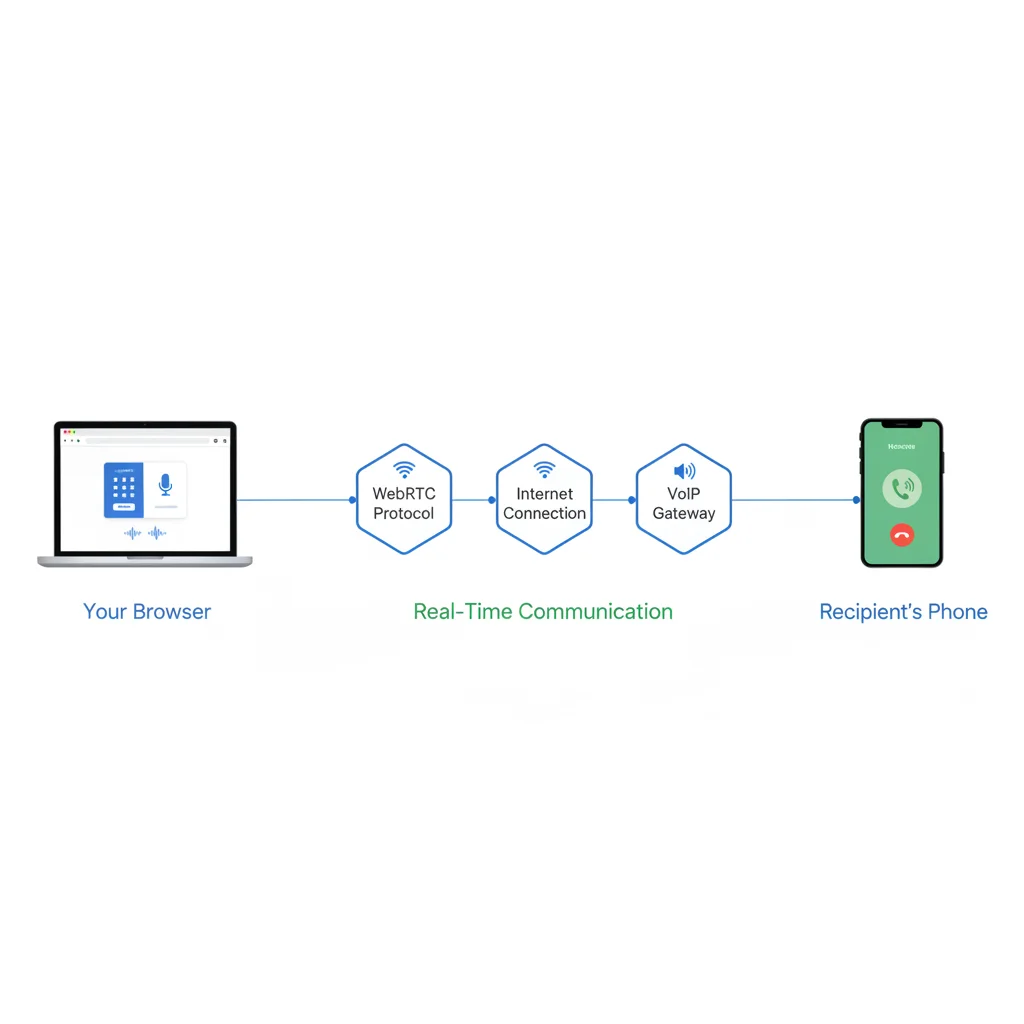
The technology behind browser-based calling is called WebRTC (Web Real-Time Communication). All modern browsers support it natively.
These packets travel over your internet connection
A VoIP gateway connects your call to the phone network
The recipient's phone rings like any normal call
The entire process takes milliseconds. No plugins, no software installations, no technical knowledge required.
WebRTC was developed by Google and became a web standard in 2021. It's the same technology powering Google Meet, Microsoft Teams, and countless other communication platforms.
Top Free Online Calling Services Compared
I tested eight browser-based calling services. Here are the five that actually work:
Globfone
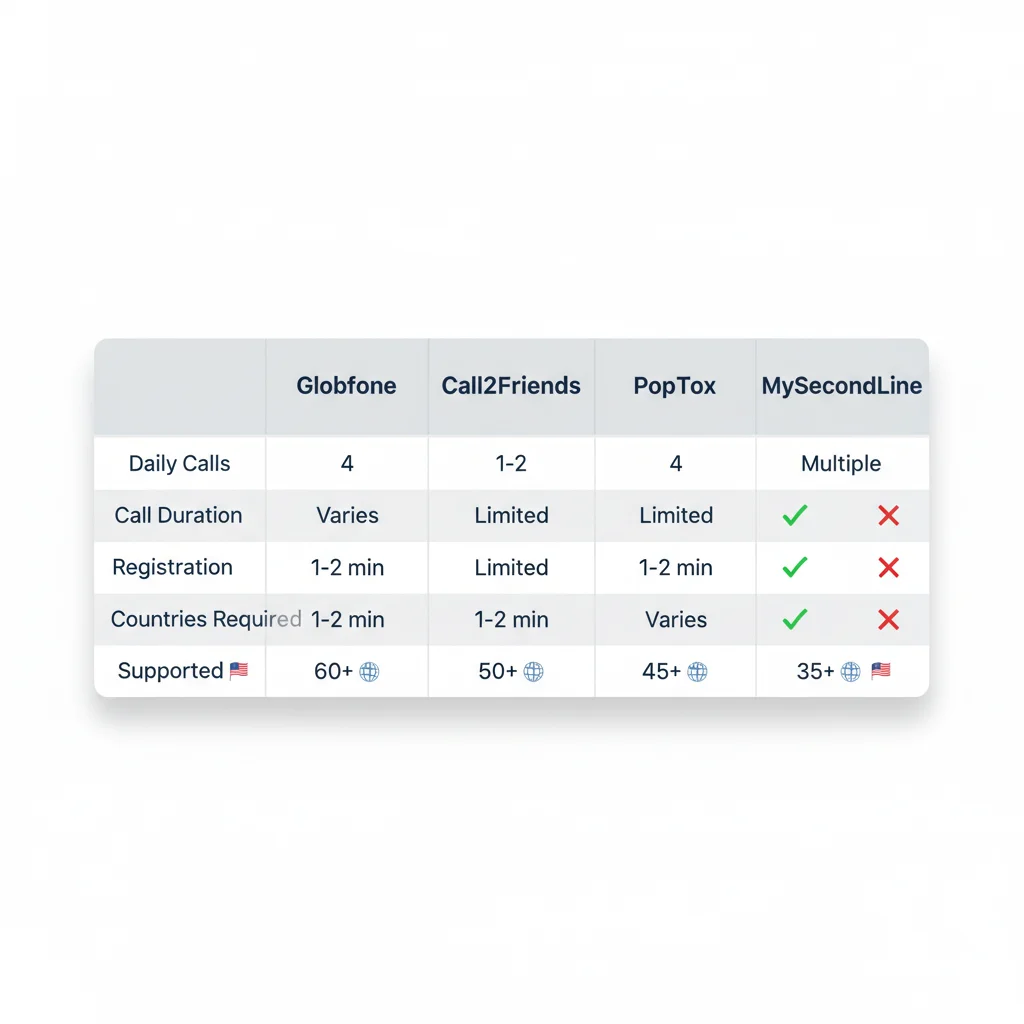
Globfone ranks first on Google for "free call online" for good reason. The service offers 4 calls per day with varying durations depending on destination cost.
Coverage: 60+ countries including USA, UK, India, Pakistan, Canada
Daily limit: 4 calls
Registration: Not required
Quality: Acceptable for short calls
Globfone uses multiple technologies (WebRTC, Flash, Java) to work across different browsers and platforms. This makes it remarkably reliable.
Call2Friends
Call2Friends limits users to 1-2 calls daily, each lasting 1-2 minutes. The quality is often better than Globfone because they use Opus codec, which adjusts to your connection quality.
Coverage: 50+ countries
Daily limit: 1-2 calls
Call duration: 1-2 minutes
Registration: Optional (app available for more credits)
They reset limits daily, so you can return every 24 hours. The service logs your IP address and called numbers—this prevents prank calling but also means your activity is tracked.
PopTox
PopTox positions itself as different from app-based services like Skype. You don't need both parties to have the same app—you call directly to any phone number.
Coverage: 40+ countries
Daily limit: Time-limited free calls
Quality: Reliable with good internet
Registration: Optional for unlimited paid calls
PopTox is transparent about their model: free calls are subsidised by users who eventually pay for credits. This keeps the service sustainable.
Ievaphone
Ievaphone gives you 4 free calls daily after installing their app, but the web version also works without downloads for quick calls.
Coverage: 45+ countries, always includes USA, India, Pakistan, UK
Daily limit: 4 calls
Call duration: 1-2 minutes typically
Registration: Not required for web
They're particularly clear about their anti-prank call policy. They'll provide your information to authorities if needed.
MySecondLine
MySecondLine offers more flexibility than pure web-based services, though it requires registration. The free version provides multiple daily calls with better reliability.
Coverage: 35+ countries
Daily limit: Multiple calls
Quality: Better than pure web services
Registration: Required
This sits between free browser services and paid VoIP apps—more features than Globfone, but requires an account.
When Free Online Calling Makes Sense
These services excel in specific situations:
Calling banks from abroad: You're travelling and need to contact your UK or US bank. Download nothing—just call. Check out our guide on calling banks from abroad for specific bank numbers.
Testing unknown numbers: Before adding a business number to your contacts, make a quick test call.
Emergency situations: Your phone is dead but you have laptop access. Browser calling gets you connected.
Avoiding app downloads: Your device storage is full or you're on a borrowed computer. No installations needed.
Limitations You Need to Know
Free online calling isn't a complete phone replacement. Here's what to expect:
Time limits: Most calls cut off at 1-2 minutes. That's enough for quick conversations but frustrating for longer chats.
Daily caps: Services limit you to 1-4 calls per 24-hour period based on your IP address. Using a VPN might cause issues.
Destination restrictions: Not all countries are available. Expensive destinations like satellite phones aren't supported.
Quality variance: Free services route calls through cheaper connections. Expect slightly compressed audio, occasional delays, or drops on poor internet.
No emergency services: You cannot call 999, 911, or other emergency numbers through these services.
Internet dependency: No connection means no calls. Mobile data usage is significant—about 1 MB per minute of calling.
How to Make Your First Free Call Online
Ready to try it? Here's your step-by-step guide:
Open your browser
Visit Globfone.com, Call2Friends.com, or PopTox.com. Any modern browser works—Chrome, Firefox, Safari, or Edge.
Allow microphone access
Your browser will ask permission to use your microphone. Click "Allow" and check the box to remember this decision for future calls.
Test your audio
Most services offer a test number (try calling 12345678 on Call2Friends). You should hear your voice played back. This confirms your microphone works properly.
Enter the number
Select the country from the dropdown, then type the phone number without the country code. The service adds it automatically.
Click call
Press the call button and wait for the connection. You'll see a timer showing remaining call duration.
Start talking
Once connected, speak normally. Avoid background noise—these services don't have advanced noise cancellation like premium apps.
Browser Calling vs. Other Options
How does free browser calling compare to alternatives?
Free Browser Calling
Pros: No downloads, works anywhere, truly free
Cons: Time limits, daily caps, basic quality
Best for: Occasional quick calls, emergencies
App-Based Services (WhatsApp, Viber, Skype)
Pros: Unlimited duration, better quality, free between users
Cons: Both parties need the same app, requires installation
Best for: Regular communication with friends and family
Paid Browser Calling (BubblyPhone)
Pros: No time limits, better routes, reliable quality
Cons: Costs money (though minimal)
Best for: Regular international calling without apps
Google Voice
Pros: Free US calls, voicemail, text messages
Cons: Only available in US/Canada, requires account
Your internet connection determines call quality more than anything else. Here's how to optimise:
Use wired connections when possible. Ethernet provides more stable bandwidth than WiFi. If you're on WiFi, stay close to your router.
Close bandwidth-heavy applications. Streaming video, large downloads, or multiple video calls on the same network will degrade quality.
Test during off-peak hours. If your first call has poor quality, try again when fewer people are using your internet connection.
Use headphones with a microphone. Your laptop's built-in microphone picks up keyboard noise and echo. A simple headset dramatically improves audio.
Check minimum requirements. You need at least 1 Mbps upload and download speed for clear calls. Test your speed at fast.com before calling.
Privacy and Security Considerations
Free calling services collect data to operate. Here's what they track:
Your IP address (to enforce daily limits)
Phone numbers you call
Call duration and timestamps
Device information
Reputable services like Globfone and PopTox state they'll provide this information to authorities investigating harassment or prank calls.
WebRTC includes encryption by default, so your call content is protected during transmission. However, once the call reaches the phone network, standard telephony security applies.
If privacy is paramount, consider encrypted app-to-app calling through Signal or WhatsApp instead.
Troubleshooting Common Issues
"Microphone not detected"
Check your browser permissions. Visit chrome://settings/content/microphone (for Chrome) or about:preferences#privacy (for Firefox) and verify the calling site has microphone access.
"Call failed to connect"
The service may have reached capacity, or your destination isn't supported. Try a different service or call again in 10-15 minutes.
"Daily limit reached"
You've used your allocated calls. Most services reset at midnight UTC. Wait 24 hours or try a different service.
"Poor call quality with drops"
Test your internet speed. If it's below 1 Mbps, switch to wired connection or better WiFi. Close other applications using bandwidth.
"Echo during calls"
The recipient hears themselves. Ask them to use headphones or reduce their speaker volume.
The Future of Browser-Based Calling
WebRTC technology continues evolving. The market is projected to reach $94 billion by 2032, growing at 38.6% annually.
What's coming:
AI-powered enhancements: Real-time noise cancellation, automatic transcription, and language translation are being integrated into WebRTC platforms.
Better codec support: New codecs like AV1 will reduce bandwidth requirements whilst improving audio quality.
IoT integration: Expect browser-based calling to extend beyond laptops—smart displays, wearables, and IoT devices will support direct calling.
5G acceleration: Faster mobile internet means browser calling from smartphones will match or exceed traditional calling quality.
For regular users, this means better free services with fewer limitations. For businesses, it means calling internationally without apps becomes standard practice.
Is Free Online Calling Right for You?
Free browser-based calling works brilliantly for specific needs:
Occasional international calls when you don't want app-based solutions
Quick calls to businesses for information or support
Emergency situations when your phone isn't available
Testing numbers before committing to longer conversations
It doesn't work well for:
Regular family calls (use WhatsApp, Skype instead)
Business calls requiring reliability (consider paid services)
Conversations longer than 2 minutes
Areas with poor internet connectivity
Think of free online calling as a helpful tool in your communication toolkit—not a complete replacement for other methods.
Start Calling Now
Pick a service, open your browser, and make your first free call. You'll be surprised how simple it is.
Remember: 1-2 minutes per call, 1-4 calls daily, decent quality with good internet. Those are your parameters.
The days of complicated international calling are over. Whether you choose free or paid services, browser-based calling puts you in control.
Frequently Asked Questions
Can I really make free calls online without downloading anything?
Yes. Browser-based calling services like Globfone, Call2Friends, and PopTox use WebRTC technology to enable calls directly from Chrome, Firefox, or Safari. You simply visit the website, enter a phone number, and call. Most services limit free calls to 1-2 minutes per call with 1-4 calls allowed daily.
What's the catch with free online calling services?
Free services typically have three main limitations: call duration (usually 1-2 minutes), daily call limits (1-4 calls per 24 hours based on your IP address), and destination restrictions (not all countries available). The recipient doesn't need any app, but you'll need a stable internet connection and working microphone.
How does browser-based calling actually work?
These services use WebRTC (Web Real-Time Communication), an open standard supported by all modern browsers. When you make a call, your voice is converted to data packets and transmitted over the internet to the recipient's phone network. The technology handles everything automatically—no plugins or software required.
Are free online calls good enough quality for important conversations?
Call quality depends heavily on your internet speed. With a stable connection of at least 1 Mbps, calls are generally clear. However, free routes often use lower-quality connections than paid services. For critical calls like job interviews or banking, consider paid options or app-based services with better reliability.
Which countries can I call for free online?
Most free calling services support the USA, India, UK, Pakistan, and Canada. Popular services like Globfone and Call2Friends cover 50+ countries, but availability varies. Expensive destinations may not be available for free. Check each service's destination list before attempting your call.
Do I need to create an account to make free online calls?
Most browser-based services like Globfone, Call2Friends, and PopTox allow calls without registration. However, they track your IP address to enforce daily limits. App-based alternatives like Google Voice or Skype require accounts but offer more features and reliability.